


Posted on 14 April 2026
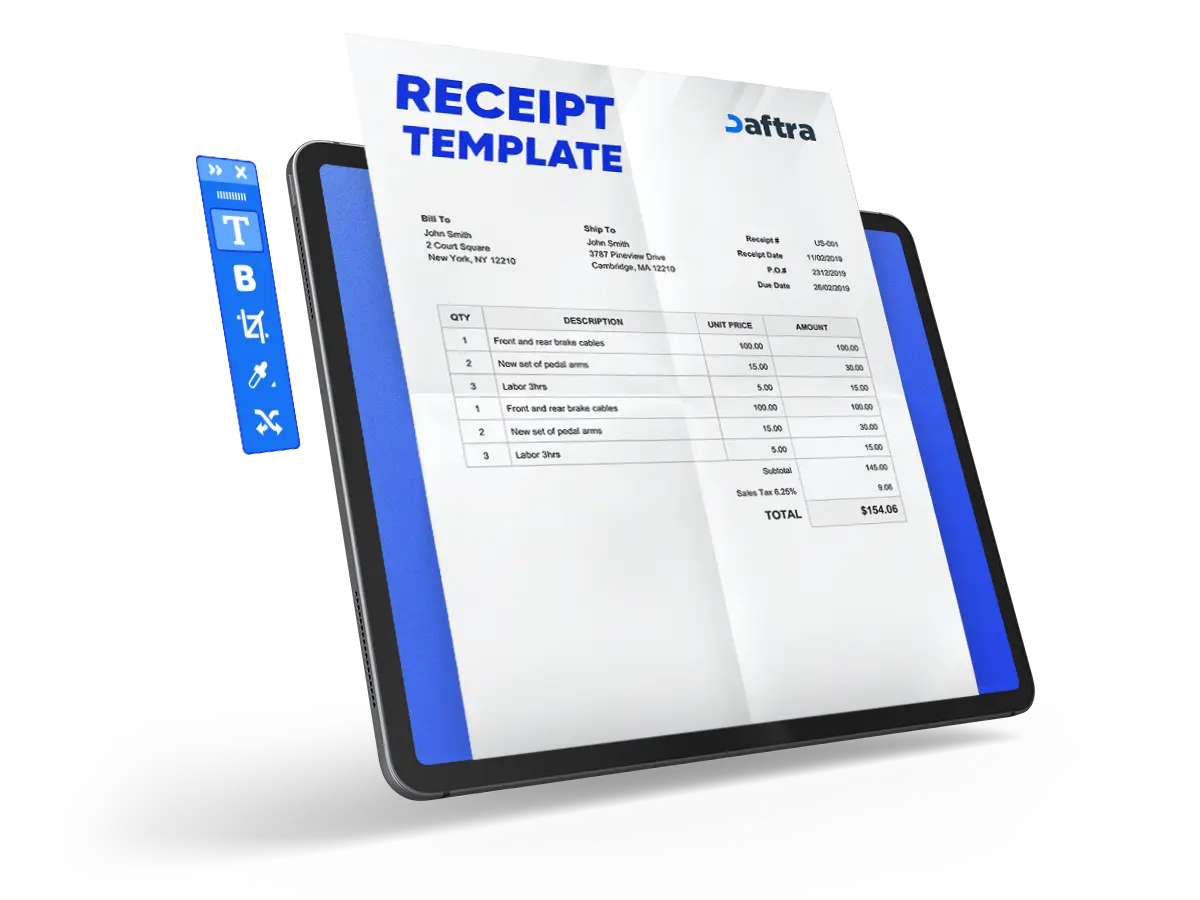
Receipt Template
- The Receipt Template is available in Google Docs and Sheets.
- It is editable and fully customizable due to the industry requirements.
- Makes the payment process clear between the buyers and sellers.


 Create and Manage Your Payments with Daftara
What is the Receipt Template?
A receipt template is a document that is used to confirm the payment between the buyer and seller, clarifying the payment amount, services and goods, and both the company and customer information.
This template makes receipt creation simple and professional; it can be customized for different transaction types to help maintain the financial records, it is available in Google Docs or Sheets, which are easy to access, edit, and customize.
What Are the Elements of the Receipt Template
Using a ready receipt template saves time, helps to reduce manual errors, and clears the purchased items to improve trust between the parties. Here are the elements of the Receipt Template:
- Receipt Number: It is a unique number that helps with easy sales and payment tracking.
- Receipt Date: when the receipt was created.
- Payment Method
- Seller details: Company Name and Address.
- Customer details: Customer Name and Address.
- Description: Details of what was purchased
- Quantity unit price: the price per item or service and the number of services.
- Subtotal
- TAX: Tax amount based on UAE regulations.
- SUBTOTAL
- TAX (10%)
- TOTAL: Total amount paid.
- Signature: Seller’s signature for validation.
Related Template:
Tax Invoice Format Template UAE
VAT Return Form 201 in UAE Template
Why is the UAE Receipt Template Important?
The UAE Receipt Template is important to create a proper receipt document to ensure compliance with the UAE VAT regulations, which are 5%; it is used as proof for payment transactions between the seller and the buyer.
This template helps to support the accounting and bookkeeping records to help in tracking sales and revenue, as well as to ensure correct records of VAT and TRN data. Furthermore, using the receipt is useful for refunds as proof.
- The receipt template is customizable and editable for easy and quick creation.
- It clarifies the payment details for goods and services and quantity items.
- Build trust and transparency between buyer and seller.
- Used as proof for payment in financial records or refunds.
How To Fill Out Your receipt template?
- Fill out the Receipt Number and Receipt Date
- Fill out the Payment Method
- Then fill in the Seller details and Customer details
- Description: Details of what was purchased [Products or Services]
- Put the quantity of items and their unit price.
- Subtotal is auto-calculated
- TAX is auto-calculated 5%
- SUBTOTAL
- TAX
- TOTAL: Total amount paid.
- Seller’s signature for validation.
Who uses the Receipt Template in Google Docs and Sheets?
The receipt template is used within Google Docs and Sheets by small and medium businesses, retail stores, and freelancers, as well as restaurants and cafes, because it has simple editing features and is fully customizable. It is necessary to use it to maintain accounting and bookkeeping, as well as for handling payments in different stores.
Why use Daftra to generate a Receipt Template?
Use Daftra to generate professional receipts quickly and easily, as it provides ready-made templates features fully customizable and editable sections, and reduces errors and mistakes, unlike a manual receipt. Daftra offers a simple and user-friendly interface, accessible anytime with cloud-based access, and has easy and fast sharing of receipts with clients.








 Invoicing
 POS
POS Offers
 Installments
 Sales Commission
 KSA E-Invoice Software
 EGY E-Invoice Software
 JO E-Invoice Software
 E-Invoice Software
 Chart of Accounts
 Asset Management
 Cost Centers
 Expenses
 Cheque Cycle
 UAE VAT-Tax
 Product Management
 Purchases
 Purchase Cycle
 Suppliers
 Requisitions
 Stocktaking
 Organizational Structure
 Personnel Management
 Attendance and Leave
 Contracts
 Payroll
 Requests
 Work Orders
 Booking Management
 Rental and Unit Management
 Time Tracking
 Work Flow
 Lease Contracts
 Manufacturing Management
  Client Follow-Up
 Loyalty Points
 Points and Credits
 Memberships
 Insurance Management
 Daftra Bussiness App
 POS App
 POS desktop application
 Expense Scanner App
 ESS Application
 E-invoice Reader App
 Stocktaking App