-
English
-
Try for Free
No credit card needed
No credit card needed
Daftra Accounting comes with a ready-made, fully automated and customizable end-to-end and easy-to-manage Chart of Accounts. Go solo or use an accountant. Get in-depth insights from curated financial transactions, generate general ledger reports, and prepare complete balance sheets.
Get Started for Free
Free 14-Day Trial
No Credit Card Required
No Setups
All-App Inclusive
Manage core accounts including Assets, Liabilities, Expenses, and Revenue.
Create and manage your Chart of Accounts automatically. No need to hire an expensive CPA.
Generate growth-driving insights from in-depth reports to identify where and how you are on or off growth track.
Find out your industry. Find out how Daftra fits your business for free.


Finance

Chart of Accounts & Journals Accounting

Cheque Cycle

Cost Centers

Asset
Categorize your Chart of Accounts into detailed main and sub accounts with each made up of corresponding credit, debit, and balance entries.
Get a snapshot of all accounts using a Directory Report. Display account details such as Code, Name, Type (Credit or Debit), Level (Main or Sub), and Cost Center, if any.
Customize your Chart of Accounts. Edit or add, determine type of, easily record, and manage journal entries of existing or new main accounts.
Get records in your COA automatically mirrored into corresponding ledger. Display account details such as Type: Credit or Debit and Routing: Automated or Manual.

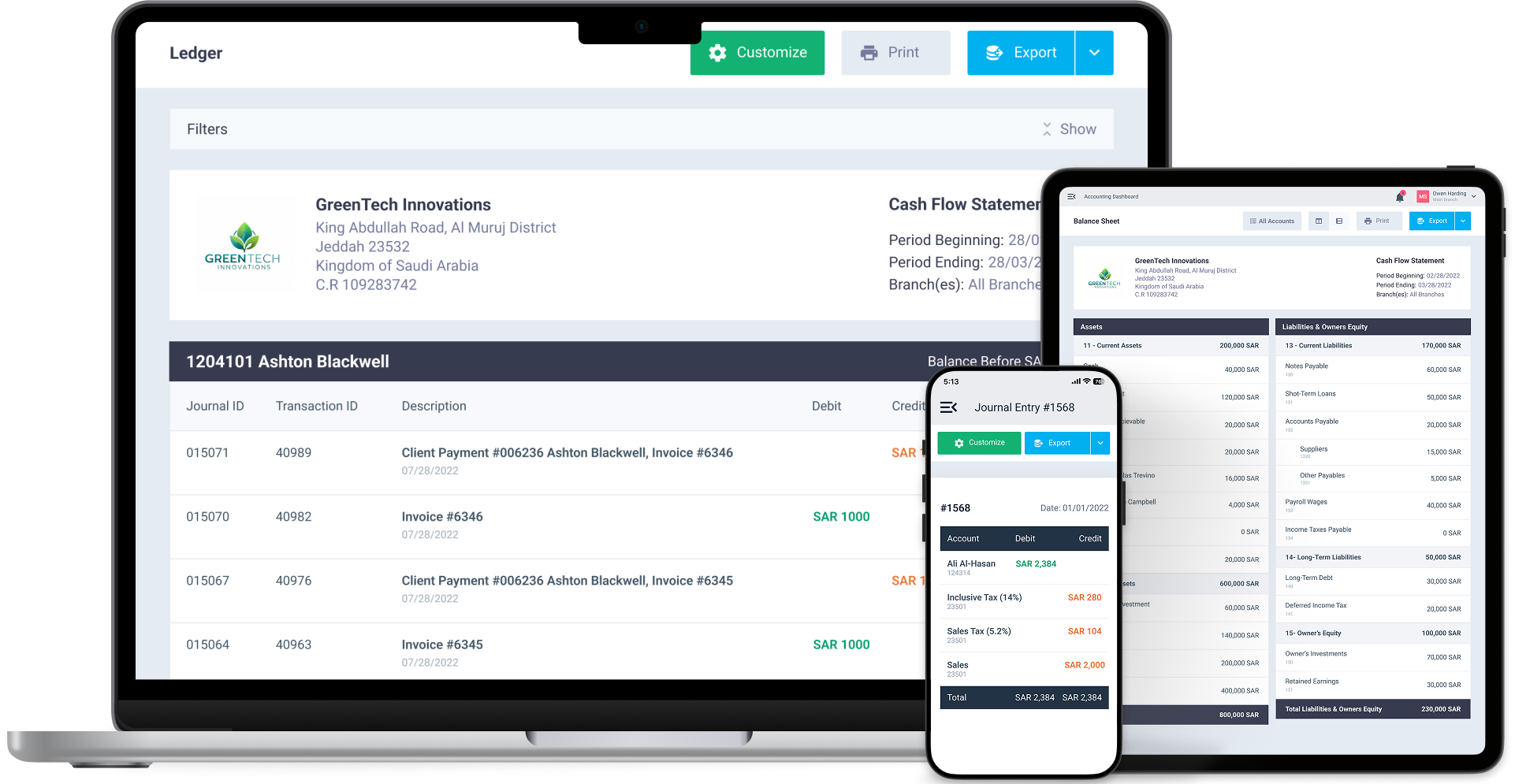
Track account transactions with General Ledger reports. Generate automated GL reports to follow account transactions. Get a reporting-ready Income Statement.
Manage your finances like a pro. Track all income, expense, and start-to-end-of-period balance transactions.

Create, edit, and customize your Chart of Accounts independently to get a comprehensive view of all your business accounts.
Get Started NowExplore Daftra plans designed for different business needs, with flexible features that grow with you.
Free 14-Day Trial
No Credit Card
No Setups
All-App Inclusive



Daftra is rapidly and constantly growing and our support expands in response. Our forever updates, whatever your plan is, ensures your software is always covered so your business can grow with Daftra.

Daftra is GDPR-compliant, hosted on cloud-based servers, and 256-bit SSL-encrypted to ensure your data integrity, safety, and security.

Daftra support caters to every business need, 24/7, to our customer base utmost satisfaction. With or without Daftra user manuals, you are never lost looking up anything to use our system efficiently, quickly, and smoothly.

Wherever or whenever you are and from any logged-in device, get instant cloud-based access to run your business. And with Daftra’s desktop app, you can issue invoices immediately even when you’re offline.
Smartest Solution
Choose your ideal digital partner
Tailored for
Expand and scale your business with Daftra.
This is where Cost Centers come in. On Daftra, Cost Centers are specifically created to account for costs per department or employee. All you need to do is to add as many cost centers you want with all necessary info and once done, you can follow your costs anywhere, anytime you want.
No. Daftra is built for and around automation. Once, you enter records into your Chart of Accounts, records are mirrored automatically to a corresponding ledger and also in your General Ledger. On Daftra, you enter records only once.
Yes, completely. You can edit or add new accounts, set the account type, and record and manage journal entries for existing or new main accounts with ease. The chart of accounts also lets you classify accounts into detailed main accounts and sub-accounts.
Yes. Daftra's accounting software comes with a ready-to-use chart of accounts that's fully integrated and automated, while still allowing customization to fit the nature of your business and make managing operations easier. The system supports more than 50 different business fields, with the experience tailored to the field you select during setup.
Yes. Since the system lets you add any sub-account under the main accounts (expenses), you can easily create a dedicated account for end-of-service expenses.
As for the chart of accounts, the system doesn't offer a feature to import it from an Excel file, since it already comes with a pre-configured chart of accounts. As for opening balances, though, you can import opening journal entries into Daftra from a CSV file.
Daftra offers several accounting linking methods:
● Automatic linking: Most transactions (invoices, purchases, expenses, payroll) automatically generate journal entries linked to the chart of accounts.
● Manual routing: Some transactions can be routed to a specific account as soon as they're created — for example, routing the sales account to a particular account in the chart of accounts.
● Manual journal entries: You can add manual journal entries and specify the debit and credit accounts directly from the chart of accounts.
Yes. You can get an overview of all accounts using the chart of accounts report, and view account details such as the account code, account name, type, level, and cost center. There's also a feature to export the account list along with cost centers. Daftra provides ready-made templates in both Excel and PDF formats for the chart of accounts.
Yes, and this is one of Daftra's strongest accounting features. Daftra is designed to cover the accounting cycle from start to finish, issuing financial statements automatically and effortlessly. It helps you record journal entries automatically and accurately, ready for use in generating income, financial position, and cash flow reports.
Available statements include:
● Income Statement (Profit & Loss)
● Balance Sheet (Statement of Financial Position)
● Cash Flow Statement
● Trial Balance
Yes. The system lets you browse the chart of accounts with search and filtering options, and view account details such as the account code, account name, type (debit or credit), level (main or sub-account), and cost center if applicable.
In Daftra, there are two paths:
● a) Automatic routing through payroll settings (the easiest, and recommended): The system doesn't require you to manually add employee accounts from scratch. Instead, it lets you route payroll journal entries in Daftra through General Account Settings → Account Routing. There's an option called "Route employee salary account" that automatically links salaries to expense accounts in the chart of accounts.
● b) Manually adding sub-accounts (for those who want more detail): It's recommended to divide employee lists into several categories, including departments, job roles, and work shifts, so that each department's employee salaries are listed under their respective department for easier accounting processing. This is done by adding sub-accounts under the main "Salary Expenses" account, via: General Accounts → Chart of Accounts → Expenses → Add New Account, then selecting the main account and setting the account type to "Sub-account."

Have a feedback, suggestion or need assistance with your Daftra account? We’ll get you the help you need 24/7 for free.
Contact Support

Discover in-depth articles and step-by-step tutorials in Arabic and English that show you how to use Daftra and manage your business efficiently.
Go to Our Help Center

Our team is happy to answer your sales inquiries, including exploring use cases for your team, billing, and discussing pricing options.
Contact Sales
Call 0248837601
Call 966115030301
Call 966115030301
Call 97144986470
Call 97444463650
Call 96522207852
Call 97316609626
Call 96822711526
Call 96262229341
Approved By




Daftra
Earn With Daftra
Account
Modules

Industries
Support
Mobile Apps


Fully compliant with Phase Two of e-Invoicing
Mobile Apps

 Invoicing
 POS
POS Offers
 Installments
 Sales Commission
 KSA E-Invoice Software
 EGY E-Invoice Software
 JO E-Invoice Software
 E-Invoice Software
 Chart of Accounts
 Asset Management
 Cost Centers
 Expenses
 Cheque Cycle
 UAE VAT-Tax
 Product Management
 Purchases
 Purchase Cycle
 Suppliers
 Requisitions
 Stocktaking
 Organizational Structure
 Personnel Management
 Attendance and Leave
 Contracts
 Payroll
 Requests
 Work Orders
 Booking Management
 Rental and Unit Management
 Time Tracking
 Work Flow
 Lease Contracts
 Manufacturing Management
  Client Follow-Up
 Loyalty Points
 Points and Credits
 Memberships
 Insurance Management
 Daftra ERP Full App
 Point of Sales App
 Point of Sales for Desktop – Support Offline Mode
 AI Expenses Scanner App
 Employee Attendance, Sign & ESS App
 E-invoice Reader App
 Inventory Stocktaking App