-
English
-
Try for Free
No credit card needed
No credit card needed
Daftra Attendance & Leave Management Software enables SMEs to automate, track, and manage employee leave and attendance anywhere, anytime. Establish attendance polices, set rules for leaves and holidays, automate leave approval permissions, and get insights into performance from detailed attendance and leave reports.
Get Started for Free
Free 14-Day Trial
No Credit Card Required
No Setups
All-App Inclusive
Find out your industry. Find out how Daftra fits your business for free.


Employees & Contracts

Organization Structure

Attendance & Leaves

Payroll Processing

Requests & Loans
Track on-site attendance with fingerprint devices or time kiosks. Automatically calculate delays, early dismissals, and enforce shift restrictions, login, and logout hours.
Track attendance for remote teams or blue-collar workers with advanced features like geofencing, IP validation, and photo verification using Daftra’s ESS app or web portal.
Geofencing
IP Address
Employee Image
Capture attendance logs accurately, even offline, with seamless syncing—avoiding data loss, delays, and preventing duplicates or invalid entries.
Record and sync mobile attendance logs instantly with fingerprint devices, time kiosks, or manual entries to deliver unified and accurate timesheets.
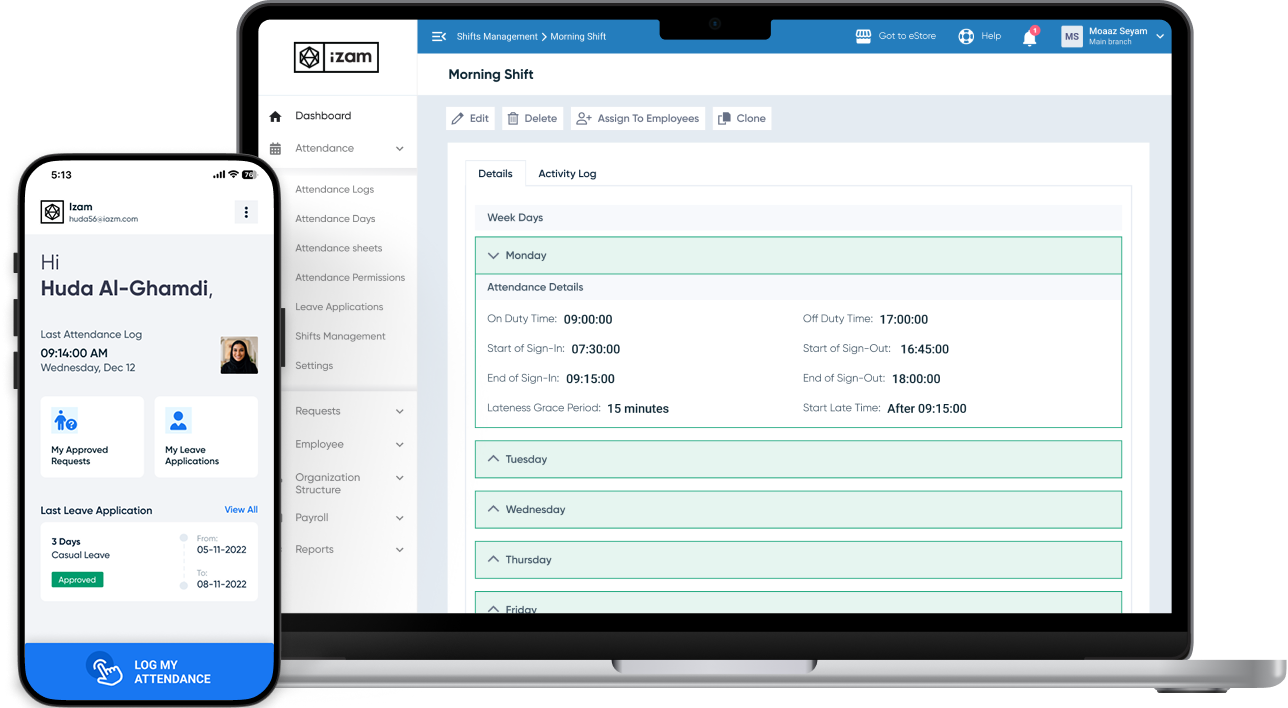
Define basic or advanced shifts by specifying workdays, off days, and daily working hours. Set rules for delays, grace periods, and clock-in/out time windows.
Assign primary shifts to teams or employees. Define and assign allocated shifts or temporary secondary shifts, and track attendance while managing your roster.

Business leaders, executive managers, and staff all working in unison.
Get Started NowConfigure leave types, public holidays, attendance restrictions, and flags. Create compliant attendance and leave rules aligned with labor legal regulations.
Create attendance flags, set conditions and formulas, and streamline leave requests and policies. Incorporate and sync shifts, leaves, flags, and restrictions with payroll.
Set up time-off and attendance permission requests with approval cycles to ensure compliance, and align automatically with payroll for accurate compensation.
Enable employees to submit requests via ESS or web portal. Allow managers and HR to approve on the go through automated workflows.
Single or Multi-level approval
Self approval
Generate a wide range of Employee Reports to get insights into residency status, attendance, salary, shifts, and more. Use Employee Reports to enhance performance—not to make calculations only.
Explore Daftra plans designed for different business needs, with flexible features that grow with you.
Free 14-Day Trial
No Credit Card
No Setups
All-App Inclusive



Daftra is rapidly and constantly growing and our support expands in response. Our forever updates, whatever your plan is, ensures your software is always covered so your business can grow with Daftra.

Daftra is GDPR-compliant, hosted on cloud-based servers, and 256-bit SSL-encrypted to ensure your data integrity, safety, and security.

Daftra support caters to every business need, 24/7, to our customer base utmost satisfaction. With or without Daftra user manuals, you are never lost looking up anything to use our system efficiently, quickly, and smoothly.

Wherever or whenever you are and from any logged-in device, get instant cloud-based access to run your business. And with Daftra’s desktop app, you can issue invoices immediately even when you’re offline.
Smartest Solution
Choose your ideal digital partner
Tailored for
Expand and scale your business with Daftra.
Yes! Daftra offers cost-efficient solutions for tracking remote workers accurately. Use features like IP address, geolocation, via a live photo capture, or using our ESS App to monitor attendance without additional licensing expenses.
Yes. On Daftra, you can establish policies and set rules of your own to manage your workforce timely, accurately, and compliantly. Our attendance and leave custom fields are an enabler to many businesses whose industries, activities, or workforce may lie outside standard policies and rules.
Daftra automates recurring entries and account allocations, eliminating manual reentry and reducing errors. When you post a record into a journal or account, it mirrors across assigned ledgers, cost centers, and the General Ledger. Set up rules to handle repetitive tasks, streamline processes, and save time.
Daftra supports both options together:
Employee attendance days can be calculated automatically as soon as records pulled from fingerprint devices are attached, with the ability to set up different work shifts and assign two shifts in a single day for an employee.
The fingerprint device and attendance records can be linked to the payroll software — all together in one comprehensive, cloud-based system.
In short: the software supports direct integration with a fingerprint device, importing files pulled from it, and manual entry — and all of these methods automatically feed into the payroll system.
Yes. Daftra clearly distinguishes between an Employee (added as a data record) and a User (who has login access to the system). You can add employee files, contracts, and salaries in full without giving them any login access to the system, and manage each employee's permissions independently.
Yes, a full employee portal is available. The Employee Self-Service (ESS) app is part of Daftra's HR software, making it easy for employees to check in from anywhere, at any time. Employees can be tracked on-site through fingerprint check-ins, or monitored remotely using IP address, geolocation, or a live photo capture.
The system syncs attendance records from phones directly with records from integrated fingerprint devices, giving you accurate, unified attendance reports for all your employees. Employees can also submit leave requests or other requests through a clear approval process.
So the available options for recording attendance are: a physical fingerprint device + the ESS mobile app + GPS + IP address + photo + manual entry — all integrated into a single system.
Daftra supports setting the restrictions needed on the attendance check-in process, with the option to define a geographic zone on the map to check in from, specify a particular IP address for the employee, or capture a photo of the employee when they check in.
For daily labor working across multiple projects without a fingerprint device, the practical options in Daftra are:
● ESS mobile app: with a geographic location defined for each project site.
● Manual entry: by the supervisor, entered in the system for each employee.
● File import: a daily or weekly file of attendance records.
After that, the system automatically calculates the deductions resulting from late arrivals or absences from the attendance records and applies them to payroll.

Have a feedback, suggestion or need assistance with your Daftra account? We’ll get you the help you need 24/7 for free.
Contact Support

Discover in-depth articles and step-by-step tutorials in Arabic and English that show you how to use Daftra and manage your business efficiently.
Go to Our Help Center

Our team is happy to answer your sales inquiries, including exploring use cases for your team, billing, and discussing pricing options.
Contact Sales
Call 0248837601
Call 966115030301
Call 966115030301
Call 97144986470
Call 97444463650
Call 96522207852
Call 97316609626
Call 96822711526
Call 96262229341
Approved By




Daftra
Earn With Daftra
Account
Modules

Industries
Support
Mobile Apps


Fully compliant with Phase Two of e-Invoicing
Mobile Apps

 Invoicing
 POS
POS Offers
 Installments
 Sales Commission
 KSA E-Invoice Software
 EGY E-Invoice Software
 JO E-Invoice Software
 E-Invoice Software
 Chart of Accounts
 Asset Management
 Cost Centers
 Expenses
 Cheque Cycle
 UAE VAT-Tax
 Product Management
 Purchases
 Purchase Cycle
 Suppliers
 Requisitions
 Stocktaking
 Organizational Structure
 Personnel Management
 Attendance and Leave
 Contracts
 Payroll
 Requests
 Work Orders
 Booking Management
 Rental and Unit Management
 Time Tracking
 Work Flow
 Lease Contracts
 Manufacturing Management
  Client Follow-Up
 Loyalty Points
 Points and Credits
 Memberships
 Insurance Management
 Daftra ERP Full App
 Point of Sales App
 Point of Sales for Desktop – Support Offline Mode
 AI Expenses Scanner App
 Employee Attendance, Sign & ESS App
 E-invoice Reader App
 Inventory Stocktaking App