



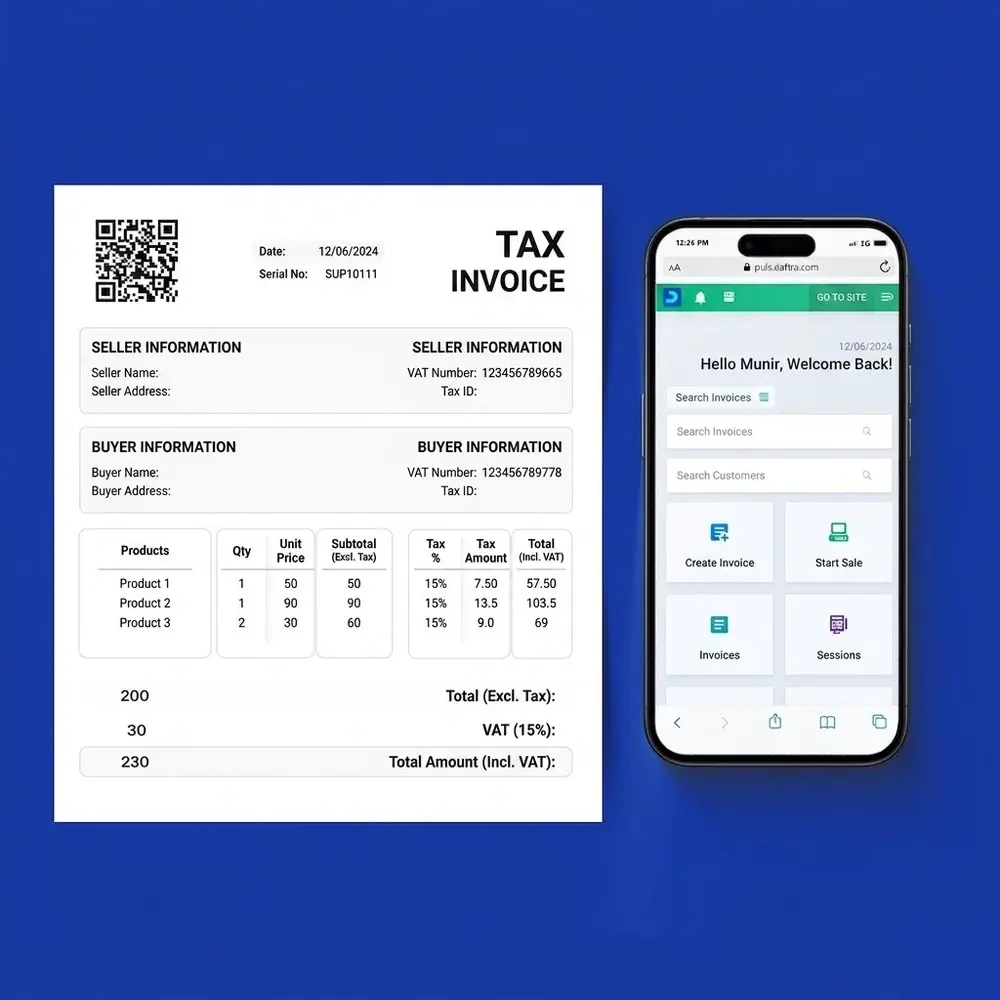
The importance of sales invoicing software stands out as an innovative solution for simplifying sales operations, tracking payments, and reducing errors resulting from routine manual invoice creation. With the right sales invoicing software, you can enhance the accuracy and transparency of financial transactions with just a few simple clicks, using less time and effort.
Sales invoices help business owners focus on growing their businesses, which is why sales invoicing software has become essential for any store, company, or commercial activity.
Now, if you are a business owner looking to improve the efficiency of your sales operations and gain customer satisfaction, in the following lines, we present everything you need to know about sales invoices.
We also review the best sales invoicing software, highlighting the key features and services each offers to help you choose the ideal solution for managing your business.
What are sales invoices?
A sales invoice is an accounting document used to record a transaction between two companies or between a company and a customer.
A sales invoice records the provided services or products, the amounts due for payment in exchange for those items, the agreed payment terms and due date, the applicable tax rate, and any other important notes or information.
What are the types of sales invoices?
Understanding the types of sales invoices helps your company identify their purposes and use them effectively, enabling you to determine the appropriate invoice type to apply. Sales invoices are divided into four main types, as outlined below:
1/ Simple sales invoice
This is the most commonly used type of sales invoice in most sales transactions. It includes the basic elements that must be present in any sales invoice, which will be explained in detail later in the article. There may be slight modifications to these elements depending on the nature of the transaction.
2/ Proforma (preliminary or estimated) sales invoice
The purpose of this type of sales invoice is to clarify the amount the customer is expected to pay for the services or products they will receive. It differs from the standard or simple sales invoice, which requires immediate payment upon receipt.
3/ Recurring sales invoice
These invoices are issued repeatedly to customers who purchase a service or product on an ongoing basis but at specific time intervals, such as internet service invoices.
4/ Commercial sales invoice
This is the most complex type of sales invoice. It is a document issued by the seller to the buyer in an international transaction, and it must clearly detail the prices and quantities of the goods sold, as well as the terms of the commercial relationship between the seller and the buyer.
What information should a sales invoice include?
A sales invoice must include a number of essential and secondary elements to provide a complete description that benefits both the seller and the buyer. Below are the main elements of a sales invoice:
1/ Company details (seller)
The seller’s information includes their name, job title, and contact details such as phone number and email.
2/ Customer details (buyer)
Customer information includes their name, address, and contact method.
3/ Invoice number
The invoice number is referred to in English as Inv. No. It is a unique code assigned to each invoice, making it easier to track, review, and document invoices.
4/ Invoice date
The invoice date indicates the actual time when the sales transaction took place. In most cases, the due date is calculated starting from the invoice issuance date.
5/ Sales transaction details
This includes the product items and quantities purchased by the customer. In the case of services, they are described in a simplified manner.
6/ Amount due
The total amount that the customer must pay for the services or products received is clearly stated. Additional notes may also be included, such as breaking down the total into detailed line items to give the customer a clear view of costs, and specifying tax rates, shipping fees, and discount percentages for offers or preferred customers.
You can also review the tax calculation guide from the invoice, which explains how to calculate tax step by step from the total invoice amount.
7/ Payment terms
Clarifying payment terms in a sales invoice defines the time period within which the invoice must be paid, helping the seller manage cash flow accurately and efficiently.
How to create a sales invoice?
Creating professional sales invoices requires understanding the steps to prepare clear, accurate invoices. Below are simplified and detailed steps to create a complete and correct sales invoice:
- Include the company logo and identification details such as name, address, phone number, and email address.
- Enter the customer’s contact information.
- Assign an invoice number by activating an automatic invoice numbering system in sales accounting software.
- Describe the services or products provided to the customer.
- Add payment terms, including the payment method and payment period.
- Clarify the total amount due after adding taxes, sales discounts, and other charges.
- Keep the invoice for accounting purposes, including auditing and review.
The Daftra system links invoices to collections when receiving cash or bank transfers from the customer, or links them directly to the invoice and closes it accounting-wise.
What is the importance of sales invoices?
The importance of sales invoices stems from their role in tracking sales activity within a company and documenting financial transactions for future reference and for use in end-of-period financial reports. The importance of sales invoices includes the following:
1/ Documenting sales
A sales invoice answers the following questions:
- What is the amount of realizable revenue generated by the business during a specific accounting period?
- How does the performance of the sales team compare to previous periods?
- What are customers’ purchasing preferences?
2/ Ensuring payment collection
Invoices obligate customers to pay the amounts due, especially through automated reminders sent by electronic accounting software at specific time intervals.
3/ Maintaining sales invoice records for tax purposes
Sales invoices help large companies and individuals complete tax documentation and the required information in tax returns submitted for collecting sales taxes.
4/ Organizing accounting records
Sales invoices help maintain organized accounting records. These records are used to review cash flows, payment tracking, monitor inventory levels based on incoming orders, and forecast future sales based on previous sales data.
Read also: What is a budget and how to prepare it
5/ Maintaining credibility and integrity in sales transactions
Sales invoices help resolve any disputes or misunderstandings between the seller and the buyer, as they serve as documented proof of the terms of sales transactions in a professional manner that builds trust and credibility with customers and ensures all parties are committed to their obligations.
Use the sales commission calculator from Daftra to automatically calculate the value and percentage of sales commission for free.
What is the best software for creating sales invoices?
Daftra cloud software is considered one of the best accounting systems for managing financial transactions and accounting operations with accuracy. Sales invoices are the most important element to focus on within the sales cycle.
Through Daftra’s interface, you can issue approved electronic invoices, convert quotations into invoices once customers approve them, and then send them automatically. All these services are provided by the system, in addition to managing recurring and returned invoices, issuing periodic invoices to track payments, and tracking departmental sales, profits, and losses.
1/ Sales invoicing software from Daftra
Daftra’s sales invoicing software helps you issue sales invoices in both Arabic and English through an easy and simple user interface. You can also customize sales invoice templates in Daftra to suit your business field and needs.
Not only that, but you can also add features to invoices, such as enabling installment payments, deferred collections, issuing returns, adding loyalty points, and quotations. All of this can be enabled when creating and displaying sales invoices that use multiple payment methods.
The Daftra system provides you with free sales invoicing software, continuous technical support, and the ability to customize it to your business needs.
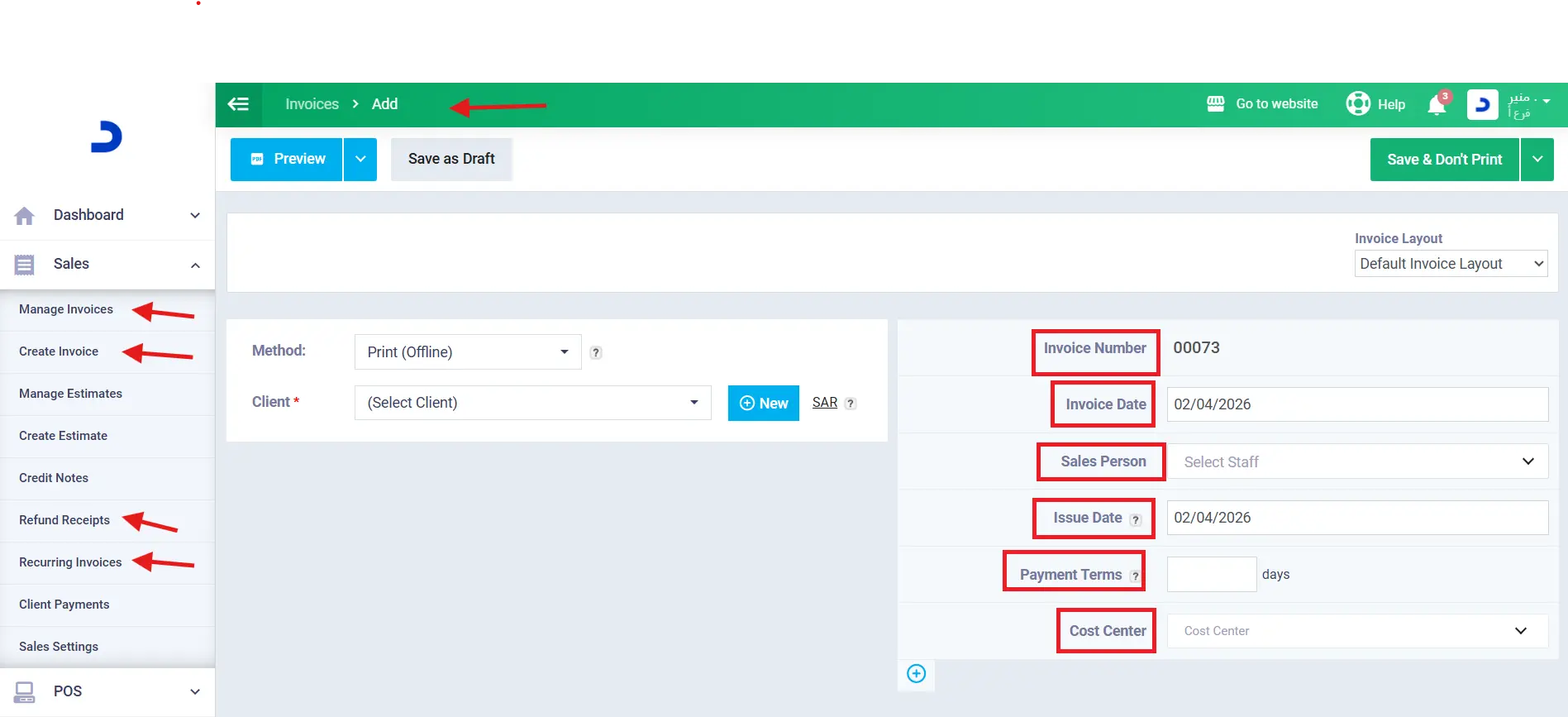
You can add your sales invoice data to Daftra with just a few simple clicks, and handle it intelligently and automatically based on the customer type, whether B2C or B2B.
You can also add sales tax rates, such as value-added tax (VAT) or other taxes, shipping details, a payment method, and any notes or attachments to the invoice.
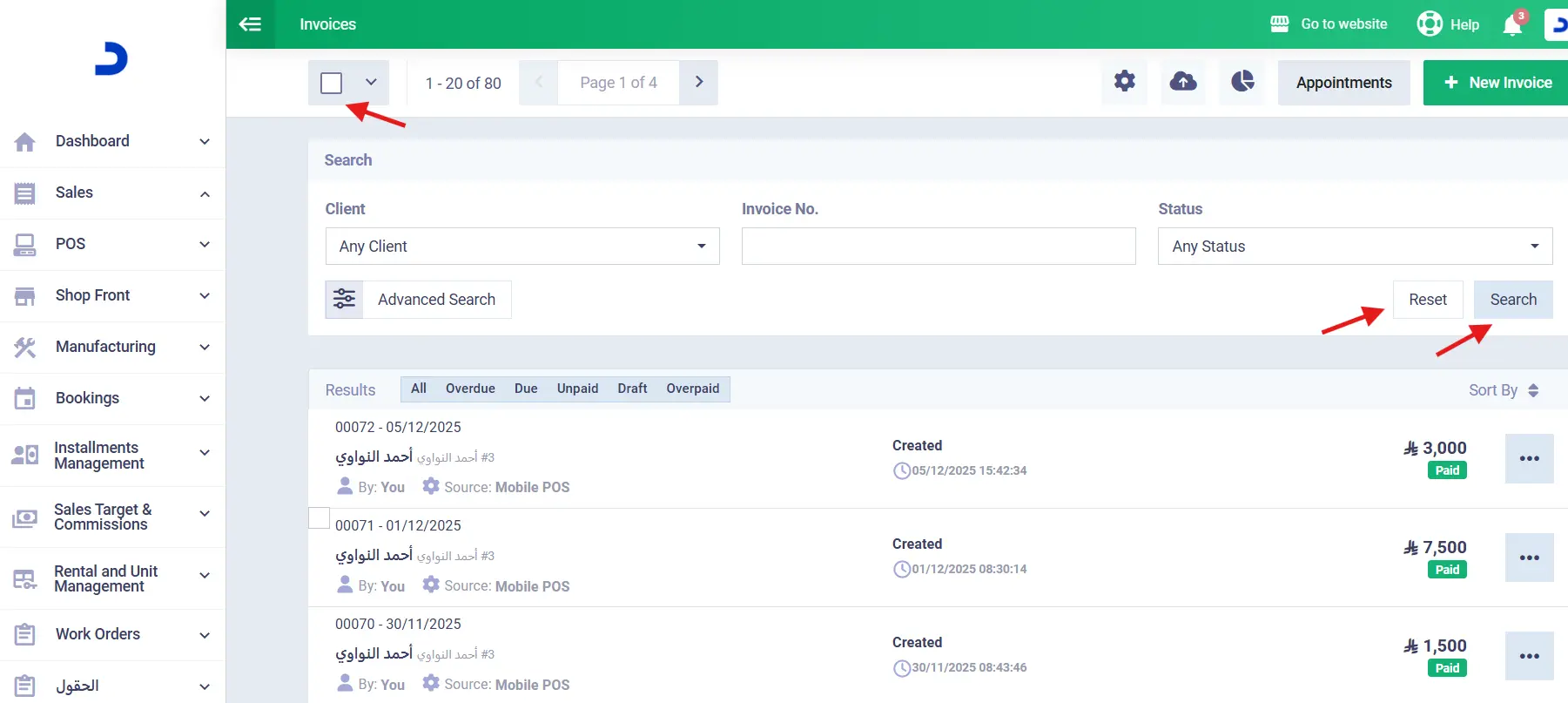
You can control search in Daftra’s sales invoicing software through filtering and selection, and perform actions on selected invoices, such as deleting, sending, printing, or marking them as paid.
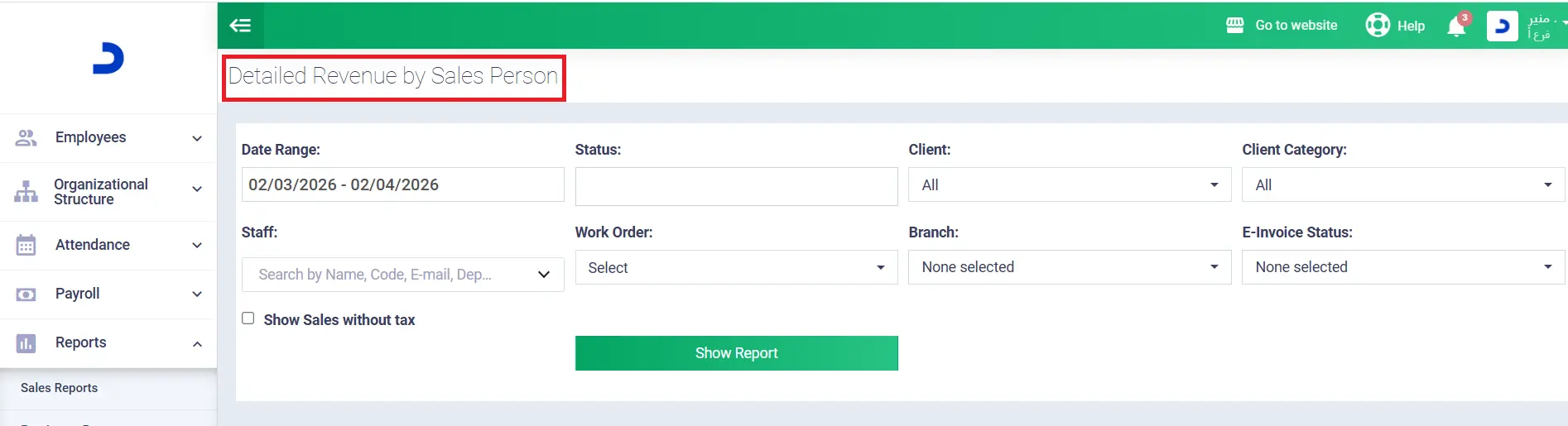
The software also provides all features on both the Android and iPhone versions, and here are some of the reviews from users of the Daftra accounting app:

2/ Sales Invoicing Software from Fawater
Fawater software is a suitable solution that helps business owners and sales managers customize and create sales invoices in a way that fits the business field, country, and official language used.
Fawater provides multiple free templates, such as a tax invoice template, a sales invoice template, a blank invoice template, a commercial invoice template, and a pharmacy invoice template. These templates are available for multiple countries, such as Saudi Arabia, Egypt, Kuwait, Qatar, Bahrain, and the UAE.
Read also: A comprehensive comparison to choose the best sales management software
3/ Sales Invoicing Software from Alif Yaa
Alif Yaa software is an accounting program that helps small businesses manage their accounting operations and sales invoices.
The software provides a variety of sales invoice templates, and customers can approve or reject quotations and view their invoices through a “guest” account, which allows them to log in using their email and password. The software enables you to create and send invoices to customers easily and quickly, helping you organize accounts and receive invoice payments quickly online.
It also allows you to customize sales invoice templates with a personal touch by adding a brand logo and payment terms.
4/ Lemona Sales Invoicing Management Software
Through Lemona accounting software, you can customize specific texts for each part of the sales invoice. You can also change the invoice type in the title, control the size of the logo added to the invoice, enter invoice data, and send it to customers via email or print it after downloading it as a PDF.
Frequently Asked Questions
What is the difference between a shipping sales invoice and a delivery receipt?
The difference between a shipping sales invoice and a delivery receipt lies in the purpose of each. The invoice is a payment request, while the receipt is proof that the buyer has received the goods.
When is a shipping sales invoice issued?
A shipping sales invoice is issued after the goods are delivered to the customer, and it is used to confirm the completion of the sale.
Is every sales invoice also a purchase invoice?
No, a sales invoice is not a purchase invoice. The seller issues a sales invoice for a product or service, while the customer receives a purchase invoice as proof of completing the financial transaction.
What is the difference between invoice sales and cash sales?
The difference between invoice sales and cash sales is the timing of payment. In cash sales, the purchase and delivery of goods occur simultaneously, whereas in invoice sales, goods are delivered first and the invoice is issued on the payment date.
What is a shipping sales invoice?
A shipping sales invoice is a document that outlines the details of the shipping service provided by the company to the customer; it is also referred to as a Shipping Sales Invoice.
Is a commercial invoice considered a sales invoice?
Yes, a commercial invoice is considered a sales invoice and is one of its types.
How to convert a proforma invoice into a sales invoice?
A proforma invoice is converted into a sales invoice by modifying it to include the final sales invoice details, such as the issuance date, payment terms, and other adjustments.
What is the double-entry for creating a sales invoice?
The double entry for creating a sales invoice is recording the debit and credit sides of the accounts related to the sales transaction in the invoice.
When issuing a sales invoice, what accounting entry will be created by this activity?
When issuing a sales invoice, the accounting entry is created as follows:
The sales account is on the debit side, and the customer account is on the credit side, then adding the tax item.
After presenting the importance of sales invoices and how they work, companies of all sizes and industries should adopt smart solutions represented in sales invoicing software. This aims to improve business efficiency and enhance customer experience.
Now, do not hesitate to choose the best software and reap the benefits of digital transformation to achieve greater profitability and growth.












 Invoicing
 POS
POS Offers
 Installments
 Sales Commission
 KSA E-Invoice Software
 EGY E-Invoice Software
 JO E-Invoice Software
 E-Invoice Software
 Chart of Accounts
 Asset Management
 Cost Centers
 Expenses
 Cheque Cycle
 UAE VAT-Tax
 Product Management
 Purchases
 Purchase Cycle
 Suppliers
 Requisitions
 Stocktaking
 Organizational Structure
 Personnel Management
 Attendance and Leave
 Contracts
 Payroll
 Requests
 Work Orders
 Booking Management
 Rental and Unit Management
 Time Tracking
 Work Flow
 Lease Contracts
 Manufacturing Management
  Client Follow-Up
 Loyalty Points
 Points and Credits
 Memberships
 Insurance Management
 Daftra ERP Full App
 Point of Sales App
 Point of Sales for Desktop – Support Offline Mode
 AI Expenses Scanner App
 Employee Attendance, Sign & ESS App
 E-invoice Reader App
 Inventory Stocktaking App