


TRN Verification in UAE 2026: How to Check a VAT Number on FTA

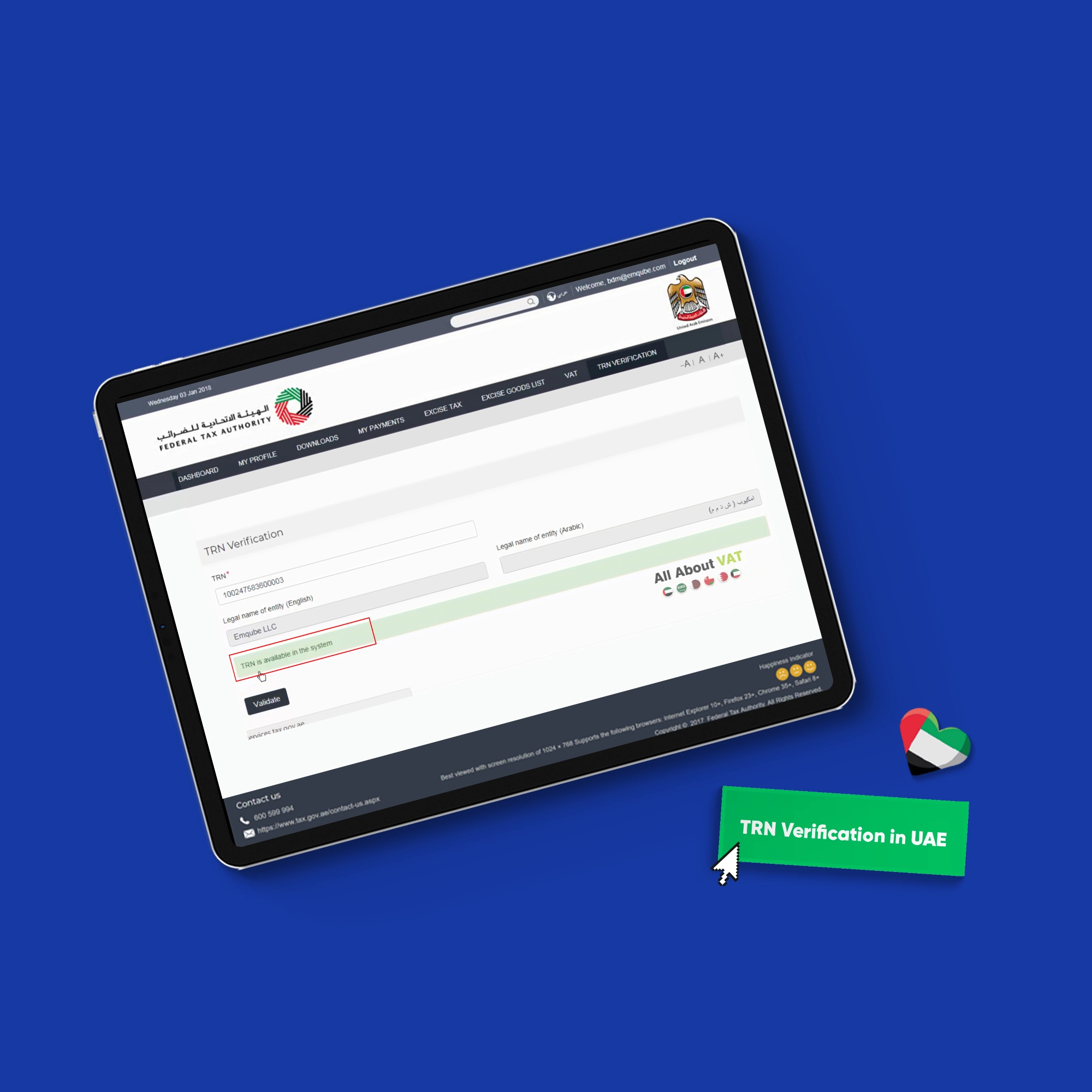
Table of contents:
- Key Summary
- How to verify a TRN in UAE (in 60 seconds)
- TRN verification on the FTA website (step-by-step)
- What the TRN verification result means (valid vs invalid vs mismatch)
- Why TRN verification is crucial
- Common TRN verification problems and fixes
- Best practices for businesses (supplier onboarding policy)
- How ERP software automates TRN validation
- Frequently Asked Questions
The Tax Registration Number (TRN) is a 15-digit number issued by the Federal Tax Authority (FTA) to businesses. It’s what shows a company is officially registered for VAT in the UAE and allowed to charge it on invoices.
Verifying that TRN isn’t just a quick check, it’s how you confirm the supplier is legitimate and make sure you’re handling VAT correctly. If the number is wrong, mismatched, or not registered at all, it can affect your VAT claims, your records, and even expose you to compliance issues later on.
In this guide, we will walk you through a simple, no-confusion process to check your TRN using the official FTA tool and understand what to do with the result.
You’ll learn:
- How to verify a TRN in the UAE using the official FTA tool step by step
- What a valid or invalid TRN actually means in practice
- How to spot mismatches before they turn into problems
- Where to find a TRN if it’s missing or unclear
- What to do next based on the verification result
How to verify a TRN in UAE (in 60 seconds)
You can verify any TRN in under a minute using the official FTA tool by following these steps:
- Open the official FTA TRN verification page
- Enter the 15-digit Tax Registration Number
- Complete the captcha on the screen
- Click the submit button to complete the request
- Review the result to confirm if the TRN is valid and registered
TRN verification on the FTA website (step-by-step)
The FTA tool is simple, but it only works if the details are entered exactly right. Most of the issues people face here aren’t technical; they’re small input errors.
If you don’t have the TRN yet, you’ll usually find it on invoices, or you can follow this guide on how to download a VAT certificate from the FTA portal to get the correct number before starting.
Once you have the TRN, follow these steps to verify it properly:
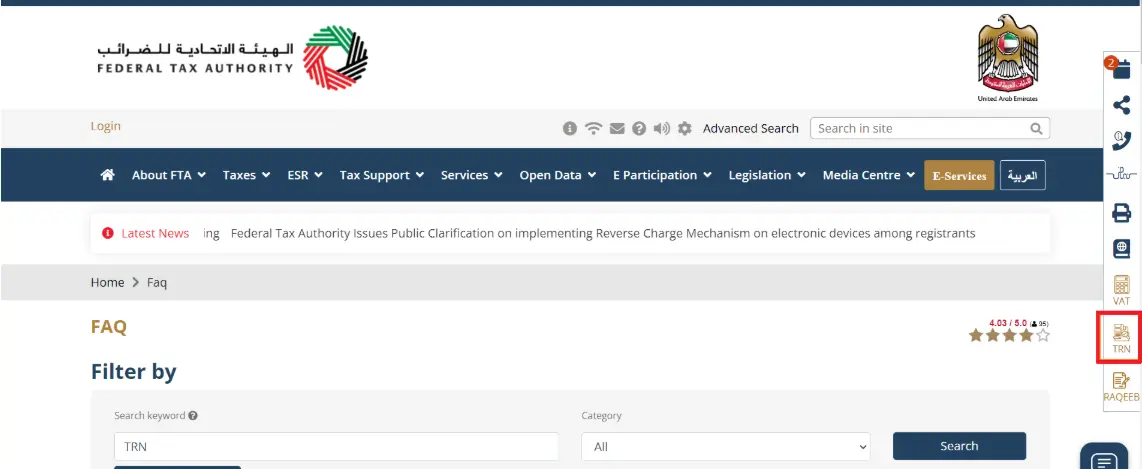
Step 1: Open the FTA website and select the TRN icon on the right. It will redirect you to the TRN verification page
Step 2: Enter the 15- digit Tax registration number
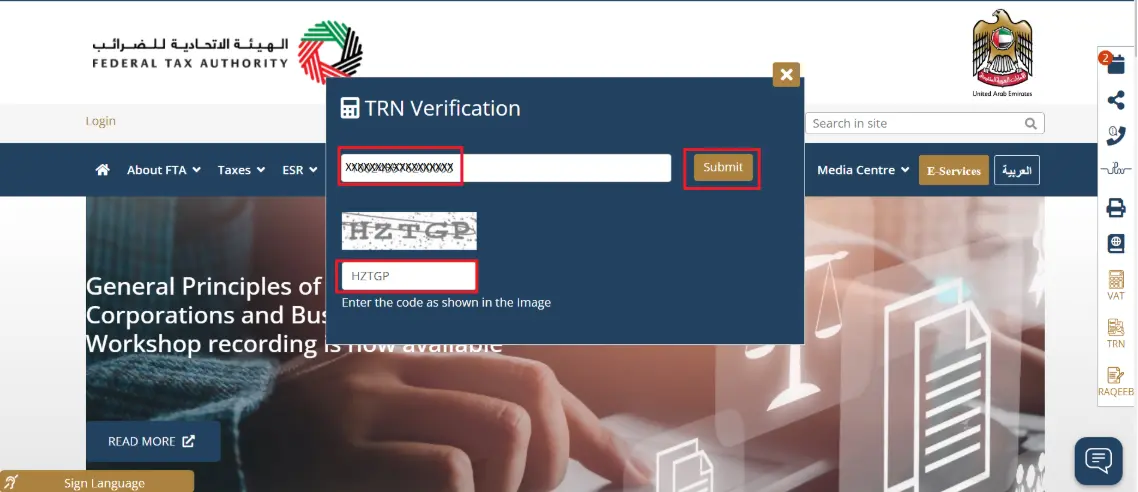
Pro tip: Make sure there are no spaces or symbols in the TRN
Step 3: Have a quick look at the number again before submitting
Step 4: Enter the captcha on the screen
Pro tip: If it is not working, refresh and try again.
Step 5: Hit the submit button and wait for the result
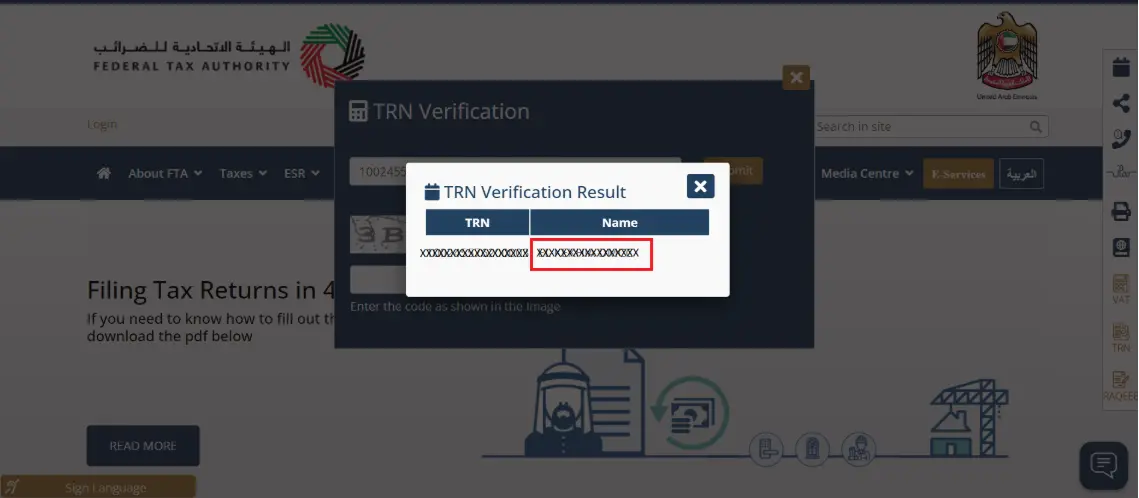
Step 6: Review the results, especially the business name linked to the TRN
What the TRN verification result means (valid vs invalid vs mismatch)
Getting the result only takes a few seconds. The real question is, what does it actually mean for you? The FTA tool gives you a clear answer, but that’s just the starting point. If you’re working with invoices or VAT, the way you interpret that result can make a real difference in what you do next. Here’s how to read each result in a practical way:
Valid TRN + name matches
- The TRN exists and belongs to the same business you’re dealing with
- The name shown matches the supplier or company on the invoice
- You can proceed with the transaction and treat VAT as normal
- Safe to accept the invoice and record it in your system
Valid TRN - but name mismatch
- The TRN is real, but the name doesn’t match the invoice or supplier
- This usually means the wrong entity was used or the document is incorrect
- Could be a branch vs. head office issue, or simply outdated details
- Do not process the invoice as-is
What to do:
- Pause the transaction
- Ask for the correct VAT certificate or updated invoice
- Make sure the TRN and business name match before continuing
Invalid or not found TRN
- The TRN doesn’t exist in the FTA system
- The business is likely not VAT-registered
- Any VAT charged on the invoice may not be valid
What to do:
- Do not accept or process VAT on that invoice
- Flag the issue internally or with your finance team
- Ask the supplier to clarify their VAT status
Missing something at this stage doesn’t just affect one invoice; it can carry through to your records and impact your VAT filing in UAE, especially if incorrect details are reported.
Why TRN verification is crucial
TRN verification is one of the simplest checks you can build into your process, and it makes everything else smoother, from handling invoices to keeping your VAT records accurate. Here’s where it actually matters:
- Supplier onboarding checks: It confirms you’re dealing with a legitimate, VAT-registered business before starting any transactions
- Confirming VAT registration: It makes sure the supplier is actually VAT-registered before you accept or claim VAT on an invoice
- Fraud prevention: It’s an easy way to spot fake TRNs or invoices issued under the wrong business before they enter your records
- Audit readiness: Verified TRNs show your process is controlled and reduces issues during audits
- Business credibility: Working with verified suppliers builds more reliable and lower-risk relationships
If you want a clearer picture of how VAT claims work in practice, you can explore Input Tax Recovery under VAT UAE.
Common TRN verification problems and fixes
A TRN might look fine, but still not go through when you check it. Most of the time, it’s not a real issue, just something small in the way it was entered or copied. Here are the common verification problems and how to fix them:
- TRN is not 15 digits → Go back to the source and make sure you’re using the full number
- Spaces or dashes included → Remove any formatting and enter digits only
- Copied extra characters → Paste the TRN into a clean field first, then copy it again
- Typing mistakes → Avoid manual entry and copy the number directly
- Captcha not working → Refresh it and try again, it often takes more than one attempt
- Wrong entity (branch vs HQ) → Ask for the correct invoice or VAT certificate for the exact entity
- Name mismatch (trading vs legal name) → Request the VAT certificate to confirm the registered name
- Old or outdated document → Ask for a recent invoice or updated certificate
- Using an unofficial source → Always verify using the FTA website, not third-party tools
- TRN not found → Double-check the number first, then confirm with the supplier if needed
Read also: how to register for vat in uae
Best practices for businesses (supplier onboarding policy)
TRN verification works best when it’s part of your normal routine, not something you remember halfway through processing an invoice.
When to verify
- When adding a new supplier
- Before processing the first invoice
- For high-value or unusual transactions
- Periodically for active suppliers
What to keep on record
- Screenshot or saved result of the TRN check
- Copy of the supplier’s VAT certificate
- Verified TRN stored in your system
Who handles it
- Procurement: during supplier onboarding
- Accounts payable: before processing invoices
- Finance: oversight and consistency
How it works in practice
- Receive supplier details or invoice
- Verify the TRN on the FTA website
- Match the TRN with the business name
- Save proof of verification
- Approve the supplier or proceed with the invoice
Read also: What is TiN Number in UAE
How ERP software automates TRN validation
Checking TRNs manually works when things are still simple. But once you’re handling more suppliers and invoices, it’s easy to miss something without noticing. Using Daftra just takes that pressure off. Instead of repeatedly checking the same things, the system handles it as part of your normal flow. Here’s what that looks like:
- Store TRN once: You add it once to the supplier or customer profile, and that’s it
- Format check (15 digits): If the number isn’t in the right format, it won’t go through
- Mismatch alerts: If the TRN doesn’t match the name on the invoice, it gets flagged early
- Built-in validation: The check happens while you’re working, not as a separate step
- Audit trail: You can go back and see who checked the TRN and when
Manual vs ERP: what actually changes
| Task | Manual | ERP |
| Enter TRN | Typed every time | Saved once |
| Format check | Easy to miss | Checked automatically |
| Matching details | Done manually | Flagged instantly |
| Tracking | Often not recorded | Logged with user and time |
| Audit support | Hard to trace | Clear history available |
Frequently Asked Questions
How can I verify my TRN number in UAE?
Visit the FTA website, enter the 15-digit TRN, complete the captcha, and the results will appear.
Where can I find a TRN?
Most of the time, it’s on the invoice. You can also find it on the VAT certificate or in your system under supplier details.
What is the format of TRN number in UAE?
It’s always 15 digits. No letters, no spaces, just numbers.
Is it free to check a VAT number?
Yes, completely free.
Are TRN and VAT number the same?
Yes, they’re the same thing in the UAE. TRN is just the term used for the VAT number.
In conclusion, TRN verification is a simple step, but it’s where a lot of small issues either get caught or missed. It’s about making sure the details you’re working with actually make sense before you proceed. That’s what saves you from having to go back and fix things later.
The steps are simple as well; you enter the TRN, run the check, and look at the result, but after a while, you don’t think about them anymore. You just check it, see that everything lines up, and move on. And when that’s handled through a system like Daftra, it becomes easier to keep things consistent without having to double-check everything yourself.








 Invoicing
 POS
POS Offers
 Installments
 Sales Commission
 KSA E-Invoice Software
 EGY E-Invoice Software
 JO E-Invoice Software
 E-Invoice Software
 Chart of Accounts
 Asset Management
 Cost Centers
 Expenses
 Cheque Cycle
 UAE VAT-Tax
 Product Management
 Purchases
 Purchase Cycle
 Suppliers
 Requisitions
 Stocktaking
 Organizational Structure
 Personnel Management
 Attendance and Leave
 Contracts
 Payroll
 Requests
 Work Orders
 Booking Management
 Rental and Unit Management
 Time Tracking
 Work Flow
 Lease Contracts
 Manufacturing Management
  Client Follow-Up
 Loyalty Points
 Points and Credits
 Memberships
 Insurance Management
 Daftra ERP Full App
 Point of Sales App
 Point of Sales for Desktop – Support Offline Mode
 AI Expenses Scanner App
 Employee Attendance, Sign & ESS App
 E-invoice Reader App
 Inventory Stocktaking App