



Table of contents:
- Key Summary
- What “VAT refund” means for a UAE business
- Refund vs carry-forward which is better for cash flow?
- Eligibility Who can claim a VAT refund in UAE
- What you need before you submit
- Step-by-step how to submit VAT refund request in EmaraTax
- How long does a VAT refund take in UAE?
- Common reasons refunds get delayed or rejected
- Accounting + reporting how to record VAT refunds in your books
- Best practices to stay “refund-ready” every tax period
- FAQ
If your business pays more Input VAT on purchases than it collects as Output VAT on sales, you might be entitled to reclaim the difference from the UAE's VAT authority. Eligible VAT-registered businesses can apply for a refund for the excess VAT credit through the EmaraTax portal using the VAT311 refund request service, rather than carrying the excess VAT credit forward to future tax periods.
VAT refunds are usually claimed by exporters making zero-rated supplies, companies investing heavily in equipment or expansion, or businesses currently growing where recoverable input VAT exceeds VAT collected from customers. Also, before submitting a refund request, businesses should ensure their VAT return is accurate and have all supporting documents ready in case the Federal Tax Authority requests additional information.
Consider this your full guide to understanding how VAT refunds work, whether to request a refund or carry the credit forward, the documents you need, how to submit VAT311 in EmaraTax, the expected processing timeline, common reasons refunds get delayed or rejected, and how accounting software can help keep your business refund-ready throughout the year
What “VAT refund” means for a UAE business
A VAT refund in the UAE occurs when the recoverable input VAT paid on business purchases and expenses exceeds the output VAT collected on taxable sales during a VAT period. This means that instead of owing VAT to the Federal Tax Authority, the business ends the period with an excess refundable tax.
There are two possible scenarios: businesses can submit a refund request through the EmaraTax portal using the VAT311 service and wait for FTA review and approval, or carry forward the credit balance to offset VAT liabilities in future periods.
Here are some business situations that commonly result in excess input VAT, including:
Zero-rated exporters
where exports are taxed at 0% but input VAT on local purchases remains recoverable.
Capital-intensive businesses
Businesses purchasing machinery, vehicles, equipment, or commercial property before generating significant taxable sales.
Startups nd fast-growing companies
Investing in inventory, office setup, technology, or operational expenses during their early stages.
Businesses with seasonal sales
Purchases occur well before revenue is generated.
Here are some cases where you can be eligible to claim a VAT refund:
- You are registered for VAT in the UAE.
- You have filed your VAT returns for the relevant tax periods.
- Your VAT account shows an excess refundable tax.
- Your purchase invoices meet the UAE VAT requirements.
- You can provide supporting documents if requested by the FTA.
Before claiming a refund, make sure you understand how input tax recovery works and which expenses qualify for VAT recovery. It's also important to identify non-recoverable input VAT to avoid claiming VAT on ineligible business expenses.
Refund vs carry-forward: which is better for cash flow?
When your business has excess refundable VAT, you don't always have to request a refund; you can also carry the VAT credit forward to offset VAT payable in future tax periods. The best option depends on your business's cash flow needs, expected VAT liabilities, and how quickly you can support a refund claim if the FTA requests additional documentation.
Here is a breakdown of both options:
| Claim a VAT refund | Carry the VAT Credit Forward |
| Receive cash back from the FTA after approval. | Apply the credit against future VAT payable. |
| Improves cash flow, especially for businesses with high upfront costs. | Reduces future VAT payments without submitting a refund request. |
| Requires submitting a VAT311 application through EmaraTax. | Happens automatically by carrying the credit balance into the next VAT return. |
| May involve document reviews or additional information requests. | Requires minimal administrative effort if you expect future VAT liabilities. |
| Best for businesses with ongoing excess input VAT or infrequent taxable sales. | Best for businesses that regularly collect output VAT and expect to use the credit soon. |
Which of them is the best option for your business? Here is how to decide:
Claim a refund when:
- Your business needs additional working capital.
- You regularly generate excess input VAT.
- You've made significant capital investments that created a large VAT credit.
- You don't expect to offset the credit against future VAT payable in the near term.
Carry the credit forward when:
- You expect to owe VAT in upcoming tax periods.
- The credit balance is relatively small.
- You prefer to reduce future VAT payments rather than wait for a refund review.
- You want to avoid submitting a separate refund application.
Here are some examples:
- An export company that sells mainly zero-rated goods overseas and consistently pays VAT on local purchases; this means the company's input VAT would regularly exceed output VAT, so claiming a refund would likely improve cash flow.
- A retail business collects VAT on daily sales and expects future VAT liabilities, so carrying the VAT credit forward may be better than requesting a refund.
- A manufacturing company invests heavily in machinery during its expansion; if the investment generates a substantial VAT credit, requesting a refund can help free up cash tied up in those purchases.
Rule of thumb: If you will likely use the VAT credit in your next few VAT returns, carrying the credit forward may be the simpler option. If the VAT credit is significant and your business would benefit from improved cash flow, submitting a refund request may be the best option.
Important Note: Always check the latest FTA guidance as refund procedures and requirements may change over time.
ERP/accounting systems can help monitor your VAT credit balance across tax periods, compare it with expected future VAT liabilities, and generate reports to determine whether claiming a refund or carrying the credit forward is the more practical option. This enables businesses to make better cash flow decisions rather than relying on manual calculations.
Read also: UAE New Tax Rules 2026
Eligibility: Who can claim a VAT refund in UAE
VAT-registered businesses in the UAE may request a VAT refund when they have excess VAT credit that can be refunded after filing their VAT return. This happens when the recoverable input VAT on eligible business purchases exceeds the output VAT due on taxable supplies.
After you submit a refund request, the FTA reviews each application and may request supporting documents to verify that the claimed VAT is recoverable and that the business has complied with the UAE's VAT requirements before approving the refund.
Your business is eligible if:
Important note: Maintaining accurate accounting records and VAT documentation can help reduce delays and errors during the review process.
In case your business is not eligible under this refund process:
Tourists
Should use the UAE's Tourist VAT Refund Scheme, which has separate eligibility requirements and procedures.
Foreign businesses
If not registered for VAT in the UAE, they might still be able to claim VAT under a separate refund scheme, subject to its own application periods and conditions.
Experienced Tip: To ensure the VAT on a particular expense is recoverable, review the rules on input tax recovery and non-recoverable input VAT before submitting; this helps ensure that only eligible VAT is included in your claim and reduces the risk of additional questions from the FTA.
What you need before you submit
Before submitting a VAT311 refund request, businesses should ensure their documents are accurate and complete to reduce the risk of delays or the FTA requesting additional information. Although documents vary depending on the nature of the claim, some are standardized, including VAT records and banking information, which must match the VAT returns you filed.
Here is a VAT Refund Submission Checklist. You must make sure you have:
- A valid bank account and an IBAN letter issued by your bank.
- Proof of payment, where applicable, to support the transaction included in the refund claim.
- Purchase register showing all recoverable input VAT.
- Valid tax invoices that comply with UAE VAT requirements (e.g. supplier TRNs and required invoice details)
- Import documentation if your refund includes VAT paid on imports.
- Filed VAT returns that reconcile with the refund amount being claimed.
- Supporting accounting records that explain how excess refundable VAT was calculated.
Important note: Outstanding tax liabilities, penalties or compliance issues on your tax account do not necessarily prevent you from applying, but they are still worth checking as they might affect the final refundable amount.
Additionally, the FTA may request additional documentation to verify your claim, especially for large refund amounts or claims involving imports, zero-rated supplies, or significant capital supplies. This is why it is important to maintain organized records so you can respond quickly and avoid unnecessary delays.
This is where an ERP/accounting system (like Daftra) becomes crucial for organizing and centralizing all VAT records in one place, rather than collecting the documents manually each time you need to apply for a refund.
Daftra can automatically:
- Store supplier TRNs and tax invoices
- Maintain complete purchase registers
- Link invoices with payment references
- Organize import documents and supporting records
- Export audit-ready VAT reports
Daftra supports your business compliance by maintaining accurate, well-organized records of refund requests and supporting evidence, as requested by the FTA.
Step-by-step: how to submit VAT refund request in EmaraTax
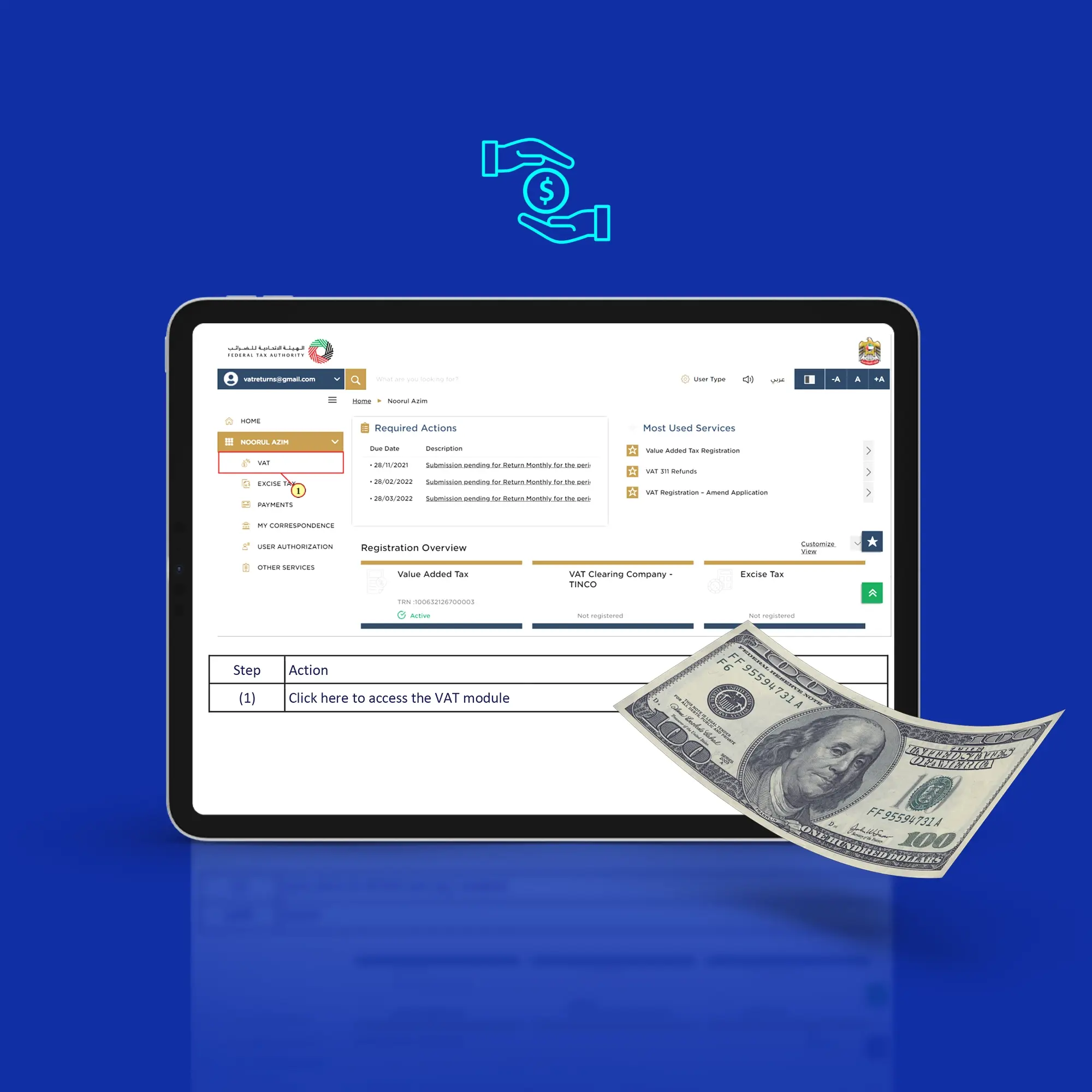
Once you have confirmed that you have an excess refundable VAT balance and gathered all required documents, you can submit your refund request through the EmaraTax portal using the VAT311 service.
While the EmaraTax portal may receive updates over time, the process remains straightforward when your VAT records are already organized.
Here is a step-by-step guide on how to submit VAT refund request in EmaraTax:
Using an ERP system (such as Daftra), you ensure that the figures in your VAT311 application match the accounting records by automatically reconciling VAT transactions, maintaining complete purchase registers, and generating VAT reports. Daftra supports your business by reducing manual work, limiting errors, and making it easy to provide documents requested by the FTA.
How long does a VAT refund take in UAE?
Every refund request is reviewed individually by the Federal Tax Authority; however, the FTA publishes service timelines that provide a general expectation for processing.
According to the FTA, a VAT refund application may be processed within:
- Up to 25 business days from the date the FTA receives a complete application.
- Up to 55 working days if the application requires an audit, investigation, or additional verification; the timeframe generally begins after the applicant has provided all requested information.
Note: Processing time varies depending on the complexity of the claim, the supporting documents, and whether the FTA requests further clarification during the review.
Why VAT refunds are sometimes delayed
Most delays occur because the FTA requests additional information to validate the claim; here are the common reasons:
- Incorrect IBAN letters
- Bank account details don't match the registered business
- Missing or incomplete tax invoices
- Insufficient proof of payment
- Differences between the refund claim and previously filed VAT returns
Prepare your VAT return and supporting documents, accounting records, and bank details to ensure a fast response and refund from the FTA.
You can reduce processing delays by using an ERP system like Dafwhich, which automatically reconciles VAT balances, stores supporting documents in a centralized location, and generates reports that prepare you to respond promptly if the FTA requests additional information.
Common reasons refunds get delayed or rejected
Submitting the VAT311 does not guarantee that your refund will be approved; the FTA reviews each claim to ensure that compliant records support the refundable VAT and that the information already submitted through your VAT returns is matched. If some information is missing or inconsistent, the FTA might request additional documents or reject the claim.
The following table presents common problems, their cause, and how to fix them:
| Problem | Cause | Fix |
| Incorrect bank details | IBAN or beneficiary information doesn't match the registered business | Verify your bank details before submitting and provide the correct IBAN letter |
| Missing or incomplete tax invoices | Supporting invoices don't meet UAE VAT requirements | Keep compliant tax invoices with supplier TRNs and all mandatory invoice details |
| Refund amount doesn't match VAT returns | The refundable amount differs from filed VAT returns or accounting records | Reconcile your purchase register and VAT return |
| Weak supporting documents | Payment evidence or import documents are incomplete or inconsistent | Maintain complete proof of payment, customs documents, and purchase records |
| Additional information requested | The FTA requires clarification, but the business responds late or provides incomplete information | Respond promptly and upload all requested documents through EmaraTax |
| Claim includes non-recoverable VAT | The application includes non-recoverable VAT under UAE VAT rules | Review recoverable input VAT carefully before submitting the claim |
Here are some experienced tips on how to avoid refund delays:
- Reconcile your purchase register with every VAT return before submission
- Confirm that supplier invoices contain valid TRNs and all required VAT details
- Keep proof of payment of the transactions included in the claim
- Organize import documentation (where applicable)
- Monitor the EmaraTax portal in case the FTA requests additional information
- Respond as quickly as possible to FTA inquiries to avoid extending the review period
Many refund delays stem from manual human errors rather than eligibility issues. Daftra helps reduce these risks by automatically matching purchase invoices with VAT records, validating supplier information, tracking payment references, and generating audit-ready reports. Instead of endless paper files and spreadsheets, Daftra helps finance teams quickly and efficiently provide the supporting evidence the FTA requests.
Accounting + reporting: how to record VAT refunds in your books
From an accounting perspective, a VAT refund is the recovery of VAT previously paid on eligible business purchases. Until the refund is completed, the amount is recorded as a VAT receivable on the balance sheet. Once the refund is transferred to the business's bank account, the VAT receivable balance is cleared.
It is crucial to keep VAT receivable balances accurate not only for financial reporting but also to ensure the refundable amount matches that reported in the VAT returns and refund application.
Here is an example of a simple journal entry when the VAT refund is received:
| Account | Debit | Credit |
| Bank | XXX | |
| VAT receivable | XXX |
This entry records the cash received from the FTA and removes the outstanding VAT receivable from the books.
The following part enlists the best practices for maintaining accurate VAT records:
- Reconcile VAT receivable balances after every VAT return.
- Match VAT receivable accounts with your submitted VAT returns.
- Investigate differences before submitting VAT311.
- Retain supporting documents for every recoverable VAT transaction.
- Record any VAT adjustments separately to maintain a clear audit trail.
Accurate records make it easier to calculate the refundable balance, respond quickly to FTA inquiries, and complete future VAT returns.
Instead of manually posting VAT transactions, ERP systems (like Daftra) can automatically:
- Record recoverable input VAT during purchase transactions.
- Track VAT receivable balances across tax periods.
- Generate VAT reports directly from accounting records.
- Reconcile VAT refunds against incoming bank payments.
- Maintain a complete audit trail for every VAT adjustment and refund.
Daftra helps reduce manual and human errors while ensuring the accounting records remain consistent with VAT filings and refund requests.
Best practices to stay “refund-ready” every tax period
If a business regularly receives VAT refunds, it probably doesn't wait until the end of the tax period to organize its records. Instead, it maintains a consistent VAT process throughout the year, making it easier to prepare refund requests, respond to FTA reviews, and receive refunds and responses without delay.
It's crucial to identify errors early, before they affect your VAT return or refund application. Here is a VAT Refund-Ready Checklist:
Standardizing a monthly procedure to be audit-ready is very important; it can include the following steps:
By following the same process each tax period, you would reduce errors and ensure your business is always prepared should the FTA request supporting information.
Daftra helps you stay VAT-compliant by automating many tasks including:
✓ Reconciling purchase invoices with VAT records
✓ Storing supplier TRNs and compliant tax invoices
✓ Marking transactions that may include non-recoverable VAT
✓ Tracking VAT credit balances across tax periods
✓ Generating VAT reports and purchase registers
✓ Exporting an audit-ready documentation pack whenever a refund application is submitted
This way, Daftra eases the burden of the VAT processes, allowing businesses to spend less time preparing refund claims and more time focusing on cash flow, financial planning, and business growth.
FAQ
Can I claim VAT back for my business?
Yes, you can claim VAT back in the UAE if your business is VAT-registered by reclaiming the VAT you pay on eligible business expenses (input VAT) and offsetting it against the VAT you collected (output VAT) through the FTA official portal.
How can I claim a VAT refund?
For a VAT-registered business that has excess refundable tax (input exceeds the output), it can claim a refund via the Federal Tax Authority portal by following these steps:
- File your VAT return, and your credit balance is reflected on the portal.
- Open the refund form VAT311 in the EmaraTax portal.
- Fill in the VAT311 form with your details (TRNs, entity names, etc).
- Attach your supporting documents, including ( tax invoices, proof of payment, IBAN letter).
- Submit your application and wait for the FTA response.
Who is eligible for VAT refund?
In the UAE, two main types of businesses are eligible for refunds: UAE-registered businesses (when input VAT exceeds output VAT) and foreign businesses (under the business visitor refund scheme)
What are the requirements to claim VAT?
To claim VAT for a UAE-registered business, your input VAT (expenses on business purchases) must exceed your output VAT (collected VAT) for a given tax period. Very important: businesses must be FTA-registered, possess a valid Tax Registration Number (TRN), and ensure their purchases are business-related and subject to valid tax.
What are the documents required to claim a refund?
To claim a VAT refund in the UAE, you should first submit a completed Form VAT311 through the EmaraTax portal with prepared documents that vary depending on whether your business is registered locally or not:
Locally registered businesses need original FTA-compliant tax invoices, proof of payment, bank account details, and a license. Foreign business visitors need a tax compliance certificate, original tax invoices, proof of payment, and documents for the authorized signatory.
What items can you claim VAT back on?
You can claim VAT on any business expense used to make taxable supplies; es, however, the FTA strictly blocks certain categories from VAT recovery. Here is a breakdown of both the claimable items and blocked items.
Input Tax Recovery Items:
Commercial rent, utilities, tech, inventory, materials, professional fees, capital assets, mandatory employee benefits, and logistics.
Non-Recoverable Input VAT:
Client entertainment, personal vehicles, discretionary employee perks, and exempt activity costs.
How much VAT refund do I get?
You can calculate your VAT refund by the following formula:
Net VAT Refund = Total Output VAT - Total Recoverable Input VAT
How to get full VAT refund?
A business cannot automatically get a 100% refund on all VAT paid, as you are only refunded the eligible excess refundable tax that offsets the VAT you collected (when you adhere to the FTA rules).
What is the difference between a tax refund and a VAT refund?
A tax refund is the return of overpaid income tax by the government to the taxpayer. VAT refund, on the other hand, is specific to Value Added Tax, where a business recovers VAT paid on expenses (input) when it exceeds VAT collected on sales (output).








 Invoicing
 POS
 Offers
 Installments
 Sales Commission
 KSA E-Invoice Software
 EGY E-Invoice Software
 JO E-Invoice Software
 E-Invoice Software
 Chart of Accounts
 Asset Management
 Cost Centers
 Expenses
 Cheque Cycle
 VAT & Tax Compliance
 Product Management
 Purchases
 Purchase Cycle
 Suppliers
 Requisitions
 Stocktaking
 Organizational Structure
 Personnel Management
 Attendance and Leave
 Contracts
 Payroll
 Requests
 Work Orders
 Booking Management
 Rental and Unit Management
 Time Tracking
 Work Flow
 Lease Contracts
 Manufacturing Management
 Client Follow-Up
 Loyalty Points
 Points and Credits
 Memberships
 Insurance Management
 Daftra ERP Full App
 Point of Sales App
 Point of Sales for Desktop – Support Offline Mode
 AI Expenses Scanner App
 Employee Attendance, Sign & ESS App
 E-invoice Reader App
 Inventory Stocktaking App