




Table of contents:
- What Is the Concept of Inventory Item Coding?
- What Is the Importance of Item Coding?
- How to Code Warehouse Inventory Items
- What Are the Standards for Coding Warehouse Inventory Items?
- What Are the Types of Coding Methods?
- General Tips for Item Coding
- How Daftra Helps You Easily Code Inventory Items
- Here Are the Most Frequently Asked Questions
If you are a business owner, you have surely faced difficulty tracking your products in the warehouse, or perhaps noticed repeated orders for the same item even though it is in stock. These problems are common and can cause significant losses if left unaddressed.
This is where inventory item coding comes in. It is not merely an organizational tool, but a strategic step that enables you to have full control over storage, supply, and sales operations without chaos or errors.
In this article, we will take you on a comprehensive journey to understand inventory item coding, its importance, implementation methods, and the standards to follow. We will also share practical tips and explain how Daftra’s warehouse and inventory management software can make this process easier than ever before.
What Is the Concept of Inventory Item Coding?
Inventory item coding is the process of assigning unique codes to each item in the warehouse to facilitate tracking and management. Imagine running a store with hundreds of products, without a coding system.
How would you know the location of each item or its quantity available? These codes may be numbers, letters, or even barcodes. The purpose of coding is to improve inventory management accuracy and speed.
For example, a code such as “SH-001-BLU” may indicate a blue shirt, while “SH-002-RED” refers to a red shirt. These codes allow you to identify item details without manual searching. Item coding is the backbone of any modern inventory management system.
What Is the Importance of Item Coding?
Many people wonder how large companies manage thousands of products without errors. The secret lies in inventory item coding. By using item coding, you can accurately track every product, improve the customer experience, and increase your profits. Discover the most important benefits of item coding:
- Through the code, quantities and the location of each item can be identified accurately.
- Facilitates manual or electronic inventory counting processes.
- Prevents duplicate ordering or the wrong item being issued.
- Helps detect lost or stolen inventory.
- Improves tracking of item movement between locations or branches.
- The code makes it easier for suppliers to accurately identify required items.
How to Code Warehouse Inventory Items
There is more than one way to code inventory items, and choosing the right method depends on the size of your business and the nature of your products. Below, we present the most important methods for coding items in warehouses:
1- Using Letters in Coding
This method relies on creating codes composed solely of letters, enabling the design of descriptive codes that reflect item characteristics (such as type or location). It is suitable for companies that prefer simple, straightforward code that is easy to remember.
Steps:
- Divide items into categories (e.g., clothing, shoes) and determine their characteristics (e.g., color, size).
- Use letters to indicate the category and characteristics, such as “SHIRTBLU” for a blue shirt.
- Document the codes in a spreadsheet or inventory management software.
- Print the codes and attach them to the items or shelves.
Practical example: If you manage a clothing store, you can use a code like “JACKETBLK” for a black jacket and “JACKETRED” for a red jacket. When searching for the jacket in the warehouse, employees can quickly identify it by the letter-based code on the label.
Advantages:
- Codes are descriptive and reflect item characteristics, making them easy for employees to remember.
- Allow creating codes that represent the category or attribute (e.g., color or type).
- Do not require advanced technology, making them cost-effective.
Disadvantages:
- Codes may become complex as the number of items increases.
- Without proper organization, code may become similar, leading to confusion.
- Difficult to integrate with scanning systems, such as barcode systems.
2- Using Numbers in Coding
The numeric coding method refers to creating codes composed solely of numbers. This method is ideal for companies that want a unified system that integrates easily with digital systems.
Steps:
- Choose a numeric format, such as serial numbers or numbers that reflect the category and item.
- For example, use “1001” for the first item in a specific category.
- Record the numbers in an inventory management system or spreadsheet.
- Print the codes and attach them to the items.
Practical example: In an auto spare parts warehouse, you can assign a code like “2001” to a specific type of tire and “2002” to another tire. During inventory counting, employees can enter the number into the system to easily identify the item and its location.
Advantages:
- Numbers are easy to create and enter into digital systems.
- New numbers can be added easily as the number of items grows.
- Suitable for systems that rely on databases.
Disadvantages:
- Do not reflect item characteristics, which may make them difficult to remember.
- Without a clear database, it may be difficult to link numbers to items.
- Numbers may become similar in large warehouses if not carefully designed.
3- Combining Letters and Numbers in Coding
This method combines letters and numbers to create unique, descriptive codes that reflect item characteristics and facilitate tracking. It is suitable for companies seeking a balance between descriptive clarity and scalability, making it common across many industries.
Steps:
- Divide items into categories (such as electronics, clothing) and determine characteristics like color or model.
- Use letters to indicate the category or attribute and numbers for the serial number, such as “TV-001-4K” for a 4K television.
- Document the codes in a spreadsheet or inventory management software such as Daftra.
- Print the mixed codes and attach them to the items or shelves.
Practical example: If you manage an electronics store, you can use a code like “LAP-001-HP” for an HP laptop and “LAP-002-DELL” for a Dell laptop. During inventory counting or sales, employees can quickly identify items by the code on the label, making inventory management easier.
Advantages:
- Combine descriptive details (letters) with sequential organization (numbers).
- Support adding new items easily while maintaining organization.
- Codes reflect item characteristics, making them easier for employees to understand.
Disadvantages:
- Codes may become long or complex if there are many categories.
- Require careful design to avoid duplication or confusion.
- May require more time to design compared to numeric-only codes.
4- Barcode System
This system relies on barcodes (such as UPC or EAN) scanned with a barcode scanner. Barcodes provide high speed and accuracy and are ideal for companies that want to automate operations without high costs.
Steps:
- Determine whether you will use a global standard (such as UPC) or a custom code.
- Create barcodes using software such as Daftra.
- Use a label printer to produce durable and clear labels.
- Link the barcode with inventory management or point-of-sale software to track sales and inventory.
Practical example: Suppose you sell water bottles in your store. You can create a UPC barcode using software like Daftra, then print a label for each bottle. At the point of sale, the employee scans the barcode to automatically update inventory, saving time and reducing errors.
Advantages:
- Allows fast, accurate tracking with scanners.
- Easily integrates with inventory management and point-of-sale systems.
- Supports standards such as UPC and EAN, facilitating international trade.
Disadvantages:
- Higher cost as it requires investment in scanners and label printers.
- Labels may get damaged or lost, requiring reprinting.
- Employees need training to use scanners and software.
To simplify coding inventory items and improve efficiency, try using Daftra to automatically generate custom codes. Start by entering your item data into the system, and Daftra will automatically begin generating codes. This method saves time, avoids duplication, reduces errors, and allows you to track inventory in real time.
What Are the Standards for Coding Warehouse Inventory Items?
To ensure successful coding, unified standards must be followed to support inventory management and facilitate compatibility with local and international systems. The most prominent of these standards are:
1- Global GS1 Codes
The GS1 code is an international coding system issued by GS1 and used to track products and services across supply chains and e-commerce. This code represents a unified, unique identity for products across more than 100 countries worldwide. A GS1 code consists of 13 digits, starts with the number “622,” and is integrated into the barcode. These codes can be obtained and purchased directly through the official GS1 organization website.
Example: The code “6223001234567” for a juice box is embedded in a barcode, and when scanned, the product details appear accurately in global markets.
2- Local EGS Codes
EGS codes are a free local coding system launched by the Egyptian Tax Authority to meet the requirements of the electronic invoicing system. They are designed to suit commercial activities in the Egyptian market.
These codes are considered a flexible and free alternative to global GS1 codes and require approval from the Tax Authority within 15 days of registration. An EGS code consists of three parts: “EG” as a prefix, followed by the company’s tax registration number, and then the company’s internal product code (SKU), such as “EG-123456789-150.”
It should be noted that the EGS code must be linked to the Global Product Classification (GPC) code, an 8-digit code starting with “1000,” obtained via the GPC browser or GS1 Egypt.
Example: The code “EG-123456789-SKU001-10001234” for a pharmaceutical product is registered and approved, then used in the barcode for precise tracking.
What Are the Types of Coding Methods?
Choosing the appropriate coding method can be the step that determines the success of your warehouse management. Each method has its own characteristics that suit different needs. Let’s review the different methods of item coding so you can choose what fits your business:
Manual Coding Using Excel
This method relies on creating a spreadsheet in software such as Microsoft Excel or Google Sheets, assigning custom codes to each item (e.g., “DR-001” for a red dress).
This method is ideal for small businesses with limited budgets, as it does not require major technology investments. However, it requires high discipline from the team to avoid human errors, such as duplicate codes or incorrect data entry.
Coding Through ERP Systems
Enterprise Resource Planning (ERP) systems automatically generate codes based on customized settings. This method allows codes to be linked to sales, purchasing, and storage operations, making it ideal for medium-sized companies seeking automation.
Coding Using Barcodes or QR Codes
This method relies on printing a barcode or QR code on the item label or packaging. These codes can be scanned, saving time and reducing errors.
Coding According to International Standards Such as GS1
GS1 standards provide globally unified codes (such as GTIN) to ensure compatibility with international supply chains. This method is essential for companies that export products or operate in global markets.
Coding According to the EGS Standard
This standard was developed in Egypt to meet the requirements of regulatory authorities, such as the Egyptian Tax Authority, especially within the framework of the electronic invoicing system. This method is ideal for companies operating in the Egyptian market and seeking to comply with tax requirements.
General Tips for Item Coding
Even if you choose the appropriate coding method for your products, the system's success ultimately depends on small details and the level of team commitment. Here is a set of simple yet effective tips to ensure an organized and easy-to-use coding system:
- Make codes short and clear; there is no need for long or complex symbols. The simpler the code, the easier it is for team members to remember and use.
- If you decide to use a specific abbreviation, such as “CL” for clothing, make sure to stick to it consistently across all related items. This consistency enhances quick understanding and prevents confusion.
- Avoid similar or confusing symbols, such as using the number 0 and the letter O in the same pattern, as this may lead to serious errors in registration or during inventory counting.
- Create a centralized database where codes are stored in a unified system, whether in specialized software or an ERP, to ensure easy access when needed.
- Train your team well, and do not assume that everyone will understand the coding system automatically. Allocate time to train employees on how to use the codes and to ensure they adhere to them in all daily operations.
- Conduct periodic reviews of the system as business activities constantly change. Make sure to review codes regularly to ensure they are still effective and appropriate.
- Take advantage of technology tools, such as the “Daftra” software, which automates coding, generates barcodes, and intelligently links items within the system, reducing manual effort and speeding up operations.
How Daftra Helps You Easily Code Inventory Items
Daftra’s inventory software provides advanced tools for generating codes, managing barcodes, and tracking inventory, simplifying the coding process. Here’s how Daftra helps enhance your business efficiency:
- Automatically generate codes when adding a new product.
- Ability to customize the coding pattern according to your company’s system.
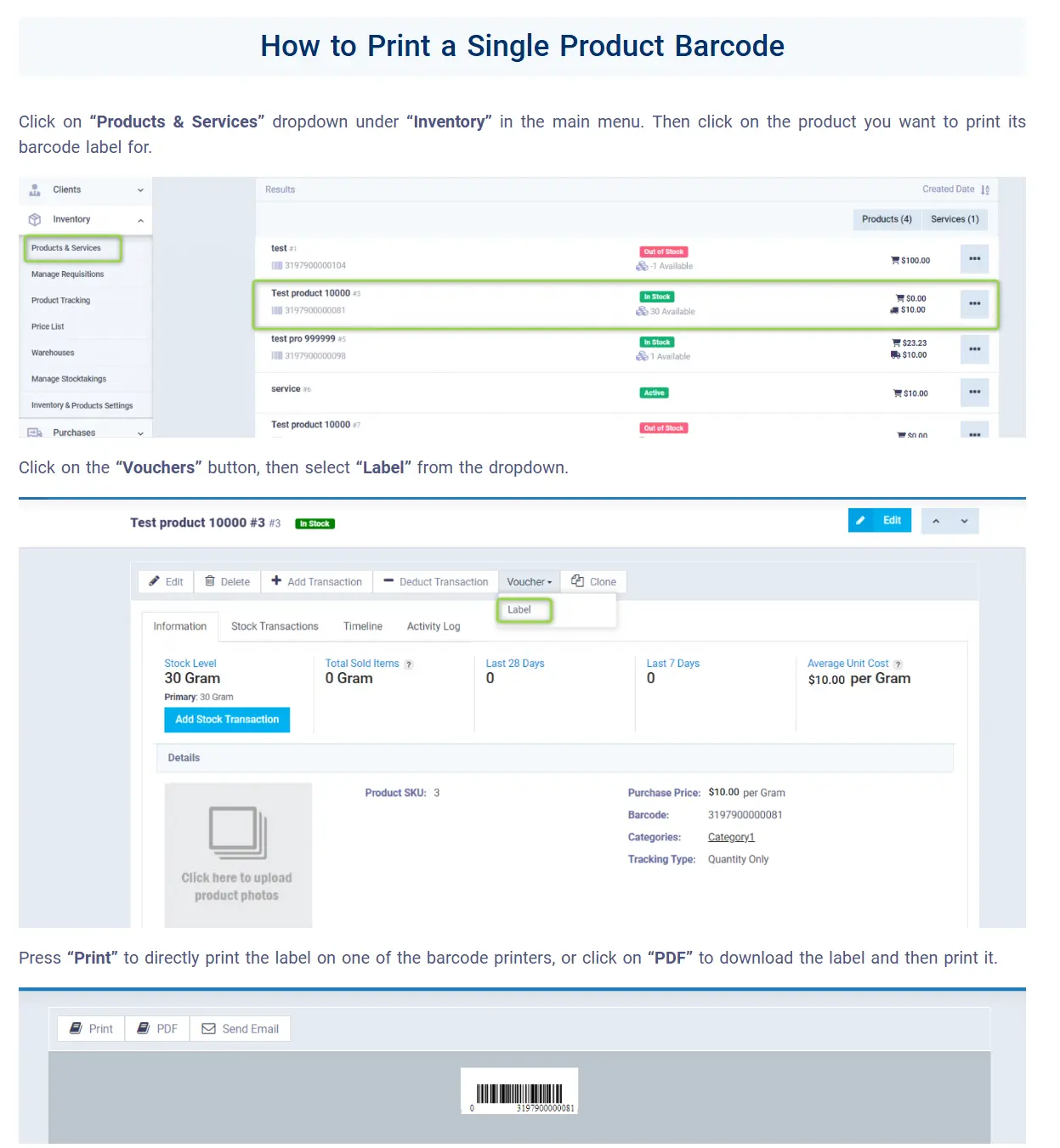
- Print barcodes directly from the system.
- Allows you to easily design and print barcode labels.
- Use filters and reports to review inventory by code.
- Support for multiple warehouses while maintaining unique codes.
Here Are the Most Frequently Asked Questions:
What is the method for organizing items in the warehouse?
Organizing items depends on your business needs. You can arrange them according to:
- Category: such as clothing or electronics.
- Frequency of use: Place the most requested items near the packing area.
- Codes: use codes to identify storage locations (e.g., “A-01” for the first shelf).
- Arrangement by size: organize items from largest to smallest; for example, place larger items at the bottom and smaller ones at the top.
- Item location in the warehouse: Use a location system (e.g., a shelving system) to clearly define storage locations.
What is coding, and what are the characteristics of good coding?
Coding is assigning unique codes to items to facilitate their management. The characteristics of good coding include:
- Uniqueness: each code must be unique to avoid overlap.
- Simplicity: codes should be easy to read and understand.
- Scalability: The system should support adding new items.
- Compliance with global standards, such as GS1 or GPC, to facilitate trade.
What is the difference between GS1 and EGS?
- GS1: A global standard for coding goods (13 digits), used internationally, requires annual fees, and registers directly without prior approval. Ideal for international trade and global platforms like Amazon.
- EGS: A free Egyptian standard, where the EGS code consists of: “EG” as a prefix, followed by the company’s tax registration number, then the company’s internal product code (SKU). It requires approval from the Tax Authority (up to 15 days) and is used locally to comply with the electronic invoicing system.
What are GPC codes?
GPC stands for Global Product Classification, created by GS1 to classify products and services uniformly to facilitate global e-commerce.
What is the global barcode system?
The global barcode system (such as UPC and EAN) is a standard for coding products that enables tracking across the supply chain, facilitating distribution, sales, and circulation.













 Invoicing
 POS
POS Offers
 Installments
 Sales Commission
 KSA E-Invoice Software
 EGY E-Invoice Software
 JO E-Invoice Software
 E-Invoice Software
 Chart of Accounts
 Asset Management
 Cost Centers
 Expenses
 Cheque Cycle
 UAE VAT-Tax
 Product Management
 Purchases
 Purchase Cycle
 Suppliers
 Requisitions
 Stocktaking
 Organizational Structure
 Personnel Management
 Attendance and Leave
 Contracts
 Payroll
 Requests
 Work Orders
 Booking Management
 Rental and Unit Management
 Time Tracking
 Work Flow
 Lease Contracts
 Manufacturing Management
  Client Follow-Up
 Loyalty Points
 Points and Credits
 Memberships
 Insurance Management
 Daftra ERP Full App
 Point of Sales App
 Point of Sales for Desktop – Support Offline Mode
 AI Expenses Scanner App
 Employee Attendance, Sign & ESS App
 E-invoice Reader App
 Inventory Stocktaking App