


What is Tax Invoice, Meaning, Requirements, and Key Elements


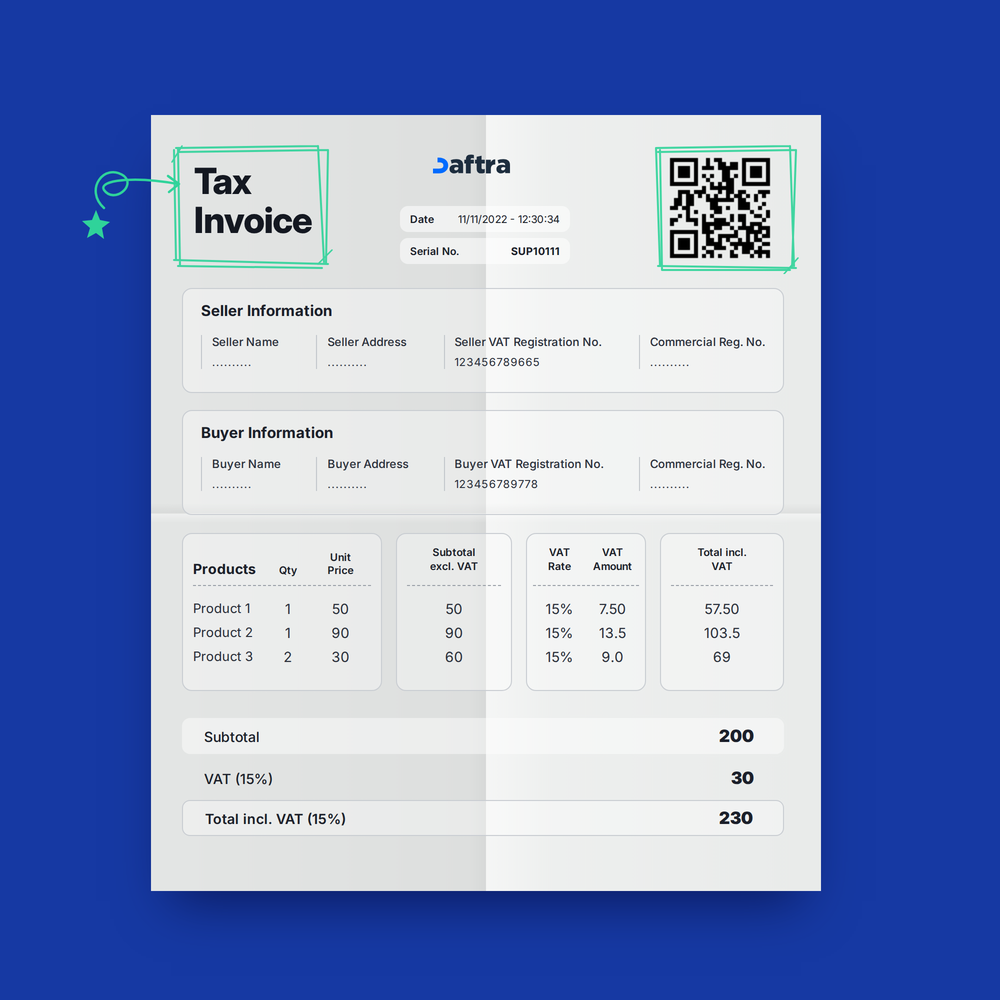
Table of contents:
- Article Summary
- What Is a Tax Invoice?
- How to Create a Tax Invoice Steps According to the Zakat, Tax and Customs Authority in Saudi Arabia
- What Is the Accounting Importance of Tax Invoices?
- What Are the Types of Tax Invoices in Saudi Arabia?
- What Is the Minimum Threshold for VAT Registration?
- Common Mistakes When Preparing ZATCA Invoices in Saudi Arabia (and How to Avoid Them)
- Consequences of Non-Compliance with the E-Invoicing System in Saudi Arabia
- How Does Daftra Help You Issue a Tax Invoice?
- Frequently Asked Questions
How are tax invoices used to promote transparency and avoid legal violations related to tax compliance? Simply put, tax invoices matter because they organize business transactions. A tax invoice links and documents the rights of both the seller and the buyer. They also support tax planning and cash flow by using the tax invoice's timeframe to recover input tax. In this article, we explore the accounting importance of tax invoices, their key elements, and the requirements and process for creating a tax invoice.
What Is a Tax Invoice?
A tax invoice is a mandatory financial and legal document the seller (supplier) issues to the buyer (customer) to document the sale of goods or the provision of services subject to Value Added Tax (VAT). It serves as essential evidence relied upon for the purposes of calculating and collecting this tax and ensuring compliance with tax regulations.
The Zakat, Tax and Customs Authority (ZATCA) regulates and oversees tax invoice issuance requirements in the Kingdom. In Saudi Arabia, an invoice must include specific information, most notably: the unique invoice serial number, issue date, supplier's name and Tax Registration Number, customer's name and Tax Registration Number (if registered), a description of the goods or services, quantities and prices, the applicable tax rate (15% in Saudi Arabia), the tax amount, and the total amount including tax.
Here, it is important to distinguish between a tax invoice and a receipt. Although both are issued by the seller (supplier) to the buyer (customer), and their components may be similar, a tax invoice is a document used by the seller to request payment for the goods or services to be received by the buyer, whereas a receipt is a document used to confirm payment by the buyer and completion of the sale.
How to Create a Tax Invoice: Steps According to the Zakat, Tax and Customs Authority in Saudi Arabia
Before covering the steps for preparing a tax invoice, you must first understand the elements the invoice must include and the requirements it must meet, according to the Zakat, Tax and Customs Authority. We can then explain the practical steps for preparing and issuing the invoice.
1- Elements of a Tax Invoice According to the Zakat and Income Authority
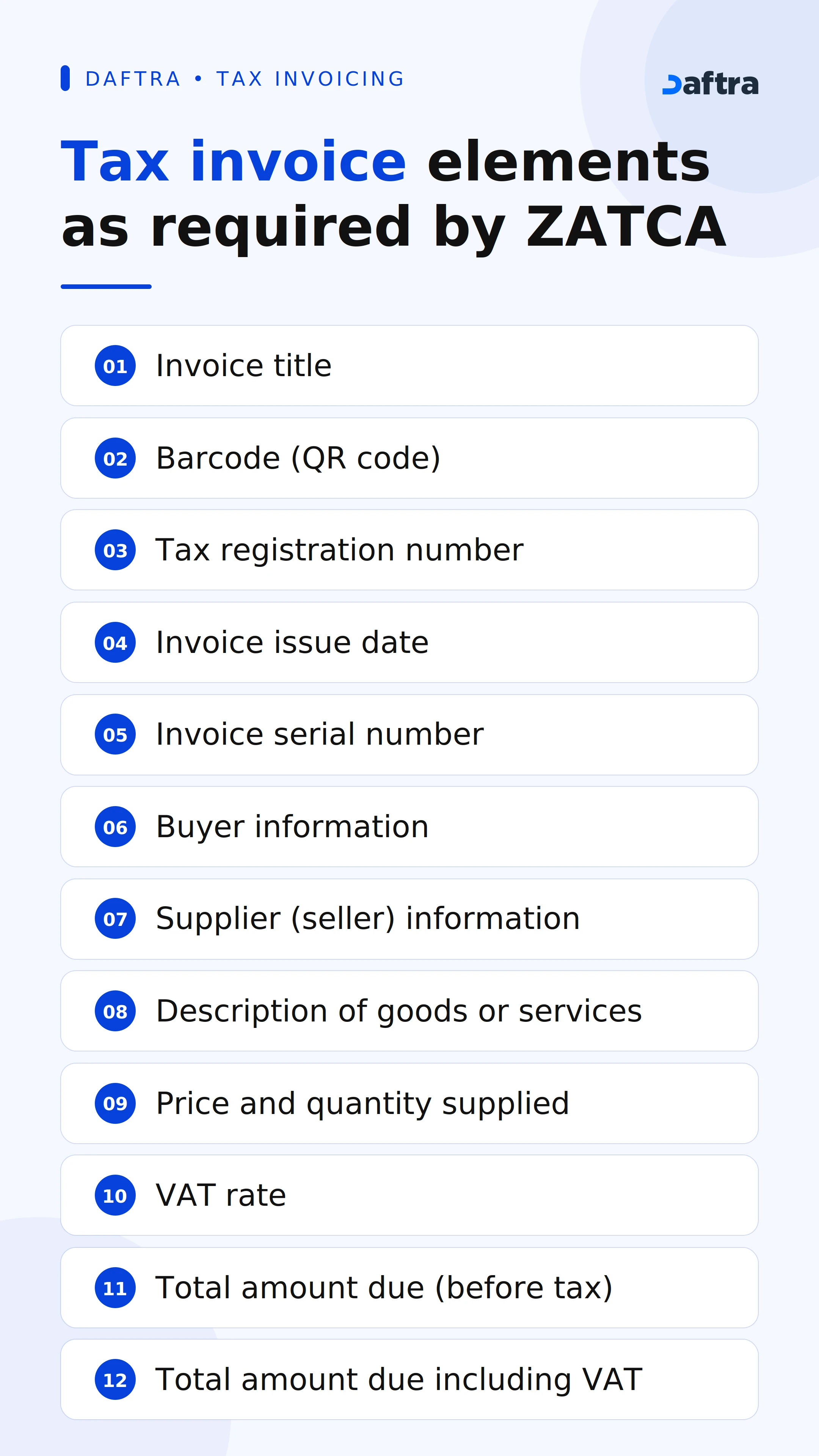
A complete tax invoice consists of several essential elements, as follows:
- Invoice Title: Indicates the type of invoice (sales invoice, commercial invoice, or tax invoice) to make its contents easier to understand.
- Barcode: A square containing encoded lines used to scan the invoice and easily identify its information.
- Tax Number: A mandatory number assigned to each person or establishment engaged in a taxable economic activity, used to verify the validity of the transaction and ensure tax compliance.
- Invoice Issue Date: Determines the tax period during which the input tax deduction can be claimed.
- Invoice Serial Number: A unique number assigned to each invoice to track invoices in accounting records and support auditing and review.
- Buyer Information: Includes the customer's name, Tax Registration Number, and address.
- Supplier (Seller) Information: The supplier's name, Tax Registration Number, and address.
- Description of Goods or Services: Clarifies what was sold to avoid any dispute or misunderstanding.
- Supply Price and Quantity: The unit price and quantity to ensure the total is calculated accurately.
- VAT Rate: The tax percentage applied to the transaction, used to calculate the VAT amount payable on the total amount due.
- Total Amount Due (Before Tax): Shows the basic cost of the supply.
- Total Amount Due Including VAT: The final amount that the buyer must pay.
You can also calculate the percentage of any number using Daftra’s free tool.
2- Tax Invoice Requirements According to the Zakat and Income Authority
The Authority has established several requirements that must be met for a tax invoice to be valid and accepted:
- Including the Required Elements: The invoice must contain all the essential elements mentioned above without omission.
- Quick Response (QR) Code: Adding a Quick Response (QR) Code is mandatory for every electronic invoice.
- Additional Details: Such as payment terms and methods and installment periods, if applicable.
- Signature and Stamp: The signature of the person authorized to issue the invoice and the stamp of the issuing establishment, where required.
3- Practical Steps for Preparing and Issuing a Tax Invoice
After understanding the elements and requirements, here are the practical steps for preparing and issuing a tax invoice:
Choosing an Approved Accounting Software
Choosing reliable accounting software approved by the Zakat and Income Authority in Saudi Arabia, such as Daftra’s cloud-based software, helps you issue electronic invoices easily and accurately while complying with e-invoicing requirements. It also integrates invoice, sales, expense, and inventory records and automatically generates comprehensive financial reports.
Entering Company Information
Enter the establishment’s details, including its trade name, Commercial Registration number, address, and tax number.
Entering Customer Information
Add the customer’s name, address, and Tax Registration Number.
Describing the Items
Specify the details of the products or services, including the name/description, quantity, and unit price.
Adding the Tax Rate
Specify the tax rate based on the type of goods or services and document any changes to it, if applicable.
Calculating the Total Amount Before and After Tax
Calculate the tax by having the accounting system automatically apply the applicable tax rate to the total amount. The accounting software displays the total amount before tax and the total amount after tax.
Reviewing the Invoice
Verify all entered information before sending the invoice and ensure that it meets all applicable conditions and requirements.
Issuing the Invoice
Issue the invoice electronically after verifying its accuracy and send it to the buyer.
Saving and Backing Up
Keep copies of tax invoices in PDF format and organize them for review, comparison, or auditing. This helps improve cash flow and ensure that payments are received on time. You should also make regular backups of tax invoices, whether through cloud storage, as available in Daftra, or by using SSD or HDD storage drives.
Taking Common Errors into Consideration
Avoid common errors when issuing a tax invoice, including missing essential elements and required information as outlined above, incorrectly calculating the tax rate or tax amount manually, failing to use a sequential invoice numbering system, failing to include payment terms, delaying the delivery of invoices, and including unclear details.
Example
What Is the Accounting Importance of Tax Invoices?
Tax invoices are important for completing accounting audits, managing financial resources, conducting financial analysis, and protecting the rights of both sellers and buyers. They also help businesses claim input tax on time. Below are the accounting benefits of tax invoices in detail:
1- Completing Accounting and Tax Audits
Tax invoices provide a detailed record of all taxable transactions, making it easier for independent auditors or tax authorities, such as the Zakat, Tax and Customs Authority, to conduct tax audits. Tax audits involve comprehensive financial analysis of a company and tax records to ensure businesses comply with tax legislation and requirements and avoid penalties and fines for tax evasion.
2- Managing Financial Resources Efficiently and Transparently
Tax invoices provide accurate documentation of transactions between parties, increasing transparency and credibility in business relationships. In addition, tax invoices serve as a reference for revenue and expense accounting, helping businesses manage and allocate financial resources more efficiently.
3- Financial Analysis and Tax Planning
Accountants and financial analysts use the data in tax invoices to analyze seasonal and periodic sales patterns, which helps forecast future revenues and expenses and plan the financial resources needed to meet tax obligations while maintaining profitability and positive cash flow. In addition, tax invoice records can help you develop effective accounting and legal strategies to reduce tax burdens by identifying eligible expenses and reporting them when preparing tax returns.
Simplify your VAT return preparation in the UAE with Daftra’s ready-to-use tax return template, and keep your sales, purchases, and tax payable data in one place. Download the template and start preparing your tax return with greater accuracy and efficiency.
4- Protecting the Rights of Sellers and Buyers
Tax invoices serve as legal evidence of the transaction and all its relevant details, such as quantities, items, prices, and transaction dates. They can therefore help reduce potential disputes or misunderstandings between sellers and buyers.
5- Determining the Appropriate Time to Claim Input Tax
Input tax is the Value Added Tax (VAT) that a business pays on purchases from suppliers. When a business receives a tax invoice from a supplier, it can claim a deduction for input tax during the tax period in which the invoice was received and recover part of the tax paid, which can contribute to improving cash flow and providing greater liquidity.
Tax Invoices with Missing Tax Numbers
I worked with a client who was issuing more than 300 tax invoices per month due to the expansion of their business, including invoices for businesses and invoices for individual customers. About a week before filing the tax return, the client asked me to review the invoices issued during the previous two months before the tax period closed. During the review, we discovered invoices that did not include a valid buyer Tax Registration Number for business transactions, as well as other invoices with incorrect Commercial Registration numbers. This was because more than one employee was entering the data manually and quickly to keep up with the volume of orders.
I suggested that the client use accounting software that complies with the requirements of the Zakat, Tax and Customs Authority, such as Daftra’s cloud-based software, instead of relying on manual data entry for every invoice. Once implemented, we noticed the following changes:
- We saved customer information in advance, eliminating the need to enter the customer's name, address, and Tax Registration Number each time.
- Daftra rejected incomplete invoices, whether they were missing a Tax Registration Number or a QR code, helping identify errors early.
- Integration with the Fatoora platform and real-time invoice submission.
- Support for encryption in accordance with the requirements of the first and second phases, ensuring data security and reliability.
- Helping the client comply with the Authority’s requirements for maintaining accurate invoice records.
- Enabling the client to customize e-invoice templates to match the elements and categories of services or products provided to customers, while including applicable tax rates in accordance with local laws.
Ultimately, Daftra's cloud-based business management solutions helped the client manage their business from anywhere, at any time, and on any device. With Arabic language support, ease of use, and integration capabilities, Daftra enabled the client to transition smoothly from the “issuance and storage” stage to the “integration and connectivity” stage with the Authority’s platform without technical complexity, while ensuring full compliance and reducing the risk of violations.
What Are the Types of Tax Invoices in Saudi Arabia?
Tax invoices vary depending on the nature of the transaction and the party to whom they are issued. Some business transactions take place between two businesses, while others occur between a business and an end consumer. In this context, the Zakat, Tax and Customs Authority (ZATCA) has identified two main types of tax invoices in the Kingdom, each with its own elements, details, and purposes:
1- Tax Invoice
A tax invoice is issued for business-to-business (B2B) transactions, as well as transactions exceeding SAR 1,000, including those involving end consumers. A full tax invoice contains comprehensive details about both the seller and the buyer, given its importance for claiming input tax deductions and for accounting audit purposes.
Components of a Full Tax Invoice
- Complete seller information (name, address, Tax Registration Number, and Commercial Registration number).
- Complete buyer information (name, address, Tax Registration Number, and Commercial Registration number).
- Invoice serial number and issue date.
- Description of goods/services and unit price.
- Total amount before tax, tax amount, and total amount including tax.
- Quick Response (QR) code.
2- Simplified Tax Invoice
A simplified tax invoice is generally issued for business-to-consumer (B2C) transactions valued at SAR 1,000 or less, such as invoices issued by restaurants, retail stores, and fuel stations. A simplified tax invoice has less stringent information requirements, as it does not require detailed tax information about the buyer because end consumers are not entitled to recover VAT.
Components of a Simplified Tax Invoice
- Store or business name and address.
- Seller's VAT Registration Number only.
- Issue date.
- Description of the goods/services, quantity, and unit price.
- Taxable amount, tax amount, and total amount including tax.
- A Quick Response (QR) code, which is mandatory.
What Is the Minimum Threshold for VAT Registration?
Under Saudi Arabia's VAT regulations, every business or individual carrying out an economic activity must register once their annual revenues exceed the mandatory registration threshold of SAR 375,000. Registration must be completed within 30 days of exceeding this threshold. Voluntary VAT registration is available in the Kingdom for businesses with annual revenues between SAR 187,500 and SAR 375,000.
Businesses with annual economic activity revenues below SAR 187,500 are not required to register for VAT in the Kingdom unless they choose to register voluntarily to benefit from advantages such as input tax deductions. Once registration is complete, the business receives a Tax Registration Number, which must appear on every tax invoice it issues.
Common Mistakes When Preparing ZATCA Invoices in Saudi Arabia (and How to Avoid Them)
Preparing electronic tax invoices in accordance with the Zakat, Tax and Customs Authority (ZATCA) requirements involves more than simply recording the sales amount and tax. It requires compliance with data, technical, and regulatory requirements. Any error in an invoice may result in its rejection or the need to amend it. Below are the most common mistakes and practical solutions for avoiding them:
| Common mistakes in preparing Tax Invoices | Solutions |
| Entering incorrect business information, such as the Tax registration number or business name | Verify the business information registered with ZATCA and link the invoicing system to the business details to reduce manual data entry and errors |
| Errors in calculating VAT, particularly when multiple items or different tax rates are involved | Use accounting software and an invoicing system that automatically calculates tax based on the business settings and transaction type |
| Failing to distinguish between a tax invoice and a simplified tax invoice may result in non-compliance with applicable requirements. | Configure the invoicing system to determine the invoice type based on the transaction and customer, and apply the requirements specific to each type. |
| Missing mandatory invoice information, such as the invoice number, date, or customer details on full tax invoices. | Use a preconfigured invoice template with the required fields, so the system won't allow the invoice to be issued until the essential information is complete. |
| Failing to issue credit notes and debit notes correctly. Some businesses may delete an invoice or amend it directly instead of issuing the appropriate document. | Link credit notes and debit notes to the original invoice, state the reason for the amendment, and keep a record of the transaction. |
| Incorrectly amending an invoice manually after issuance, which may disrupt invoice sequencing or cause the documents to fail to comply with e-invoicing requirements. | Make amendments through the approved mechanisms within the invoicing system, while maintaining a clear record of changes and related documents. |
| Failing to comply with the Zakat, Tax and Income Authority's e-invoicing requirements. | Choose an e-invoicing system that complies with ZATCA requirements, meets the technical requirements, and can integrate with the system. |
| Providing an unclear description of a product or service, or entering an inaccurate quantity, price, or unit of measurement. | Create a unified database of products and services and link it to the invoicing and inventory systems so that the data is automatically transferred to invoices. |
| Storing invoices without a clear system makes them harder to retrieve and review, especially when you need an old invoice. | Use an electronic system that stores invoices and related documents and allows easy searching and access. |
| Relying too heavily on manual data entry, increasing the likelihood of errors in figures, tax amounts, customer details, and product information. | Automate the invoicing cycle and link invoices to inventory, accounts, and customers through accounting systems and software, such as Daftra Accounting Software, which is approved by the Zakat and Income Authority. Use API integrations when necessary to exchange data between systems. |
Consequences of Non-Compliance with the E-Invoicing System in Saudi Arabia
E-invoicing has become a key component in developing the Kingdom’s economic and tax environment and improving the efficiency of commercial transactions. In this context, the Zakat, Tax and Customs Authority launched the e-invoicing system to regulate the electronic issuance and storage of invoices, curb non-compliant practices, and enhance transparency and compliance with tax requirements.
Businesses subject to the e-invoicing regulations must comply with the requirements and controls established by the applicable laws and regulations. Failure to meet these requirements constitutes a violation that may result in regulatory and financial consequences, depending on the type, nature, and recurrence of the violation.
| Violation | Penalty |
| Using handwritten invoices or systems that do not meet the Authority’s requirements. | A fine ranging from SAR 5,000 to SAR 50,000, depending on the violation's severity and recurrence. |
| Failing to include a valid QR code on invoices for consumer transactions (B2C). | Penalties escalate from a warning to SAR 1,000, SAR 5,000, SAR 10,000, and up to SAR 40,000. |
| Deleting or amending an invoice after issuance, which is considered an attempt to compromise the integrity of the system. | A fine starting at SAR 10,000 and potentially reaching SAR 50,000. The correct method of correction is through credit notes or debit notes only. |
| Businesses covered by Phase Two failing to connect their systems by the deadline assigned to their group. | A fine of up to SAR 50,000. Each invoice issued through an unconnected system may be treated as a separate violation. |
| Omitting the buyer’s Tax Registration Number from B2B invoices. | A warning followed by a fine starting at SAR 1,000 and potentially reaching SAR 100,000. |
How Does Daftra Help You Issue a Tax Invoice?
You can use Daftra’s cloud-based e-invoicing software as a smart, approved solution listed among the approved accounting systems for creating electronic invoices in accordance with the Zakat and Income Authority’s requirements, by following these steps:
- Log in to your Daftra account.
- Click on “Templates.”
- Select “Print Templates” from the drop-down menu.
- Click on “Invoice and Quotation Designs.”
- Click on “New Design.”
- Choose the appropriate invoice template, either in Arabic or English.
- Start filling in the fields of the ready-made tax invoice template provided by Daftra.
In conclusion, we covered the key details of tax invoices, including their importance, elements, requirements, and the steps involved in creating them.
Consider using accounting software, such as Daftra’s integrated system, to speed up creating approved tax invoices that comply with all applicable requirements and include the necessary elements. This helps ensure compliance with tax laws, avoid legal consequences and accounting errors, and support efficient, effective financial management.
Frequently Asked Questions
When Is a Tax Invoice Due?
A tax invoice becomes due on the date the product or service is supplied, when the tax invoice is issued, or, in some cases, when payment for the product or service is received.
Who Should Receive a Tax Invoice?
Tax invoices are issued to other businesses involved in a sale or purchase transaction with the issuing business. They may also be issued to individuals or consumers in general.
What Is the Difference Between a Regular Invoice and a Tax Invoice?
- Regular Invoice: An invoice issued for sales and purchases without stating tax. Small businesses not subject to tax use it.
- Tax Invoice: An invoice issued by businesses registered for tax purposes that includes the applicable tax amount.
How Can I Tell Whether an Invoice Is a Tax Invoice?
Use Daftra’s e-invoice reader to identify tax invoices, check their validity, and confirm they comply with regulations set by the Zakat, Tax and Customs Authority.
Is a Tax Invoice Accepted Without a Barcode?
No. One of the requirements for a tax invoice is that it must include a barcode.
Can a Tax Invoice Be Canceled?
No. A tax invoice cannot be canceled after it has been issued. You can only create a reversing journal entry to adjust the invoice or correct an error in it.
What Is the Difference Between a Tax Invoice and a Simplified Tax Invoice?
A tax invoice is for companies and businesses with Tax Registration Numbers, while a simplified tax invoice is for individuals without a Tax Registration Number.
Are Handwritten Invoices Prohibited?
Yes. Following the introduction of electronic invoicing, handwritten invoices have been prohibited to enhance transparency and oversight.
How can tax invoices be used to promote transparency and avoid legal violations related to tax compliance? The answer lies in the vital role tax invoices play in regulating commercial transactions. A tax invoice links and documents the rights of both the seller and the buyer. It also supports tax planning and cash flow by letting businesses use the time frame specified on the tax invoice to recover input VAT. This article explores the accounting importance of tax invoices, their key elements, and the requirements and steps involved in creating them.








 Invoicing
 POS
POS Offers
 Installments
 Sales Commission
 KSA E-Invoice Software
 EGY E-Invoice Software
 JO E-Invoice Software
 E-Invoice Software
 Chart of Accounts
 Asset Management
 Cost Centers
 Expenses
 Cheque Cycle
 UAE VAT-Tax
 Product Management
 Purchases
 Purchase Cycle
 Suppliers
 Requisitions
 Stocktaking
 Organizational Structure
 Personnel Management
 Attendance and Leave
 Contracts
 Payroll
 Requests
 Work Orders
 Booking Management
 Rental and Unit Management
 Time Tracking
 Work Flow
 Lease Contracts
 Manufacturing Management
  Client Follow-Up
 Loyalty Points
 Points and Credits
 Memberships
 Insurance Management
 Daftra ERP Full App
 Point of Sales App
 Point of Sales for Desktop – Support Offline Mode
 AI Expenses Scanner App
 Employee Attendance, Sign & ESS App
 E-invoice Reader App
 Inventory Stocktaking App