


Posted on 10 August 2026
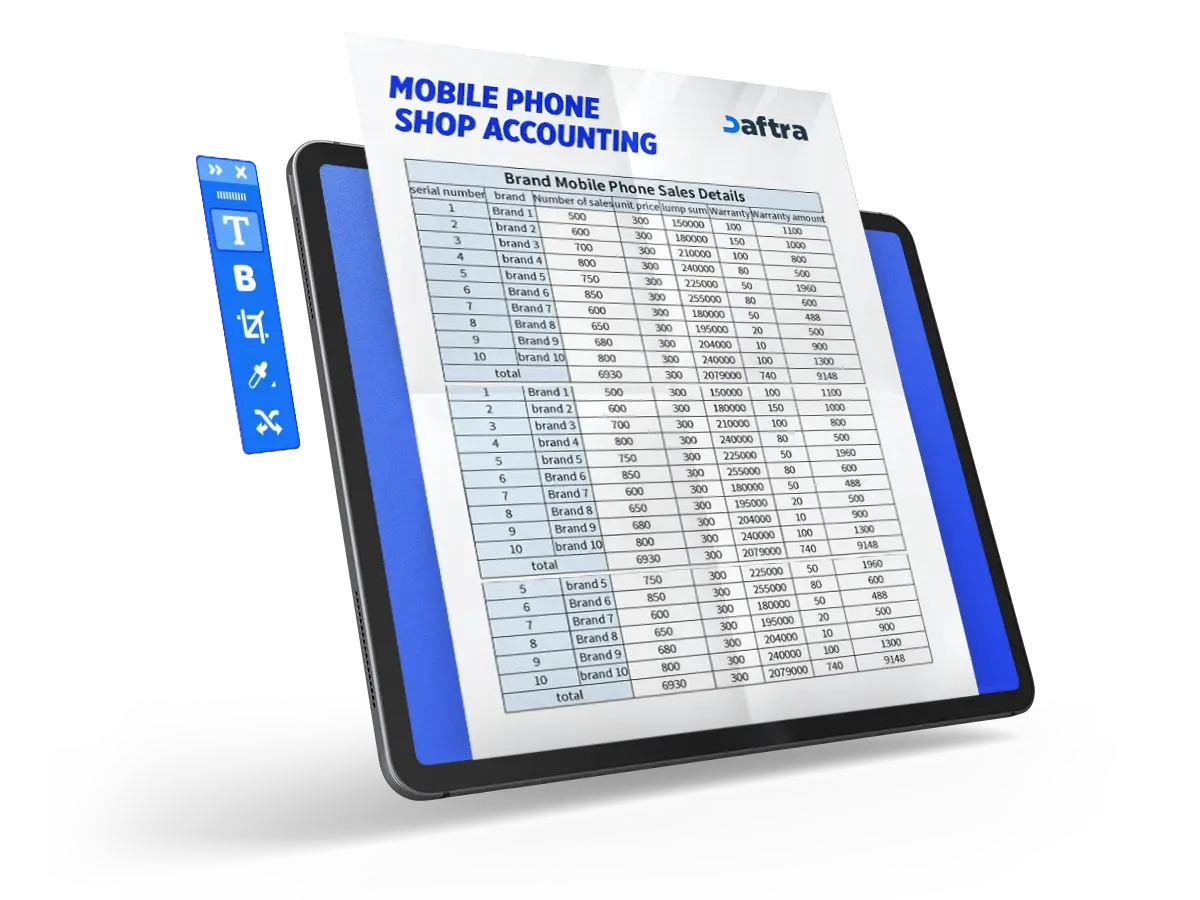
Mobile Phone Shop Accounting Excel Template
A ready-to-use Excel file for mobile phone shop accounts is a structured file used to record sales, purchases, expenses, inventory, and profit and loss in one place.
It helps organize accounts, reduce errors, monitor performance, and identify profit or loss in order to support better decision-making.
Daftra is considered one of the best solutions for managing mobile phone shops, as it provides an integrated system for handling accounting, inventory, sales, and reporting with ease and efficiency.


 Manage Your Mobile Shop Accounts with Daftra
How to Set Up a Mobile Phone Shop Accounting Workbook?
To create a professional accounts table that helps you organize your financial data and analyze it easily, you need to follow clear steps based on proper planning and logical data classification. The steps are as follows:
1. Define the structure of the accounts table
Start by identifying the purpose of the table, which is to track the accounts of a mobile phone shop. Then divide the Excel file into five main tabs, with each tab containing a specific type of data: Sales, Purchases, Expenses, Inventory, and Profit and Loss.
2. Create the Sales tab
Create a table to record all sales transactions, including columns such as: Date, Invoice Number, Customer Name, Product, Quantity, Selling Price, and Total.
This table helps you monitor revenue and analyze sales performance.
3. Create the Purchases tab
Set up a table to record goods purchase transactions, including: Date, Invoice Number, Supplier Name, Product, Quantity, Purchase Price, and Total.
This tab is important for identifying product costs and managing suppliers.
4. Create the Expenses tab
Record all operating expenses in a table containing: Date, Expense Type, Description, and Amount.
This helps you control expenses and reduce waste.
5. Create the Inventory tab
To track product movement, create a table containing: Product Name, Cost Price, Selling Price, and Total Value.
The remaining quantity is calculated using the following formula:
Available Quantity = Incoming Stock − Sold Quantity
6. Create the Profit and Loss tab
This tab brings together all financial results and is based on: Total Sales, Total Purchases, and Total Expenses.
Net profit is calculated using the following formula:
Net Profit or Loss = Sales − (Purchases + Expenses)
Related Template:
What Is the Best Software for Managing Mobile Phone Shops?
The best software for managing mobile phone shops is Daftra’s Mobile Shop Management Software, as it provides an integrated system for managing all aspects of the business from one place and with ease.
The software is distinguished by its ability to organize daily operations within the shop, allowing you to:
- Create sales invoices quickly and manage customer installment plans with ease
- Record customer and supplier data and track transactions with them
- Manage inventory accurately, with the ability to track mobile phones using serial numbers
- Monitor product movement and receive alerts when stock quantities are running low
It also helps improve financial performance through:
- Issuing accurate financial reports, including profit and loss reports
- Tracking sales and identifying the most in-demand products
- Recording expenses and comparing them with revenue to calculate net profit
In addition, Daftra provides advanced features such as:
- Managing employees, work shifts, and performance evaluation
- Activating offers and discounts to increase sales
- Sending installment reminders via SMS or email
Among its key advantages are that it:
- Is a cloud-based system that you can use anytime and from anywhere
- Does not require a complicated setup
- Offers a 14-day free trial with no credit card required
What Is the Best Way to Manage Mobile Phone Shop Accounts?
Managing the accounts of a small shop depends on using an integrated accounting system that helps you organize all aspects of your business in one place. Daftra is considered one of the best solutions for this purpose, as its system helps you to:
- Record financial transactions accurately: such as daily sales and purchases, which reduces errors and provides a clear view of cash flow.
- Manage and monitor inventory: by tracking quantities and product movement, with the option to use valuation methods such as FIFO or Average Cost to avoid shortages or overstocking.
- Issue invoices easily: and generate professional sales documents quickly, with support for installment sales.
- Analyze financial performance: through comprehensive reports that show the results of your business activity, clarify profits and losses and their causes, identify the best-selling products, and generate daily, monthly, and annual reports with ease.
By using a system like Daftra, and by consistently recording and monitoring your data, you can manage your shop accounts more efficiently, reduce errors, and achieve sustainable growth for your business.
What Is the Best App for Account Management?
The best app for account management is Daftra’s Business Management App, because it provides an integrated system that combines accounting and business management in one place.
The app allows you to manage your accounts easily through:
- Recording journal entries and organizing the general ledger and cost centers
- Tracking revenues and expenses and calculating profit and loss accurately
- Accessing comprehensive financial reports anytime and from anywhere
It also offers additional features that support operational efficiency, such as:
- Managing inventory and suppliers, while tracking quantities and purchase orders
- Monitoring sales through a Point of Sale (POS) system and linking them to the accounts
- Managing human resources such as payroll, attendance, and leave
- Organizing operations and projects and tracking performance
One of its key advantages is that it is a cloud-based system that can be accessed through mobile phones or computers, allowing you to work anytime and from anywhere. It also offers customizable reports that give you a clear view to support accurate financial decision-making.
Daftra is considered one of the best accounting management apps because it combines ease of use with comprehensive tools, helping you manage your business efficiently and professionally.







 Invoicing
 POS
POS Offers
 Installments
 Sales Commission
 KSA E-Invoice Software
 EGY E-Invoice Software
 JO E-Invoice Software
 E-Invoice Software
 Chart of Accounts
 Asset Management
 Cost Centers
 Expenses
 Cheque Cycle
 UAE VAT-Tax
 Product Management
 Purchases
 Purchase Cycle
 Suppliers
 Requisitions
 Stocktaking
 Organizational Structure
 Personnel Management
 Attendance and Leave
 Contracts
 Payroll
 Requests
 Work Orders
 Booking Management
 Rental and Unit Management
 Time Tracking
 Work Flow
 Lease Contracts
 Manufacturing Management
  Client Follow-Up
 Loyalty Points
 Points and Credits
 Memberships
 Insurance Management
 Daftra ERP Full App
 Point of Sales App
 Point of Sales for Desktop – Support Offline Mode
 AI Expenses Scanner App
 Employee Attendance, Sign & ESS App
 E-invoice Reader App
 Inventory Stocktaking App