




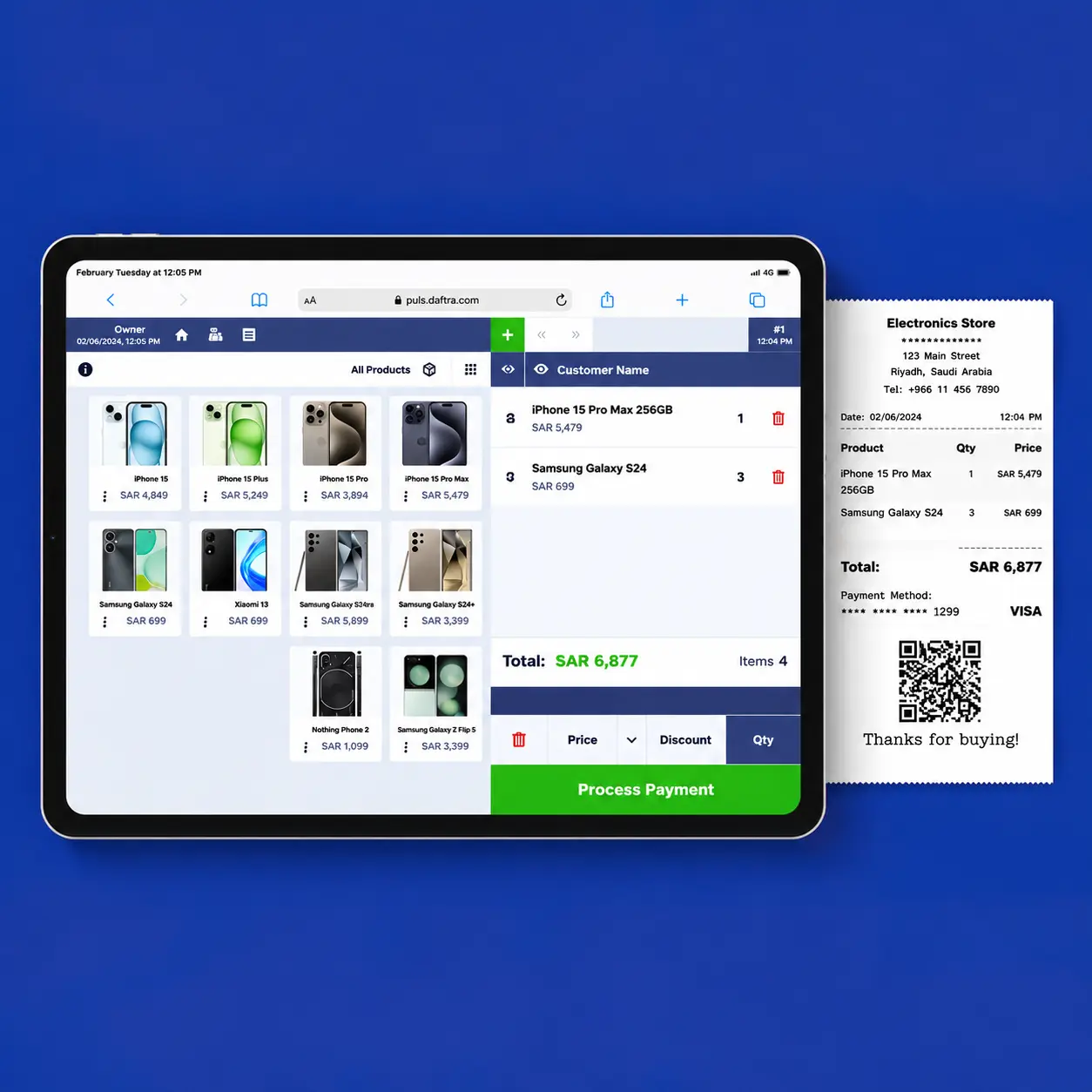
Table of contents:
- Key Summary
- What Is a POS?
- What Are the Different Types of POS Systems and Their Uses?
- Comparison of POS System Types
- How Does a POS System Work?
- What Are the Benefits of POS Systems for Improving the Customer Experience?
- How Do You Choose the Right POS System for Your Store?
- What Are the Advantages and Disadvantages of POS Systems?
- How Does Daftra Help You Manage POS Operations Efficiently?
- Frequently Asked Questions
Retail businesses, restaurants, and other businesses that serve large numbers of customers every day rely on point-of-sale systems to record transactions, process payments, and manage sales data. A point of sale is not limited to a single type of hardware or setup. It can be a fixed checkout station inside a store, a mobile device, a cloud-based system, or a self-service station.
The right POS setup depends on the business type, number of branches, sales volume, store operations, and your needs for inventory management, reporting, and integration with other systems.
What Is a POS?
A point of sale (POS) is the place or channel where a customer purchases a product or service. Traditionally, the term refers to the physical location where a purchase takes place, such as a retail store, restaurant, or other commercial establishment where sales are conducted.
However, as e-commerce and digital commerce have expanded, sales are no longer limited to physical stores. Customers can now shop online, while businesses can use hardware and software solutions to record sales and process transactions both in-store and through online channels.
This has led to the broader concept of a POS system, which encompasses the hardware and software used to manage sales transactions. A POS system may include a display or touchscreen, barcode scanner, receipt printer, and POS software that helps staff manage products, prices, and quantities and process transactions more quickly and efficiently.
POS systems offer functions beyond simply recording a purchase. They may allow staff to scan a product barcode to retrieve its price and details, record sales transactions, and issue invoices or receipts. They can also support sales-session management, such as handing off a session from one salesperson to another, reconciling transactions and cash when closing a session, or recording fund transfers between POS terminals.
In other words, a point of sale is the place or channel where a sale takes place, while a POS system refers to the hardware and software that help businesses process, manage, and record sales transactions and related data, whether in physical stores or through online sales channels.
What Are the Different Types of POS Systems and Their Uses?
POS systems vary in terms of their hardware, operating model, and the functions they offer. Some of the most common types that may suit different businesses include:
1. Fixed POS Systems
Fixed POS systems, also known as traditional or countertop POS systems, are the conventional form of POS used by many businesses. They typically consist of a combination of physical hardware and software that manages POS transactions. The main components of a fixed POS system can be summarized as follows:
- Display: Used to display products and transaction details. This may be a computer monitor, tablet screen, or a dedicated POS touchscreen.
- Receipt printer: Used to print customer receipts.
- Barcode scanner: Used to scan product barcodes and instantly retrieve product information on the screen.
- POS software: This may be dedicated POS and invoicing software or an integrated ERP system that supports invoicing, sales management, inventory management, and other business functions.
This type of POS is well suited to stores and branches with a fixed checkout location that need an integrated setup for managing day-to-day transactions.
2. Mobile POS Systems
Mobile POS systems are a more flexible alternative to traditional fixed POS setups. They typically use smaller, simpler hardware, allowing businesses to process transactions in locations where conventional POS systems may be impractical and giving staff the flexibility to move the POS system as needed.
Key advantages of mobile POS systems include:
- Simple setup: They generally require fewer and smaller devices to process transactions and issue receipts.
- Access to new markets: Mobile POS systems make it easier to sell in locations where setting up a traditional checkout station may not be practical, helping businesses reach new markets and customers.
- Portability: A mobile POS system can be moved from one branch to another or relocated within the same branch, allowing businesses to use their POS setup where it is needed most.
3. Cloud-Based POS Systems
Cloud-based POS systems rely on software that is hosted and accessed through the internet, although the specific capabilities vary by provider. They can be used with traditional or mobile POS hardware while allowing transaction data and other business information to be stored and managed centrally. Depending on the system, they can support functions such as issuing invoices and electronic receipts.
Using a cloud-based POS system does not necessarily mean eliminating hardware. The system may run on a computer, tablet, or smartphone and can integrate with barcode scanners, receipt printers, and other peripherals, depending on the solution.
Benefits of Cloud-Based POS Systems:
- Suitable for small businesses: Small retail businesses, whether operating physical stores or selling online, can use cloud-based POS solutions to manage their sales operations.
- Support for e-invoicing requirements: Cloud-based POS systems can help businesses issue electronic invoices and receipts and manage related data in accordance with local requirements, with integration with government systems and platforms where supported by the service provider.
- Online access to data: Businesses can manage the system and review data from different devices, subject to the system's access permissions.
- Operational flexibility: The system can be used across different types of devices, depending on the software requirements.
- Easy scalability: Cloud-based POS can be suitable for businesses that need to manage multiple branches or POS terminals through a centralized system.
- Centralized updates: For cloud-based systems operated by a service provider, software updates can be managed centrally by the provider.
- Monthly subscription model (SaaS): Many cloud-based POS systems follow a Software as a Service (SaaS) model, allowing businesses to use the system through a subscription rather than paying the full cost of purchasing or developing a custom system upfront. Subscription fees and available services vary from one provider to another, giving businesses greater flexibility in choosing a solution that fits their needs and budget.
A cloud-based POS system is not necessarily less expensive in every case. The actual cost depends on factors such as subscription fees, required hardware, the number of users and branches, and any additional services.
4. Self-Service POS Systems
Have you ever seen a POS screen in a restaurant that allows customers to place their own orders?
That is the basic concept behind self-service POS systems.
Self-service POS systems allow customers to complete a significant part of the ordering or purchasing process themselves, without requiring an employee to enter every detail of the order.
These systems are particularly common in restaurants and retail businesses that use self-service kiosks or screens. Key benefits of self-service POS systems include:
- Improved customer experience: Customers can control the details of their orders and select the options they want, creating a more convenient purchasing experience and reducing the need to communicate every detail to a waiter or store employee.
- Potentially lower costs: Self-service POS systems can reduce the need to assign employees to order-taking and order-entry tasks, particularly when multiple POS stations are operating or during busy shifts. This may help reduce certain operating costs.
- Reduced waiting times: Providing enough self-service stations can allow customers to place orders more quickly and reduce waiting times, particularly during periods of high customer traffic.
Comparison of POS System Types
Understanding the differences between POS system types can help you identify the solution that best fits your business and operational needs. The following table compares the different POS types and highlights the key features of each:
| POS Type | Fixed POS Systems | Mobile POS Systems | Cloud-Based POS Systems | Self-Service POS Systems |
| Hardware and setup | Display, receipt printer, barcode scanner, and software for managing sales transactions | Smaller and simpler hardware compared with fixed POS systems | Primarily software-based and can run on different devices | Primarily software-based and can run on different devices |
| Common uses | Stores and branches that require a fixed, integrated checkout station | Businesses that need to move the POS during sales or relocate it between branches | Small retailers, e-commerce businesses, and businesses that need online access to their POS system | Restaurants and retail businesses that allow customers to enter their orders directly |
| Key benefits | Sales processing, inventory tracking, product and customer data management, and reporting | Easy setup, portability, and the ability to serve new locations and markets | Potentially lower upfront costs, operational flexibility, online transaction data storage, and electronic invoicing and receipts | Improved customer experience, potentially reduced staffing needs for order entry, and shorter waiting times |
Based on this comparison, the right POS system depends on the nature of your business and its operational requirements. If you need a comprehensive, fixed checkout setup, a fixed POS system may be the right choice, while mobile POS can be a practical option for businesses that require portability. If flexibility and lower upfront setup costs are priorities, a cloud-based POS system may be suitable. Self-service POS systems, meanwhile, are well suited to businesses that allow customers to place orders and complete payments themselves.
How Does a POS System Work?
A POS system organizes the sales process from entering products through payment processing and transaction recording. It can be used in physical stores or online stores, with the specific workflow and hardware varying according to the business and the POS solution being used.
A typical sales transaction goes through the following stages:
1. Adding Products
The salesperson adds products to the transaction by scanning their barcodes or manually entering the product code, depending on the capabilities of the system. Some POS systems also allow users to scan products using a smartphone or device camera.
2. Setting Quantities and Prices
The system records the selected products, quantities, and prices, with the option to apply discounts or additional charges supported by the system.
3. Calculating the Transaction Total
The POS system calculates the total value of the purchase, including applicable discounts, taxes, and additional charges according to the system settings.
4. Selecting a Payment Method
The customer selects a payment method supported by the business, such as cash, electronic payment, or another available payment option.
5. Processing the Payment
Once the payment method has been selected, the transaction is processed and the amount paid is recorded according to the payment method and POS system being used.
6. Issuing an Invoice or Receipt
After the payment is completed, the system issues an invoice or receipt using the format and delivery method it supports, whether printed or electronic.
7. Updating Inventory and Recording the Transaction
In systems integrated with inventory management, the sale is reflected in available stock quantities and inventory data is updated. Transaction data is also stored in the system for use in sales reports, product movement reports, and other reports provided by the system.
A POS system therefore does more than record payments. It helps organize the sales process and capture transaction data, with the ability to connect this data to inventory, customer, and accounting information depending on the capabilities of the system being used.
With Daftra POS Software, businesses can manage sales transactions and issue invoices, with integration with customer management, inventory, and accounting, depending on the modules and capabilities available in the system.
What Are the Benefits of POS Systems for Improving the Customer Experience?
Modern POS systems can significantly improve the experience of both your customers and sales staff, helping make the overall shopping process smoother and more efficient. Here are some of the key ways POS systems can improve the customer experience:
1. Speeding Up the Sales Process
POS systems can significantly speed up the checkout process, reducing waiting times and improving customer satisfaction through features such as barcode scanning and convenient payment processing, including contactless card payments where supported.
2. Offering Multiple Payment Options
Modern POS systems often support a variety of payment methods, including credit cards, mobile wallets, bank transfers, and installment payment options through services such as Tabby and Tamara. This gives customers greater flexibility to pay using the method that suits them best.
3. Reducing Calculation Errors
Processing transactions through a POS system can help reduce errors associated with manual calculations, provided that product data, prices, and system settings are entered correctly.
4. Improving Operational Efficiency
Recording sales and invoices and managing inventory electronically can reduce some manual tasks, giving employees more time to focus on other activities within the business.
5. Improving Customer Service
Faster transactions and an easy-to-use POS system can help sales staff complete purchases more efficiently, allowing them to focus more on interacting with customers and providing more attentive, personalized service. This can contribute to an improved overall customer experience.
6. Supporting Loyalty Programs and Promotions
Some integrated POS systems can use customer data and purchase history to support loyalty programs and personalized promotions, depending on the tools available within the system. This can contribute to higher customer satisfaction and engagement.
7. Maintaining Transaction Records
A POS system provides an electronic record of recorded transactions, making it easier to retrieve sales data and generate reports without relying solely on paper records.
8. Supporting Data Security
POS systems that implement appropriate security controls and receive regular updates can provide better data protection than systems that are not properly secured or maintained. The level of protection depends on the system, service provider, and how the system is configured and used.
Overall, a well-designed POS system can make the sales process faster, smoother, and less prone to errors for both employees and customers.
How Do You Choose the Right POS System for Your Store?
Choosing the right POS system depends on your store's current and future operational needs. Therefore, it is important to look beyond the system's price or the number of features and assess how well it fits your business processes, supports sales and inventory management, and can scale as your business grows.
1. Identify Your Store's Needs
Start by assessing your sales operations and the volume of transactions your store handles. A store with a large number of products and transactions may require more robust inventory management capabilities and the ability to handle higher sales volumes, while a smaller store may have simpler requirements.
You should also identify your customer management needs, such as maintaining customer information and purchase history, if these functions are important to your business.
2. Choose the Right Hardware and Software
POS systems are available in different configurations, ranging from traditional cash registers to systems that run on devices such as tablets. Choose a solution that fits your store's operations and how your employees will use the system.
You can also choose between an on-premises system and a cloud-based system. Some cloud-based systems provide remote access and automatic updates, which can be particularly useful when managing multiple locations.
3. Make Sure It Is Easy to Use
Your POS system should be intuitive and easy to use so that employees can process sales without unnecessary complexity. A well-organized interface, clear labels, and a logical workflow can reduce employee training time and make the system easier to use.
4. Review Inventory Management and Reporting
If your store manages a large number of products, check the system's inventory tracking and stock-level update capabilities. Features such as real-time inventory updates and low-stock alerts can help you manage products more efficiently.
You should also review the system's reporting capabilities, including sales reports and product movement reports, to make sure it provides the data you need to monitor your store's performance and make informed decisions.
5. Check Payment Options and Integrations
Make sure the POS system supports the payment methods your store needs. You should also check whether it can integrate with the other systems you use, such as accounting software or e-commerce platforms.
These integrations can help streamline data transfer between systems and reduce the need for repetitive data entry.
6. Evaluate Security and Customer Support
Protecting customer and transaction data is an important consideration when choosing a POS system. Review the security features provided by the system, such as encryption and user access controls.
It is also important to make sure reliable customer support is available when technical issues arise, as resolving problems quickly can help minimize disruptions to your sales operations.
7. Compare Costs and Scalability
Do not focus solely on the system's upfront price. Instead, compare the pricing model, fees, and services included in the overall cost. Some systems may charge transaction-based fees, while others may use monthly or annual subscription models.
Finally, choose a system that can keep pace with your store's growth, whether through handling a higher transaction volume, adding new products and locations, or accessing additional features in the future.
read also: Best POS Software in Saudi Arabia
What Are the Advantages and Disadvantages of POS Systems?
POS systems provide a range of tools that help businesses organize sales operations, manage inventory, and analyze performance. However, they may also involve upfront and ongoing costs and increase a business's reliance on technology. Here are some of the key advantages and disadvantages:
Advantages of POS Systems
- Increased sales efficiency: POS systems can speed up transactions and automate certain tasks, such as barcode scanning and report generation, reducing the time and effort required to complete daily operations.
- Improved inventory management: Some systems allow businesses to track inventory levels and update stock quantities, while also providing low-stock alerts and reports that help identify best-selling products.
- Business performance insights and reporting: POS systems provide data on sales, sales trends, peak hours, and best-selling products, helping businesses understand store performance and make data-driven decisions.
- Improved customer experience: Faster transactions and multiple payment options, along with customer relationship management tools and loyalty programs offered by some systems, can make the purchasing experience more convenient for customers.
- Simplified operations management: Some POS systems integrate functions such as sales, inventory management, and accounting, helping businesses organize their operations and reduce the need to perform certain tasks manually.
Disadvantages of POS Systems
- Upfront and ongoing costs: Operating a POS system may require purchasing hardware and software, as well as ongoing costs such as subscriptions, transaction fees, and maintenance, depending on the system and service provider.
- Reliance on technology: Internet connectivity issues or hardware and software failures can disrupt sales operations. Some systems offer offline mode, but availability and functionality vary from one provider to another.
- Employee training requirements: Some systems may require time to train employees, particularly when they include a large number of functions and features.
- Security risks: POS systems handle customer and transaction data and may therefore be exposed to risks such as phishing, malware, and data breaches. Some systems provide security measures such as encryption, multi-factor authentication, and access controls to help protect data.
- Upgrade and update costs: Some POS providers may charge fees for certain upgrades or additional features, which should be considered when calculating the system's total cost of ownership.
How Does Daftra Help You Manage POS Operations Efficiently?
Daftra POS helps you manage your point-of-sale operations and organize sales, orders, cash, and employees through a range of integrated tools, including:
- Sales and order management: Record sales and issue invoices quickly, with the ability to track order and invoice history across different POS terminals, devices, and sales sessions.
- Streamlined payment processing: Offer your customers multiple payment methods, including cash, checks, and cards. You can also combine multiple payment methods within the same transaction and support partial and split payments.
- Product and inventory management: Add products quickly using a barcode scanner or camera, and view product prices and availability across the store and warehouse, along with applicable price lists and permitted discounts.
- Cash and sales session management: Close and reconcile sales sessions, record collected cash, and make cash deposits and withdrawals from the cash drawer while linking these movements to the relevant cash registers.
- Employee and shift management: Organize sales shifts and assign tasks and permissions to individual salespeople or groups, while accessing sales performance reports.
- Returns and discount management: Process full or partial refunds and issue store credit for returned items, while applying discounts and promotions according to predefined rules.
- Customer and loyalty management: Use the customer directory to track purchase history and preferred products, and create loyalty programs based on purchase history and spending levels.
Ultimately, remember that a POS system is simply a technology tool. The value you get from it depends on how well you identify your business needs and configure the POS system to meet them. With Daftra POS, we help you make the most of your POS system by providing the technical solutions, guidance, and customization you need to maximize its value.
Frequently Asked Questions
What Are the Requirements for Getting a POS Terminal?
The requirements for obtaining a POS terminal vary depending on the bank or payment service provider and the type of business. They may include valid business registration or a valid business license, a business bank account, and documents required to verify the business owner’s or authorized representative’s identity.
What Are POS Services?
POS services include technology solutions that help businesses manage sales, process payments, and organize their day-to-day operations. Key services include:
- Electronic payment processing through cards and contactless payment methods.
- Sales and invoice management, including recording transactions and issuing electronic invoices.
- Inventory management by tracking product movement and updating stock levels as sales are processed.
- Payment settlement and transferring the amounts due to the merchant’s account.
- Reporting and analytics for monitoring sales and financial performance.
Therefore, using an accounting system such as Daftra, which includes POS management solutions, a Warehouse and Inventory Management Software, and customer management software can help businesses manage these operations from an integrated system.
Can I Get a POS Terminal Without a Commercial Registration?
Not necessarily. POS providers and banks may require commercial registration or equivalent business documentation, depending on the nature of the business and the provider’s requirements.
What Are the Names of POS Companies?
Examples of local POS and payment service providers include PaySky Egypt, Geidea, Green Apple, and Egypt Trust. For international POS and payment solutions, examples include Square, Shopify POS, Clover, and SumUp. Availability varies by country and market.
What Are the Types of POS Systems?
- Fixed POS systems
- Mobile POS systems
- Cloud-based POS systems
- Self-service POS systems
How Much POS Financing Can I Get?
POS financing in Saudi Arabia varies depending on the financing provider, the business’s sales volume, and the specific financing product. The available financing amount and eligibility requirements differ from one provider to another.
What Does Purchasing Through a POS Mean?
Purchasing through a POS generally means paying for goods or services at a physical point of sale using a POS terminal and a payment method such as a bank card or a contactless payment method such as Apple Pay. Online purchases made through a website are generally classified as e-commerce or online payments rather than traditional POS transactions.
What Is the Main Function of a POS System?
The primary function of a POS system is to facilitate and record sales transactions, whether at a physical point of sale or through integrated sales channels. It can record transactions, issue invoices or receipts, process payments, and update inventory based on sales.
How Do I Stop Using a POS Terminal?
A POS service can generally be stopped in two ways, depending on whether you want to terminate the service with the bank or disable a terminal within the POS system:
Stopping the Service Through the Bank:
- Submit a formal request to cancel the POS service in accordance with the bank’s requirements.
- Send the request through the designated service email or submit it at a bank branch, where applicable.
- Pay any applicable cancellation fees, if any.
- Return the POS terminal to the bank if required.
Deactivating the Terminal in the POS System:
- Log in to the dashboard or Back Office.
- Go to the POS device settings or the relevant POS devices section.
- Select the device or user you want to deactivate.
- Click Deactivate or remove the relevant permissions, then save the changes.
Deactivating a terminal within the POS system does not necessarily mean that the POS service has been terminated with the bank.
What Is the POS Transaction Fee?
POS transaction fees vary depending on the payment service provider, card network, card type, merchant agreement, and other factors. There is no single percentage that applies to all POS transactions.
What Is the Penalty for POS Violations?
Penalties for failing to provide electronic payment methods or comply with related requirements in Saudi Arabia depend on the specific violation and the applicable regulations. Businesses should refer to the latest requirements and penalties issued by the relevant Saudi authorities rather than relying on a single fixed penalty amount.
How Much Is VAT on POS Transactions?
The standard VAT rate in Saudi Arabia is 15% for taxable supplies. However, VAT is not automatically applicable to every POS transaction; the applicable tax treatment depends on whether the sale is subject to VAT. For more information, see Value Added Tax.
How Much Does It Cost to Cancel a POS Service?
POS cancellation fees vary from one bank or payment service provider to another. It is best to check with your service provider to determine whether any cancellation fees apply to your POS terminal.
How Does a POS System Work?
A POS system records the products purchased by the customer, either by entering the product code manually or scanning it. It then calculates the transaction total and applies any applicable discounts and taxes before the customer selects a payment method and the transaction is completed. The system can then issue an invoice or receipt and update inventory and sales records based on the completed transaction.
What Is the Difference Between a Point of Sale, a POS Terminal, and a POS System?
It is important to distinguish between these three terms:
- Point of sale: The place or sales channel where a transaction takes place.
- POS terminal: The hardware used to process a transaction, such as a display, barcode scanner, or receipt printer.
- POS system: The software and hardware that work together to manage sales transactions and the related business data.










 Invoicing
 POS
POS Offers
 Installments
 Sales Commission
 KSA E-Invoice Software
 EGY E-Invoice Software
 JO E-Invoice Software
 E-Invoice Software
 Chart of Accounts
 Asset Management
 Cost Centers
 Expenses
 Cheque Cycle
 UAE VAT-Tax
 Product Management
 Purchases
 Purchase Cycle
 Suppliers
 Requisitions
 Stocktaking
 Organizational Structure
 Personnel Management
 Attendance and Leave
 Contracts
 Payroll
 Requests
 Work Orders
 Booking Management
 Rental and Unit Management
 Time Tracking
 Work Flow
 Lease Contracts
 Manufacturing Management
  Client Follow-Up
 Loyalty Points
 Points and Credits
 Memberships
 Insurance Management
 Daftra ERP Full App
 Point of Sales App
 Point of Sales for Desktop – Support Offline Mode
 AI Expenses Scanner App
 Employee Attendance, Sign & ESS App
 E-invoice Reader App
 Inventory Stocktaking App