




Table of contents:
- Why is Inventory Management Software important for Saudi Companies?
- How to Choose the Best Inventory Management Software in Saudi Arabia
- Best Warehouse and Inventory Management Software
- 1- Daftra Warehouse and Inventory Management Software
- 2- QuickBooks Warehouse and Inventory Management Software
- 3- Zoho Warehouse and Inventory Management Software
- 4- Alsafi System Warehouse and Inventory Management Software
- 5- Phenix Systems Warehouse and Inventory Management Software
- Phenix Systems Warehouse and Inventory Management Software Prices
- Comparison Table
- In conclusion
As a company’s operations expand, leading to a wider range of products and increased sales and purchasing activity, manual inventory management becomes extremely difficult. This is especially challenging because you must constantly track available quantities, product inflows and outflows, and stock levels. This is where inventory and warehouse management software becomes crucial, helping you streamline operations, minimize errors, and improve inventory data accuracy.
Today, we review the best inventory management software available in the Saudi market to help you select the ideal solution for managing your business efficiently.
Why is Inventory Management Software important for Saudi Companies?
Key factors making inventory management systems essential for Saudi companies include:
Reducing Waste and Capital Tie-up
Excess inventory can tie up a business's liquidity, while stock shortages can lead to lost sales opportunities. Inventory management systems help by tracking available quantities in real-time, setting reorder points, identifying slow-moving items, and monitoring expiration dates.
Handling High-Demand Seasons
The Saudi market experiences several periods of high demand such as Ramadan, Eid, National Day, and Hajj. These systems help forecast demand based on historical data, while proactive planning helps prevent stockouts.
Multi-Branch and Warehouse Management
Geographic distances between the Kingdom's cities challenge companies managing inventory across multiple branches or warehouses. Inventory management software addresses this by providing a unified view of stock quantities and item movements across all locations, while also streamlining transfer operations.
Support for E-commerce and Logistics
As e-commerce and logistics expand, companies need systems that can track shipments, payments, and serial numbers. These systems also enable integration between inventory, online sales channels, and shipping companies, ensuring data updates and operational coordination.
Improving Financial Decision Making Accuracy
Accurate inventory reports provide vital data on inventory value and cost of goods sold, enabling management to make more informed decisions about pricing, purchasing, and capital management.
Minimizing Waste, Theft, and Human Error
Recording all inventory movements, assigning user permissions, and maintaining logs of transactions and adjustments help reduce errors and quantity discrepancies, while also minimizing the risk of waste or fraud.
Compliance with Phase 2 of E-Invoicing
The Zakat, Tax and Customs Authority (ZATCA) mandates that businesses issue electronic invoices in accordance with specific requirements. Integrating the inventory system with the invoicing system ensures that quantities, prices, and VAT figures on invoices align with actual goods movement, thereby minimizing the risk of fines and facilitating Zakat and tax audits.
Alignment with Saudi Vision 2030
Saudi Vision 2030 fully supports digital transformation; therefore, reliance on manual processes could hinder companies' ability to align with this vision.
Therefore, before selecting an inventory management system, consider a range of factors that affect its suitability for your business. The following section highlights the key criteria to consider when evaluating different inventory management solutions
How to Choose the Best Inventory Management Software in Saudi Arabia
Based on the Daftra team's extensive experience working with numerous businesses, here are the key factors to consider when selecting an inventory management system for your organization:
Define your business requirements
As a first step, identify the specific tasks you want to manage through the software. Additionally, determine the number of branches and warehouses, the volume of stock items, and the nature of your products. Requirements differ significantly between large enterprises operating multiple branches and smaller businesses.
Real-time inventory management capabilities
Choose software that can continuously track available quantities and item movements. The system should monitor stock-ins, stock-outs, transfers, and inventory counts, while clearly showing the impact of each transaction on inventory balances.
Multi-branch support
If your company operates multiple branches or warehouses, choose a system that can manage them all. The system should maintain separate inventory records for each location, support stock transfers between warehouses, and provide visibility into available stock levels at any specific branch or warehouse.
Accurate tools for stocktaking and tracking item movement
When selecting an inventory management system, ensure it offers tools that simplify stocktaking and make it easy to compare recorded quantities with actual physical stock. Barcode Support
Barcode functionality speeds up sales recording, receiving, issuing, and stocktaking while minimizing errors from manual data entry. Therefore, the system should support barcode generation and scanning, and link each code to a specific item and its corresponding inventory.
Integration with Accounting, Sales, and E-Invoicing
When selecting an inventory management system, ensure it integrates with accounting, sales, and purchasing systems. This ensures every transaction is reflected in financial data without redundant entry. Additionally, the software must comply with Zakat, Tax and Customs Authority (ZATCA) regulations and the requirements for both Phase 1 and Phase 2 of e-invoicing.
Integration with Online Stores
If you operate an online store, choose software that can synchronize product, sales, and inventory data across your sales channels. This helps minimize discrepancies arising from inventory updates.
Generation of Detailed Reports
The inventory management software should provide reports that help you understand inventory performance and stocktaking discrepancies; the more detailed and filterable the reports, the more valuable they are.
Ease of Use and Permission Management
When selecting inventory management software, prioritize ease of use for employees to avoid extensive training. The system should also allow you to configure user permissions and access rights.
Scalability Support
When choosing inventory management software, consider your current and future business needs and expansion plans to avoid extra costs as you scale.
Comparison (Cost Based on Actual Feature Coverage)
Before selecting the right inventory management system, compare subscription costs, additional expenses, and the features you will actually receive; some providers charge extra for additional branches or users.
Integration with Other Systems
When selecting an inventory management system for your business, ensure it integrates seamlessly with accounting software, point-of-sale (POS) systems, e-commerce platforms, and shipping providers. This ensures that every transaction or transfer is automatically reflected in inventory levels, accounting entries, and invoices.
Availability of a Free Trial Before Subscribing
Before subscribing to any inventory management system, test it hands-on to ensure it fits your business operations and meets your needs.
Best Warehouse and Inventory Management Software
Here is a list of the best automated warehouse and inventory management software:
- Daftra Integrated Cloud System
- QuickBooks Accounting Software
- Zoho Accounting Software
- Al-Safi Business Solutions Software
- Phenix Systems for Accounting and Financial Solutions
1- Daftra Warehouse and Inventory Management Software
Daftra is an integrated cloud-based business management software. Its ERP system allows the management of accounting operations for all financial transactions, such as inventory, invoices, expenses, revenues, liabilities, assets, and profits, as well as managing customer and employee relationships with ease and flexibility through its unified interface.
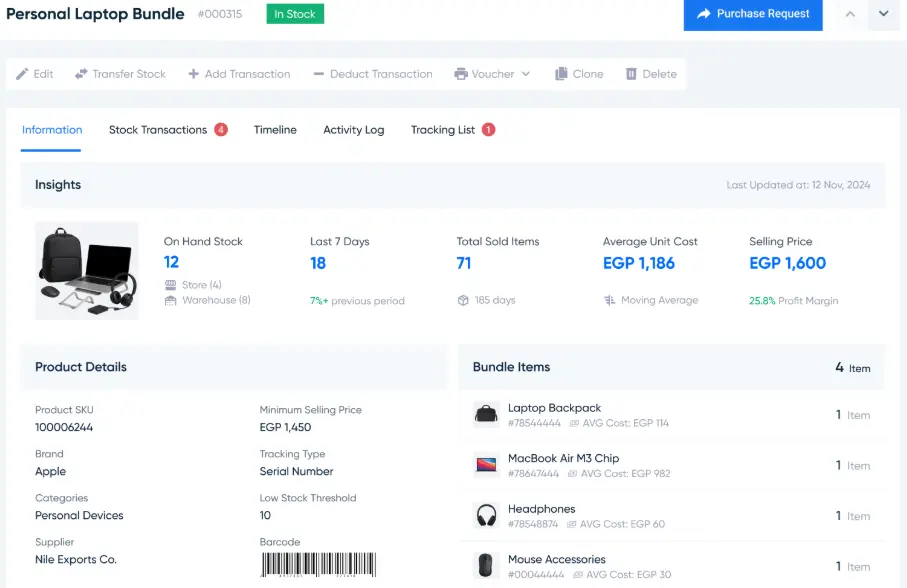
Key Features of Daftra in Inventory Management
- Organizes and tracks inventory movement for products, goods, and materials stored in warehouses, making it easy to monitor them accurately.
- Allows you to add an unlimited number of products and group, classify, and categorize them by units, quantities, and barcodes; organize them into price lists based on business needs; and update this data at any time.
- Sends alert notifications to monitor inventory levels before they run out, helping to set reorder points and avoid delays in meeting customer needs or halting production operations.
- Enables managing all branch warehouses of your business in one place through the inventory management software on Daftra’s dashboard, which is user-friendly and intuitive.
- Provides the ability to issue all types of warehouse vouchers related to purchases and sales, such as warehouse issue vouchers, receipt vouchers, and transfer vouchers for internal warehouses for production and operational purposes.
- Allows you to assign permissions to warehouse managers responsible for issuing and receiving stock.
- Simplifies searching for products and goods in warehouses using their barcodes, enabling quick tracking of remaining stock for specific items and offering clear visibility.
- Helps organize supplier records by creating individual files with supplier details and contact information, speeding up the process of filtering quotations and converting them into purchase invoices.
- Simplifies automatic inventory audits through Daftra’s warehouse and inventory management system, comparing sales and purchase transactions with updated stock levels on a regular basis.
- Provides accurate inventory adjustments, along with detailed reports on inventory movement and warehouse team performance. These reports support monitoring, accountability, and internal auditing.
- Offers warehouse management services across more than 50 different business sectors.
- Integrates with popular e-commerce platforms such as Zid, WooCommerce, and Shopify, making it easier to synchronize purchase transactions, stock requests, and accounting between Daftra and these online stores.
Daftra Subscription Prices
The Software offers three subscription plans tailored to customer needs:
| Plan | Monthly Cost | Yearly Cost |
| Basic | 95 SAR | 1140 SAR |
| Advanced | 155 SAR | 1860 SAR |
| Comprehensive | 225 SAR | 2700 SAR |
User Feedback
.png)
.png)

Read also:
2- QuickBooks Warehouse and Inventory Management Software
QuickBooks is accounting Software designed to meet the needs of small and medium-sized businesses, offering features such as invoice management, inventory, and sales, along with the ability to track financial performance.
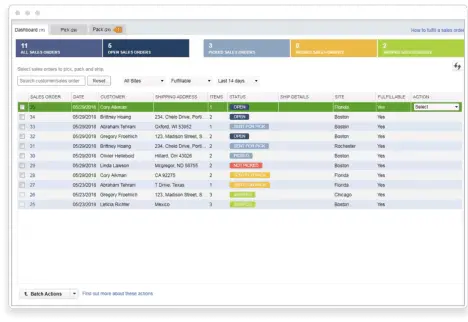
Advantages of QuickBooks for Inventory Management
- Enables tracking of all warehouses within the inventory system.
- Automatically backs up inventory data every minute, storing it securely and safely.
- Allows you to classify warehouses into main and sub-warehouses, with full control over updating, adding, or deleting inventory information.
- Allows you to create a record of opening stock balances and manage the entry of opening data by item category, as well as import opening stock data for various accounting purposes.
- Offers control over setting maximum and minimum limits for inventory items.
Disadvantages of QuickBooks for Inventory Management
- Limited to only five business sectors, which restricts its scope of use.
- The Software’s services are available exclusively online.
- Creates virtual item codes at points of sale, allowing sales on negative stock, which may lead to accounting manipulation or theft.
- Limits the number of users that can be added to just four users, which is a drawback compared to other accounting software, such as Daftra, which allows an unlimited number of users with customizable access permissions.
QuickBooks Subscription Prices
There are three subscription plans available for QuickBooks:
| Plans | Monthly Cost | Yearly Cost |
| Simple Start | 7 SAR | 79 SAR |
| Essentials | 11 SAR | 116.25 SAR |
| Plus | 17 SAR | 172.50 SAR |
| Advanced | 33 SAR | 333.75 SAR |
Some User Feedback on QuickBooks
A question was raised on one of the websites: “What do you, as accountants, think of QuickBooks?”
Here are some of the responses that followed:
.png)
3- Zoho Warehouse and Inventory Management Software
Zoho is a cloud-based accounting system that offers comprehensive solutions for managing accounting and inventory by automating tasks related to invoice creation, financial reporting, and expense management.
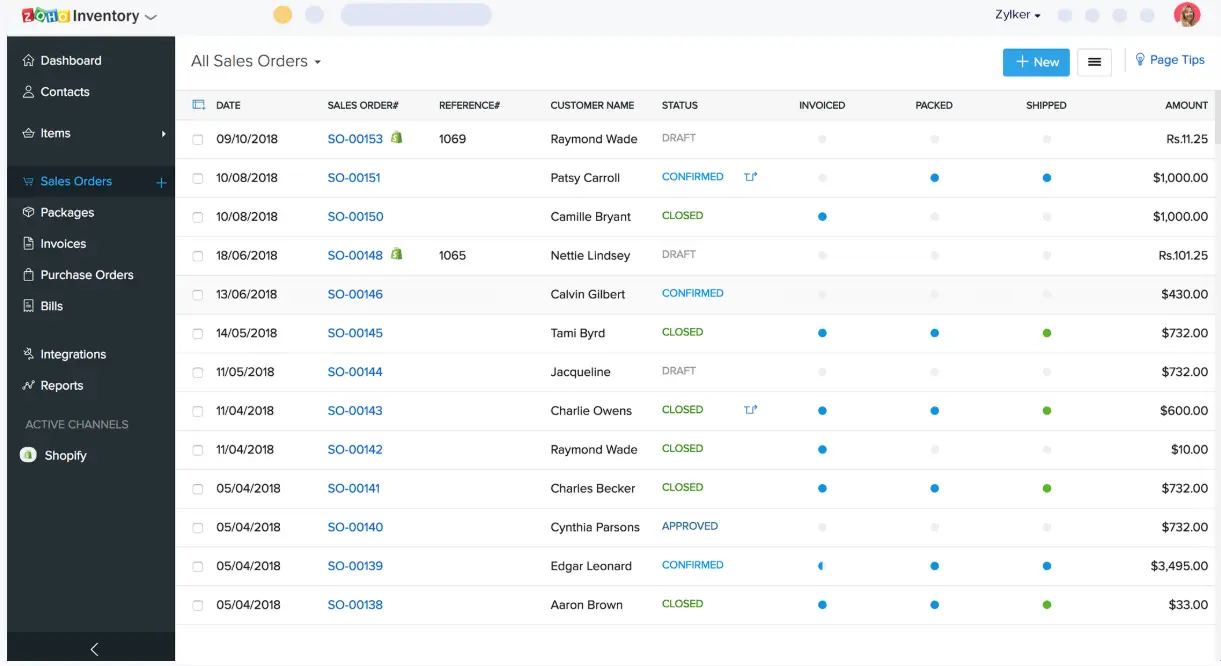
Advantages of Zoho Accounting for Warehouse Management
- Track inventory and communicate with suppliers from preferred shipping companies through the system dashboard.
- Automatic stock level updates with every new order, along with real-time updates of total quantities for each product, while also allowing manual adjustments to increase or decrease stock levels.
- Define geographic zones where services are provided, set delivery schedules based on order price, and generate warehouse issue vouchers specifying quantities, weights, and item types.
- Simplifies inventory transfer between multiple warehouses and enables monitoring of stock flow between the store and warehouses through an integrated system dashboard.
- Sends reorder notifications to suppliers as soon as stock reaches the predefined reorder levels.
- Provides quick insights into weekly and monthlysalesand purchase transactions, and shows the impact of these transactions on inventory records through an illustrative chart.
Disadvantages of Zoho Accounting for Warehouse Management
- Despite the advantages offered by Zoho, there are some drawbacks associated with the Software, including:
- Lack of integration between the Software’s applications and other systems, and even limited integration among the Software’s own internal modules.
- Frequent downtime and application crashes affect the accuracy of tracking transaction times and dates.
- Inability to customize certain financial reports to suit specific business needs.
- Accessing key features requires paying additional costs.
Zoho Subscription Prices
The software offers three subscription plans:
| Plans | Monthly Cost | Yearly Cost |
| STANDARD | 69 SAR | 59 / month SAR |
| PROFESSIONAL | 169 SAR | 139 / month SAR |
| PREMIUM | 269 SAR | 219 / month SAR |
| ENTERPRISE | 499 SAR | 399 / month SAR |
Some User Feedback on the Zoho Software
.png)
4- Alsafi System Warehouse and Inventory Management Software
Alsafi is an accounting software designed for business solutions, focusing on accounting and inventory management to help companies improve their financial operations and increase profits.
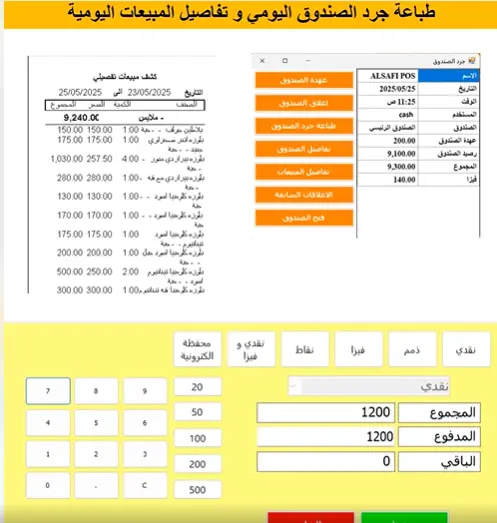
Advantages of Alsafi Accounting for Warehouse Management
- Provides a complete record of sales and purchase operations, with automatic updates to inventory records based on incoming and outgoing quantities.
- Automatically calculates costs and stock levels when you issue or receive items manually, with notifications for low stock.
- Allows adding notes to stock issuance, import, or transfer operations, and supports uploading an Excel file containing product data directly into the system without the need for manual entry.
- Enables sending purchase orders to suppliers quickly before inventory runs out, ensuring customer needs are met, sales grow, and profits increase.
- Uses a barcode system for warehouse management, making it easier to search for products and prepare purchase and sales orders quickly and efficiently.
- Simplifies stocktaking with detailed inventory reports that compare actual stock in warehouses with sold items.
- Allows you to monitor employees responsible for inventory and warehouses by assigning specific permissions to each employee to control stock and issue sales and purchase orders.
Disadvantages of Alsafi Accounting for Warehouse and Inventory Management
- The Software supports the Arabic language only.
- All Software applications operate exclusively through an internet connection.
- The Software does not integrate with e-commerce platforms (unlike Daftra ERP System), which makes it impossible to manage inventory simultaneously when working with online stores.
- There is no mobile application available on Google Play or the Apple App Store, making it difficult to use the Software smoothly on smartphones.
Alsafi Warehouse and Inventory Management Software Subscription Prices
To obtain subscription pricing for the Alsafi warehouse management software, you need to contact Alsafi’s technical support to find the package best suited to your business operations.
Read also: Best Invoicing Software in Saudi Arabia
5- Phenix Systems Warehouse and Inventory Management Software
Phenix is an integrated system for accounting and financial solutions. It provides effective tools to track financial transactions and manage warehouses and inventory, helping organizations monitor financial performance and make sound decisions to improve their financial standing.
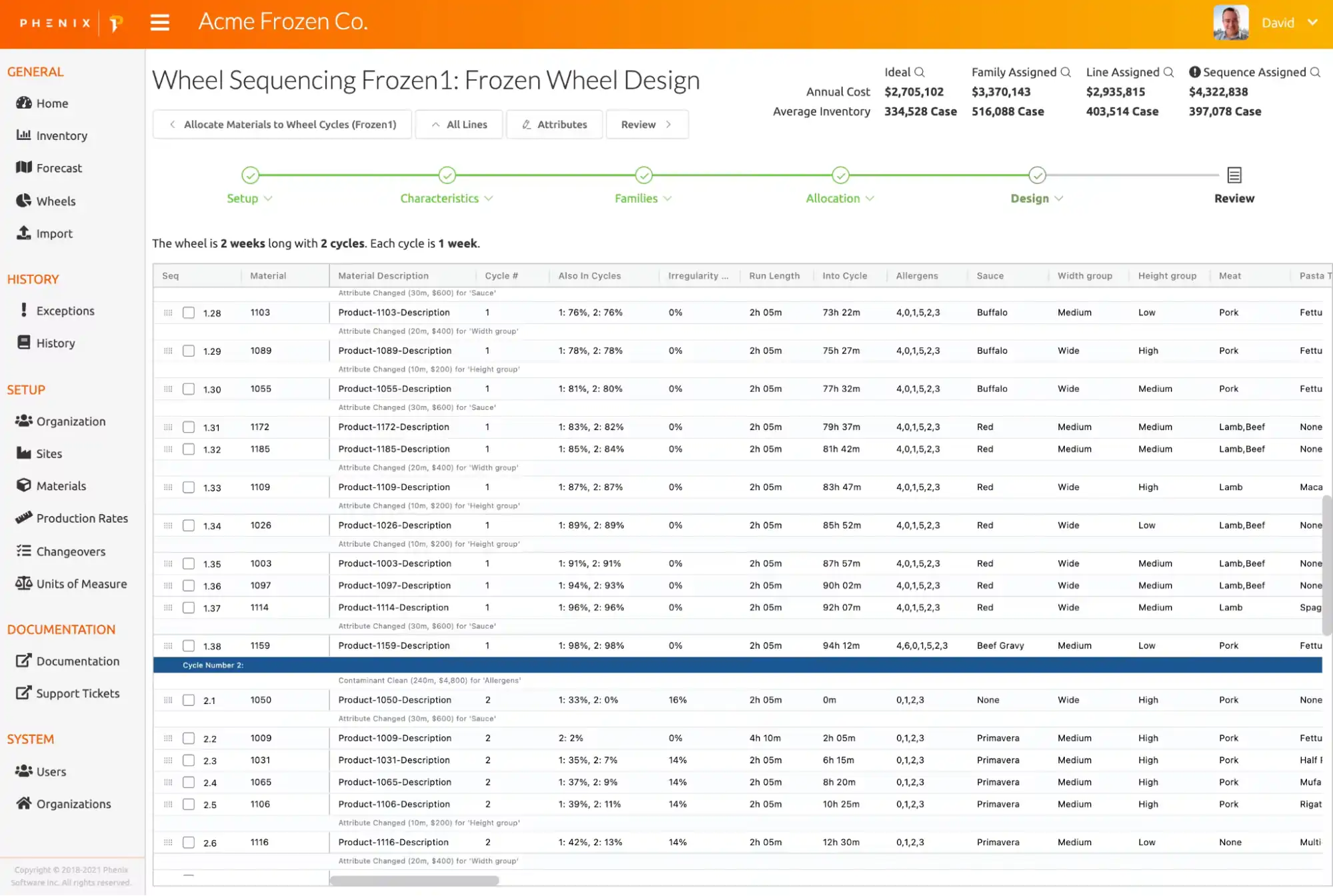
Advantages of Phenix Systems in Warehouse Management
- Enables supervision and accurate tracking of inventory operations, with product and goods classification based on their characteristics and features.
- Allows you to add an unlimited number of products and review stock balances at any time through the system interface.
- Supports accurate automated stocktaking for all main and sub-warehouses.
- Provides alert notifications when stock levels are low or about to run out.
- Simplifies searching for products in warehouses using their unique item code or shipment number.
- Allows assigning expiration dates for each product in stock, helping to determine required inventory quantities accurately, as well as production costs.
Disadvantages of Phenix Systems in Warehouse Management
- Limited language support within the system.
- Limited solutions are offered for managing clinics, pharmacies, and sales representatives.
- The user interface of Phenix systems is somewhat complex, making it difficult to fully utilize the features of the inventory management Software.
- Subscription costs are relatively high, which may not suit small or startup companies.
Phenix Systems Warehouse and Inventory Management Software Prices
The official Phenix Systems website does not list subscription prices; you must contact their technical support team to learn pricing and the features included in each plan.
Comparison Table
| Software Name | Inventory Tracking | Multi-branch Support | Stocktaking | Barcode Scanner Support | Reorder Alerts | Reports | Free trail avilavilaty | E-commerce Integration |
| Daftra | ✅ | ✅ | ✅ | ✅ | ✅ | ✅ | ✅ | ✅ |
| QuickBooks | ✅ | ✅ | ✅ | ✅ | ✅ | ✅ | ✅ | ✅ |
| Zoho | ✅ | ✅ | ✅ | ✅ | ✅ | ✅ | ✅ | ✅ |
| Alsafisys | ✅ | ✅ | ✅ | ✅ | ✅ | ✅ | ❌ | ✅ |
| Phenix | ✅ | ✅ | ✅ | ✅ | ✅ | ✅ | ❌ | ✅ |
In conclusion
Accounting software for warehouse and inventory management is a double-edged sword. On one hand, it provides numerous advantages that improve efficiency and support financial and administrative decision-making; on the other, it faces challenges that limit its full potential. Therefore, it is essential to look for the best of these software options in terms of maximizing benefits and minimizing drawbacks.
Remember, choosing the right Software for managing warehouses and inventory can make a significant difference in workflow and in achieving both profitability and organizational goals.













 Invoicing
 POS
POS Offers
 Installments
 Sales Commission
 KSA E-Invoice Software
 EGY E-Invoice Software
 JO E-Invoice Software
 E-Invoice Software
 Chart of Accounts
 Asset Management
 Cost Centers
 Expenses
 Cheque Cycle
 UAE VAT-Tax
 Product Management
 Purchases
 Purchase Cycle
 Suppliers
 Requisitions
 Stocktaking
 Organizational Structure
 Personnel Management
 Attendance and Leave
 Contracts
 Payroll
 Requests
 Work Orders
 Booking Management
 Rental and Unit Management
 Time Tracking
 Work Flow
 Lease Contracts
 Manufacturing Management
  Client Follow-Up
 Loyalty Points
 Points and Credits
 Memberships
 Insurance Management
 Daftra ERP Full App
 Point of Sales App
 Point of Sales for Desktop – Support Offline Mode
 AI Expenses Scanner App
 Employee Attendance, Sign & ESS App
 E-invoice Reader App
 Inventory Stocktaking App