


Posted on 24 November 2026
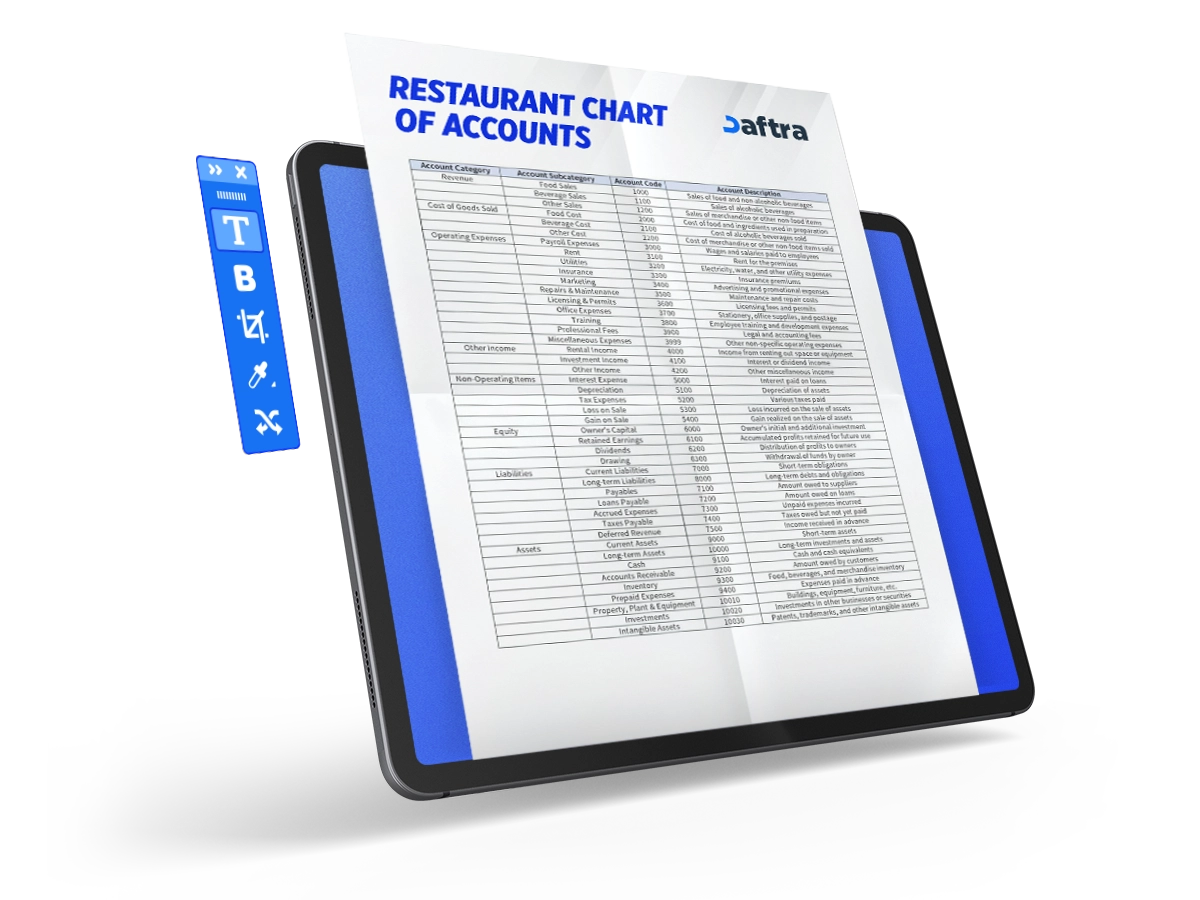
Restaurant Chart of Accounts Template
- A Restaurant Chart of Accounts Template provides accurate data on the costs borne by the restaurant, which contributes to better cost management.
- This template helps organize restaurant financial accounting in a detailed and structured manner.
- It also helps restaurant owners monitor financial performance.


 Automate Your Restaurant Accounts with Daftra

What Is a Restaurant Chart of Accounts Template?
A Restaurant Chart of Accounts Template is a document used to organize financial accounting in restaurants in a detailed manner, as it contains precise classifications such as revenue, expenses, assets, and liabilities. This contributes to managing restaurant accounting more effectively and efficiently.
What Are the Elements of a Restaurant Chart of Accounts Template?
The template consists of a main table containing several elements:
- Account Number: The number used to identify the account.
- Account Name: The description of the account is written here, such as food sales, rent, salaries, or other items.
- Account Type: The type of account is recorded here to determine whether the account represents revenue, expenses, assets, liabilities, or equity.
- Debit: The financial values recorded as an addition to the account, representing amounts paid or expenses incurred.
- Credit: The financial values recorded as a reduction to the account, representing revenue or amounts received.
You May Also Need:
Why Is a Restaurant Chart of Accounts Template Important?
This template contributes to several important areas:
1- Organizing accounts: It helps classify accounts in an organized way, making it easier to track revenue and expenses accurately.
2- Analyzing financial performance: It helps analyze the restaurant’s financial performance by providing accurate data for calculating profitability and identifying excessive expenses.
3- Managing costs: The template provides accurate data on the costs borne by the restaurant, which helps control costs.
4- Avoiding legal issues: It helps document all financial transactions in an organized manner, ensuring compliance with financial and tax regulations and avoiding any legal issues that may arise.
5- Achieving transparency: It contributes to transparency by organizing accounts and documenting all transactions in detail.
How Is a Restaurant Chart of Accounts Template Used?
A Restaurant Chart of Accounts Template is used by following these steps:
1- Review the account list: Go through the ready-made accounts, which are already classified into assets, liabilities, equity, revenue, and expenses, then add, rename, or remove sub-accounts to match your restaurant's operations.
2- Enter the data: Enter the amount of each account in the designated Debit or Credit fields, recording revenue such as food and beverage sales and expenses such as rent and salaries accurately.
3- Review the accounts: Check that total debits equal total credits. The template shows "Balanced" when the accounts match, which helps you catch entry errors quickly.
4- Update continuously: Review and update the template regularly to reflect any changes to the accounts or to add new financial transactions.
5- Prepare reports: Use the summary sheet, which automatically totals each account category and calculates gross profit and net profit, to monitor the restaurant's financial performance and prepare reports such as the profit and loss statement and the balance sheet.
6- Save a copy: Finally, save a copy of the template for future reference when needed.
Who Benefits from a Restaurant Chart of Accounts Template?
Many parties benefit from this template, including:
1- Restaurant owners: It helps restaurant owners monitor financial performance and make decisions based on accurate data.
2- Accountants: It helps them prepare financial reports by organizing and analyzing accounts.
3- Investors: The template helps them understand the restaurant’s financial position and make investment decisions based on accurate data.
4- Tax officers: They need it to ensure the restaurant’s compliance with tax laws by reviewing all financial transactions documented in the template.







 Invoicing
 POS
 Offers
 Installments
 Sales Commission
 KSA E-Invoice Software
 EGY E-Invoice Software
 JO E-Invoice Software
 E-Invoice Software
 Chart of Accounts
 Asset Management
 Cost Centers
 Expenses
 Cheque Cycle
 VAT & Tax Compliance
 Product Management
 Purchases
 Purchase Cycle
 Suppliers
 Requisitions
 Stocktaking
 Organizational Structure
 Personnel Management
 Attendance and Leave
 Contracts
 Payroll
 Requests
 Work Orders
 Booking Management
 Rental and Unit Management
 Time Tracking
 Work Flow
 Lease Contracts
 Manufacturing Management
 Client Follow-Up
 Loyalty Points
 Points and Credits
 Memberships
 Insurance Management
 Daftra ERP Full App
 Point of Sales App
 Point of Sales for Desktop – Support Offline Mode
 AI Expenses Scanner App
 Employee Attendance, Sign & ESS App
 E-invoice Reader App
 Inventory Stocktaking App