




Table of contents:
- Key Summary
- How to Calculate Tax from the Total Invoice Amount
- Does the Tax Calculation Method Vary Depending on the Type of Tax?
- How Can I Calculate VAT in the Chart of Accounts?
- 2026 ZATCA Tax Return Filing Deadlines
- From Personal Experience
- Tips to Avoid Errors When Calculating Tax from the Total Invoice Amount
- How to Calculate VAT on an Invoice Using Daftra
- Frequently Asked Questions
In today’s business environment, it is not acceptable for a business owner or accountant to issue an invoice without having a clear understanding of how Value Added Tax (VAT) is calculated. This is essential to ensure compliance with tax laws and avoid penalties.
In this article, we will guide you through clear and straightforward steps for calculating tax from the total amount, with practical examples. We will also explain the difference between prices that are inclusive and exclusive of VAT.
How to Calculate Tax from the Total Invoice Amount
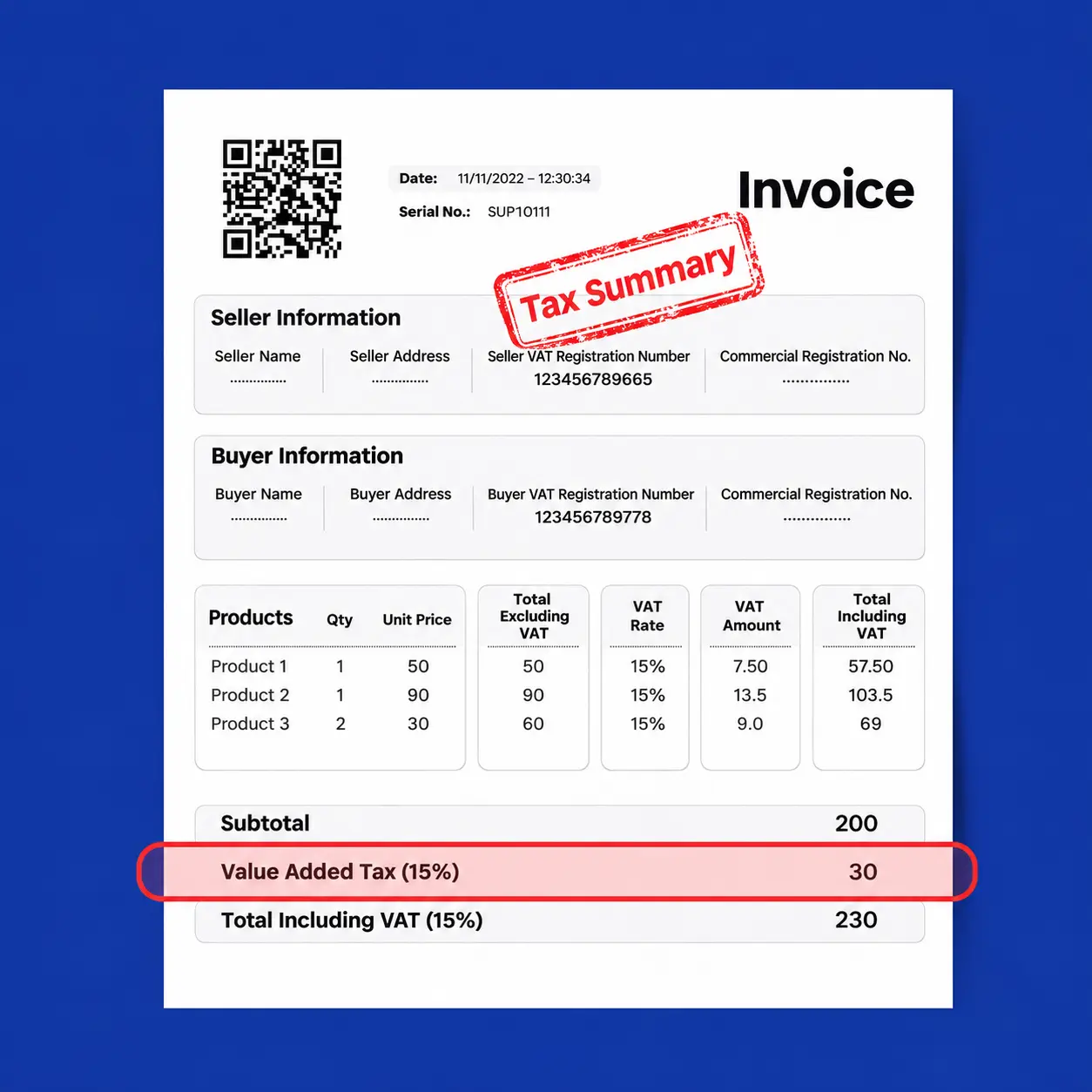
Value Added Tax (VAT) is imposed on most goods and services in the Kingdom of Saudi Arabia at the standard rate of 15%. Sometimes, you may receive an invoice showing the total amount, including VAT, and need to determine the VAT amount and the net price, excluding VAT.
If you receive an invoice with a total amount that includes VAT, whether you are a business owner or an accountant, you may need to separate the VAT amount from the net price for various purposes, such as preparing financial reports, reviewing payments, or ensuring that the invoice complies with the Saudi tax system.
Calculating VAT from the total invoice amount is simple if you follow the correct steps. Below, we will show you how to determine the VAT amount and net price using clear steps, practical examples, and simple mathematical formulas:
1- Identify the Total Amount:
Find the total amount on the invoice, including VAT.
2- Confirm the Tax Rate:
In Saudi Arabia, the standard rate is 15% (or 0.15).
3- Calculate the VAT Amount:
Use the following formula:
VAT amount = Total amount × 15 / (100 + 15).
4- Calculate the Net Price:
Use the following formula:
Net price = Total amount × 100 / (100 + 15).
5- Verify the Calculation:
Make sure that the net price + VAT amount = the total amount.
Alternative Method (Simplified):
Looking for a faster method? You can use a simple calculator:
- Divide the total amount by 1.15 to obtain the net price:
2,300 ÷ 1.15 = SAR 2,000. - Subtract the net price from the total amount to obtain the VAT amount:
2,300 - 2,000 = SAR 300.
Both methods give the same result, but the alternative method is faster when using a basic calculator.
You can use Daftra’s Tax Calculator to calculate the VAT amount automatically and completely free of charge.
Does the Tax Calculation Method Vary Depending on the Type of Tax?
In Saudi Arabia, Value Added Tax (VAT) is the primary type of tax applied to most goods and services at the standard rate of 15%. However, the calculation method may vary depending on the type of tax or the exemptions that apply. Let’s review the different types of taxes and how each is calculated:
1- Tax Exclusive of VAT
In some cases, an invoice may be issued without including Value Added Tax (VAT), and you may need to add it to the net amount. In this case, you can use a simple formula to calculate the tax:
Tax amount = Net amount × Tax rate / 100
Total amount = Net amount + Tax amount
2- VAT Inclusive
This is the case we discussed earlier, where VAT is included in the total invoice amount. Use the following formulas:
Tax amount = Total amount × 15 / 115
Net amount = Total amount × 100 / 115
Example:
Suppose you receive an invoice for SAR 4,600, including VAT at 15%.
VAT amount:
4,600 × 15 ÷ 115 = SAR 600
Amount before VAT:
4,600 × 100 ÷ 115 = SAR 4,000
3- Withholding Tax
Withholding Tax is imposed on certain payments, such as payments for services provided by non-residents in Saudi Arabia, including consulting or technical services. Its rates range from 5% to 20%, depending on the type of service. To calculate it from the total amount:
Tax amount = Total amount × Tax rate ÷ 100
Net amount transferred to the supplier = Total amount - Tax amount
4- Excise Tax
Excise Tax is imposed on certain goods, such as tobacco products (100%), soft drinks (50%), and energy drinks (100%). To calculate it from the total amount:
Tax amount = Total amount × Tax rate / (100 + Tax rate)
Net amount = Total amount × 100 / (100 + Tax rate)
Example:
An invoice for soft drinks worth SAR 230, including 50% tax:
Tax amount:
230 × 50 / (100 + 50) = SAR 76.67
Net amount:
230 × 100 / 150 = SAR 153.33
How Can I Calculate VAT in the Chart of Accounts?
VAT can be accounted for in the chart of accounts by creating separate accounts for VAT on purchases and expenses (Input Tax) and VAT on sales (Output Tax), and then reconciling the two at the end of the tax period.
For example:
If the VAT on your business's sales during the period is SAR 30,000, and the deductible VAT on its purchases and expenses is SAR 18,000, the net VAT payable is calculated as follows:
30,000 - 18,000 = SAR 12,000
Therefore, your business must pay SAR 12,000 as net VAT for the period. The effect of the reconciliation appears in the chart of accounts by closing the Input Tax balance against the Output Tax balance, thereby recognizing the net amount payable in a separate VAT Payable account, as follows:
| Account | Debit | Credit |
| VAT on Output tax | 30,000 | |
| VAT on Input tax | 18,000 | |
| VAT Payable | 12,000 |
read also: How to Calculate VAT in Saudi Arabia
2026 ZATCA Tax Return Filing Deadlines
Monthly Tax Return
A monthly Tax Return is filed by establishments whose annual taxable supplies exceed SAR 40 million. The Tax Return must be filed for each month by the deadline specified by the Authority, which is generally the last day of the following month.
For example, the deadline for filing the Tax Return for April 2026 was May 31, 2026.
Quarterly Tax Return
A quarterly Tax Return is filed by establishments whose annual taxable supplies do not exceed SAR 40 million. The establishment must file the Tax Return after the end of each quarter. For example, the deadline for filing the Tax Return for the first quarter of 2026 was April 30, 2026.
The Zakat, Tax and Customs Authority (ZATCA) allows VAT-registered establishments to submit a request to change their VAT return filing period from monthly to quarterly or vice versa, subject to ZATCA's approval.
Withholding Tax
Withholding Tax statements are filed monthly, as this differs from VAT. For example, the Authority set May 10, 2026, as the deadline for filing the Withholding Tax statement for April 2026.
The deadline is generally the tenth day of the following month and may change if it falls on an official holiday. ZATCA's current guidance states that the monthly Withholding Tax statement and payment of the withheld amount are due within the first 10 days of the month following the month in which the payment was made.
Tips to Avoid Errors When Calculating Tax from the Total Invoice Amount
You may have previously calculated VAT only to discover a small error that caused significant discrepancies in your financial reports. Errors in calculating tax from the total invoice amount may seem minor, but they can lead to penalties from the Zakat, Tax and Customs Authority (ZATCA) or complications in your accounting records. Here are some practical tips to help ensure the accuracy of your tax calculations:
- Make sure that the invoice uses the standard VAT rate of 15%, as there may be exceptions, such as zero-rated supplies.
- Is the total amount inclusive or exclusive of VAT? Ask the supplier if you are not sure.
- Keep a paper or digital record to track your calculations, especially if you manage multiple invoices.
- If you deal with a large number of invoices, consider using accounting software such as Daftra to reduce errors.
How to Calculate VAT on an Invoice Using Daftra
Do you find that calculating Value Added Tax (VAT) manually takes too much time and effort? When you use Daftra's invoicing software to issue your invoices, you no longer need to calculate VAT manually. The system automatically calculates VAT accurately in accordance with the applicable standards in Saudi Arabia.
- Go to the Sales section in the system, then click Create New Invoice.
- Select the customer and enter the products or services in the invoice table. You can then select the tax type to be applied to each line item using the designated field in the invoice.
- If the products or services you add have already been configured with a tax type, the system will apply it automatically. Daftra displays the calculated tax amount for each line item, along with the total VAT amount at the bottom of the invoice. This helps you issue accurate invoices that comply with the requirements of the Zakat, Tax and Customs Authority (ZATCA).
Calculating VAT from the total invoice amount in Saudi Arabia is not complicated once you understand the basic steps and formulas. Whether you calculate it manually using the formulas explained in this article or use accounting software, the goal is to ensure accuracy and compliance with ZATCA regulations. Always verify your calculations and maintain accurate records to avoid legal issues.
Frequently Asked Questions
How Can I Calculate VAT at 5%?
The standard VAT rate in Saudi Arabia is 15%, not 5%, for taxable supplies.
To calculate VAT on an amount that includes VAT, use the following formula:
VAT amount = Total amount × 15 ÷ 115
If the amount excludes VAT, use this formula:
VAT amount = Amount before VAT × 15 ÷ 100
The 5% rate is no longer the standard VAT rate in Saudi Arabia, as the rate was increased to 15% effective July 1, 2020.
Why Do You Need to Know How to Calculate Tax from the Total Invoice Amount?
You need to know how to calculate tax from the total invoice amount to determine the VAT amount separately from the price of the goods or services. This helps you record invoices correctly, separate sales revenue from VAT, and accurately review accounting records and Tax Returns.
How Can I Check VAT Registration Status?
You can check whether an establishment is registered for VAT through the verification service provided by the Zakat, Tax and Customs Authority (ZATCA). The service allows you to search using the Tax Identification Number, VAT Registration Certificate number, or Unified Commercial Registration Number.












 Invoicing
 POS
 Offers
 Installments
 Sales Commission
 KSA E-Invoice Software
 EGY E-Invoice Software
 JO E-Invoice Software
 E-Invoice Software
 Chart of Accounts
 Asset Management
 Cost Centers
 Expenses
 Cheque Cycle
 UAE VAT-Tax
 Product Management
 Purchases
 Purchase Cycle
 Suppliers
 Requisitions
 Stocktaking
 Organizational Structure
 Personnel Management
 Attendance and Leave
 Contracts
 Payroll
 Requests
 Work Orders
 Booking Management
 Rental and Unit Management
 Time Tracking
 Work Flow
 Lease Contracts
 Manufacturing Management
 Client Follow-Up
 Loyalty Points
 Points and Credits
 Memberships
 Insurance Management
 Daftra ERP Full App
 Point of Sales App
 Point of Sales for Desktop – Support Offline Mode
 AI Expenses Scanner App
 Employee Attendance, Sign & ESS App
 E-invoice Reader App
 Inventory Stocktaking App