


How Daftra is the Best Accounting Software for Salla in 2027



Selling through Salla makes it more convenient for businesses to reach customers and manage online orders. However, as sales grow, tracking orders, payments, returns, inventory, and financial records can become difficult when you manage each process separately.
Connecting your Salla store with an accounting system like Daftra brings sales and accounting together, reduces manual work, and gives sellers a clearer view of their business finances.
In this guide, we explain why Salla sellers may need accounting software, how Daftra can help manage Salla sales, the benefits of connecting the two platforms, and how to set up the integration.
Why Salla Sellers Need Accounting Software
Selling through Salla can simplify online commerce, but managing a growing store's finances gets harder as orders, customers, and payment transactions increase. Accounting software helps Salla sellers organize these activities and maintain accurate financial records without relying on disconnected spreadsheets or manual processes.
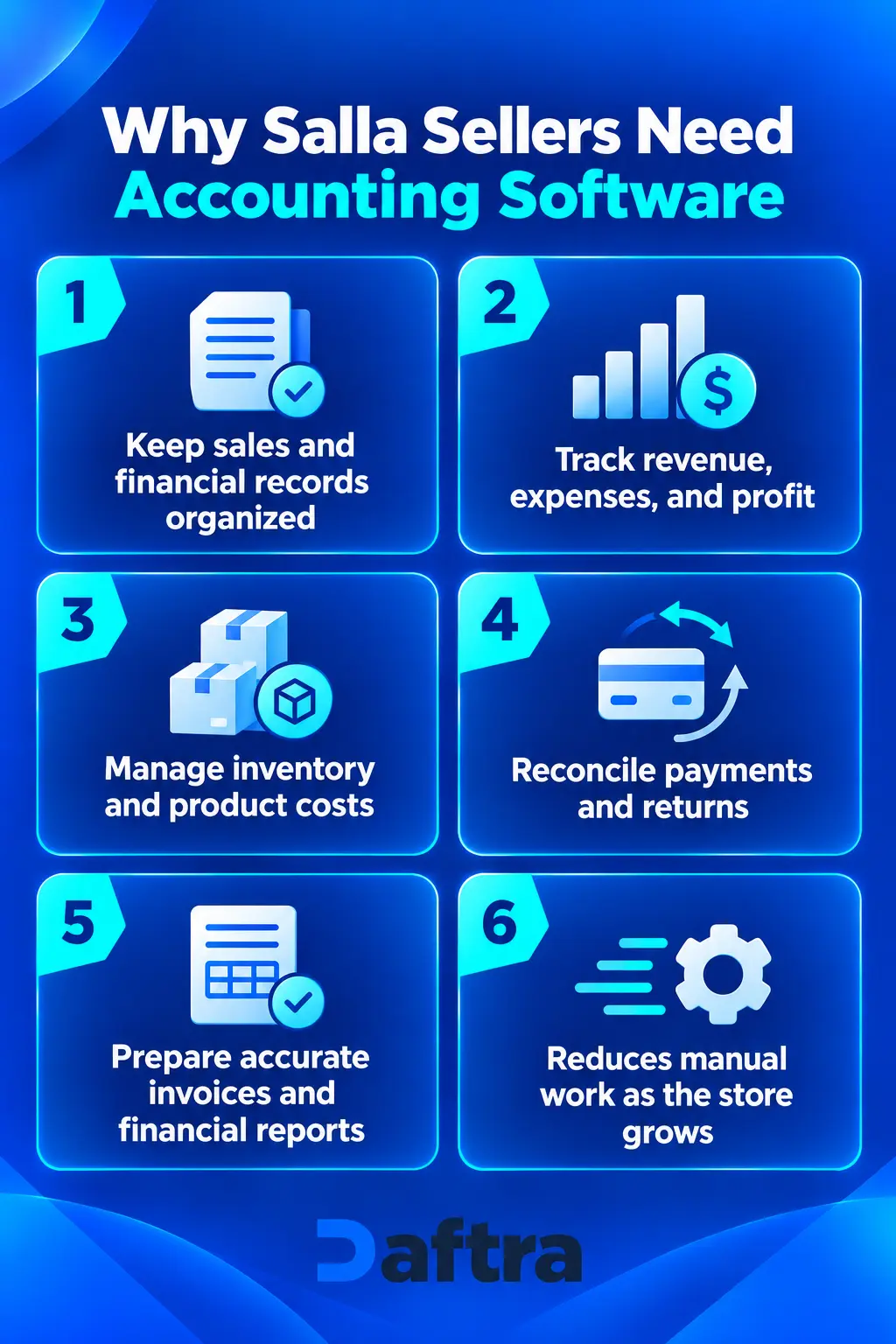
Keep sales and financial records organized
As order volumes increase, manually recording sales and updating accounting records becomes time-consuming and increases the risk of errors or duplicate transactions. Accounting software keeps sales data organized and linked to financial records.
Track revenue, expenses, and profit
Allows sellers to track expenses and costs to understand their actual profitability and make informed business decisions.
Manage inventory and product costs
For stores selling multiple products, tracking stock quantities and product costs becomes increasingly important. Accounting software links inventory movements to sales records, helping sellers maintain better control over products and costs.
Reconcile payments and returns
Salla stores receive payments through different methods and process refunds or returns; aligning these transactions with sales records makes it easier to reconcile revenue and spot discrepancies.
Prepare accurate invoices and financial reports
Accounting software helps sellers organize invoices and maintain the financial records needed to review business performance; it also provides reports that make it easier to monitor sales, expenses, receivables, and profitability.
Reduces manual work as the store grows
Automating repetitive accounting tasks lets sellers avoid wasting time on manual data transfers.
Why Use Daftra to Manage Salla Sales?
Managing Salla sales gets complicated as order volumes grow, especially when you keep sales data separate from your accounting records. Daftra connects your Salla sales to your accounting workflow, reducing manual data entry and giving you a more organized way to manage orders, invoices, payments, and returns.
In our experience in the Saudi market, we handled a case where a Salla store exported orders, manually compiled them in Excel, and then entered the sales into its accounting system. As a result, some orders were recorded late, matching revenue to payment methods was difficult, and returns became harder to manage.
After implementing Daftra, the issue became clearer: the challenge wasn't necessarily sales volume, but the separation between store data and the accounting cycle. After connecting Salla with Daftra, Salla orders could flow into Daftra for processing through invoices and accounts, instead of requiring repeated manual entry.
How Can Connecting Daftra with Salla Streamline Your Business?
By connecting Daftra with Salla, you can bring your store's sales activity and accounting processes together, so you can manage transactions without repeatedly transferring data between platforms. Instead of handling each aspect separately, from sales and customer records to inventory and invoices, you can manage them through a connected workflow in Daftra.
1- Keep sales and accounting data in sync
Salla orders are reflected in Daftra, making it easier to keep sales records connected to your accounting data. Track sales across periods, review payment methods used, and get a clearer view of your store's revenue.
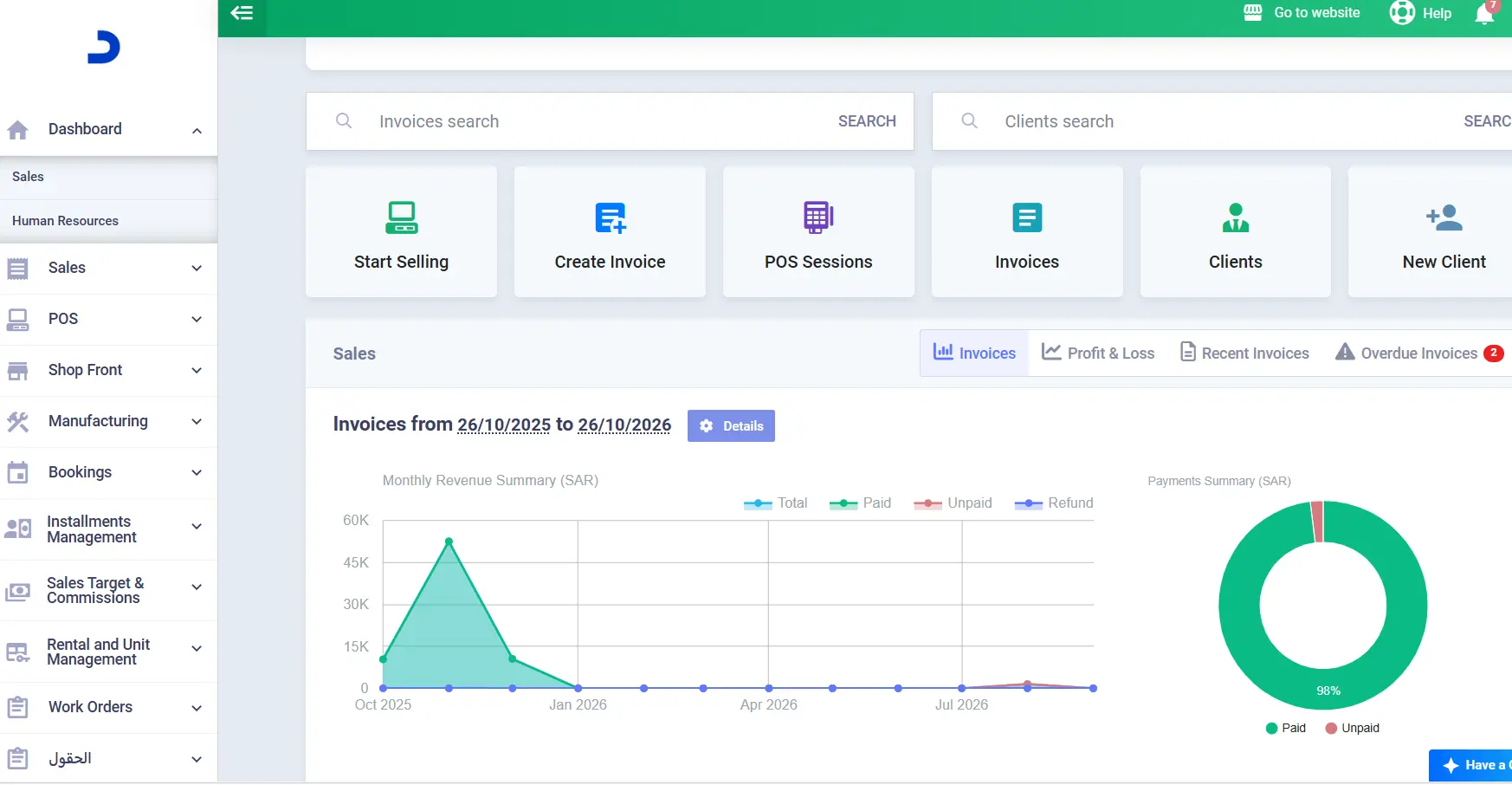
2- Reduce manual data entry
Connecting the two platforms reduces the need to export orders and manually enter the same information into your accounting system. This helps minimize repetitive work and makes it easier to keep transaction records organized.
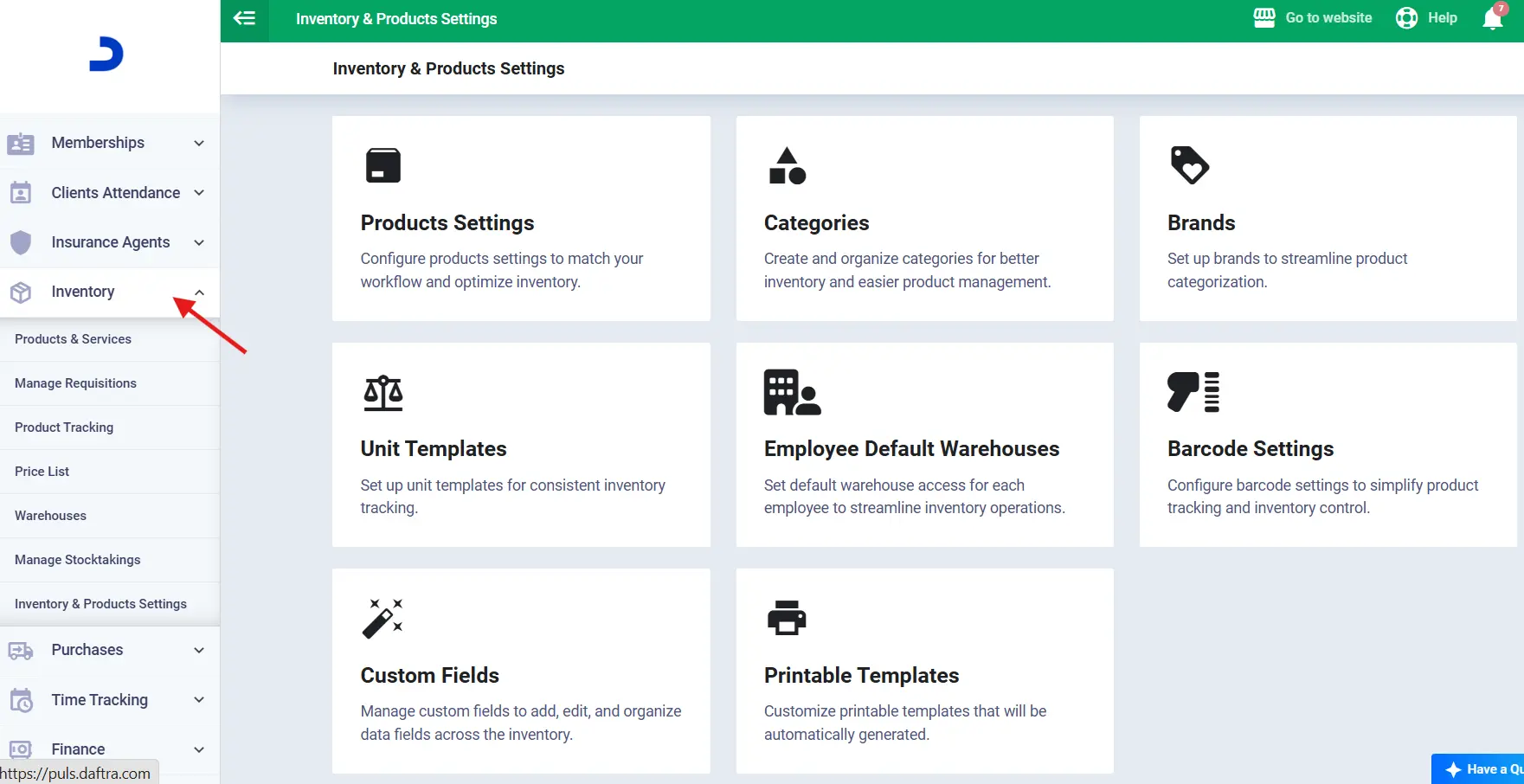
3- Manage inventory alongside sales
Sales activity connects to your inventory records, letting you track product movements and remaining quantities and giving you better visibility into stock levels as you manage orders through your Salla store.
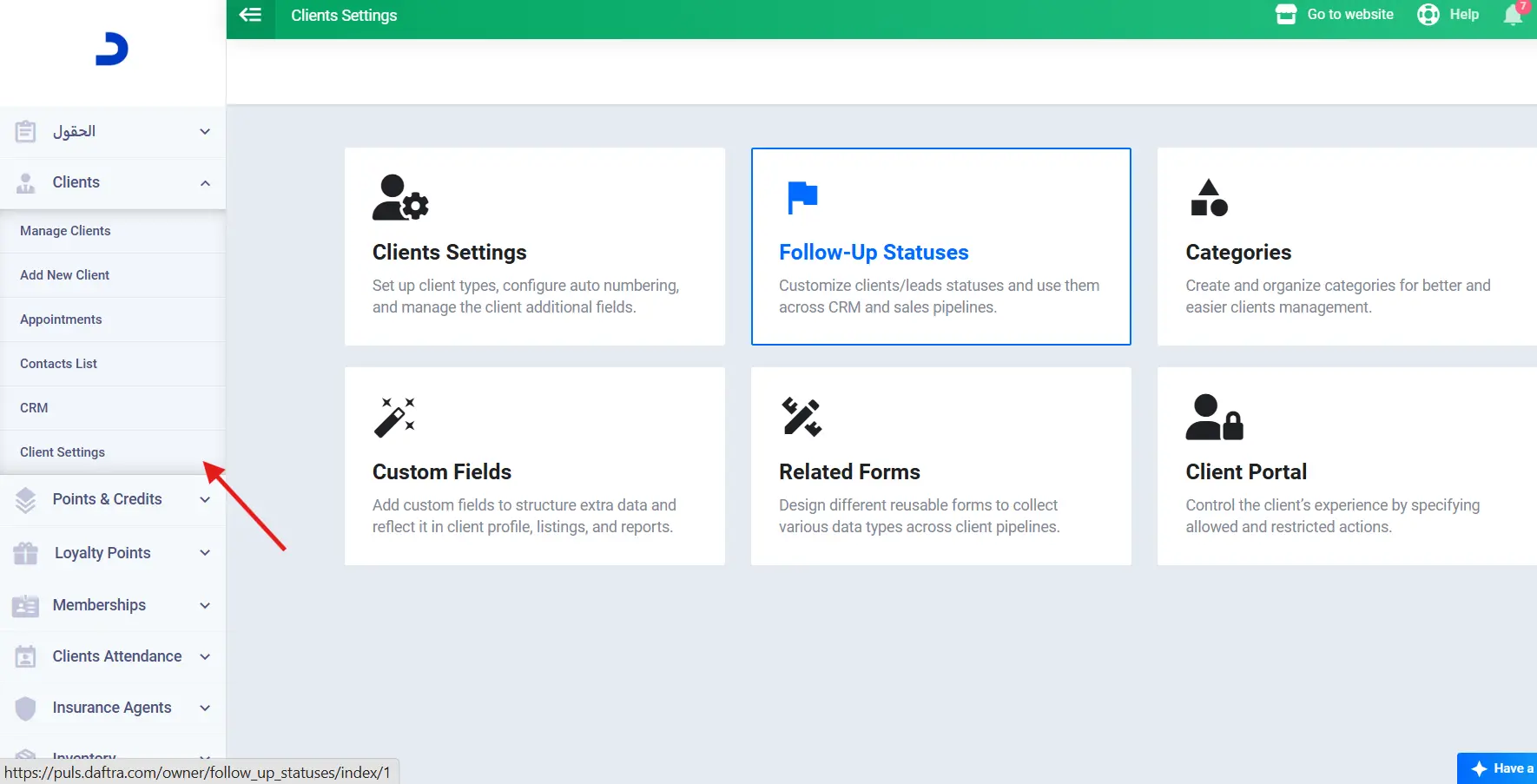
4- Organize customer accounts
Manage customer transactions through Daftra for a clearer view of purchase history and account balances, making it easier to follow up with customers and organize transactions alongside your sales records.
5- Simplify invoicing
Turn store transactions into invoices within the accounting workflow; this keeps invoice information, sales transactions, and customer records connected instead of requiring separate manual processing.
Together, these connected processes introduced by Daftra, turns Salla from a standalone sales channel into an integrated, more organized sales and accounting workflow within Daftra.
Read also: Best Accounting Software for Zed Platform
How to Connect Your Daftra Account with Salla
Connecting Daftra with a Salla store takes a few easy steps; first, make sure your Salla store is active and that you have permission to edit general settings in Daftra.
Here are the steps for connecting Daftra with your Salla store:
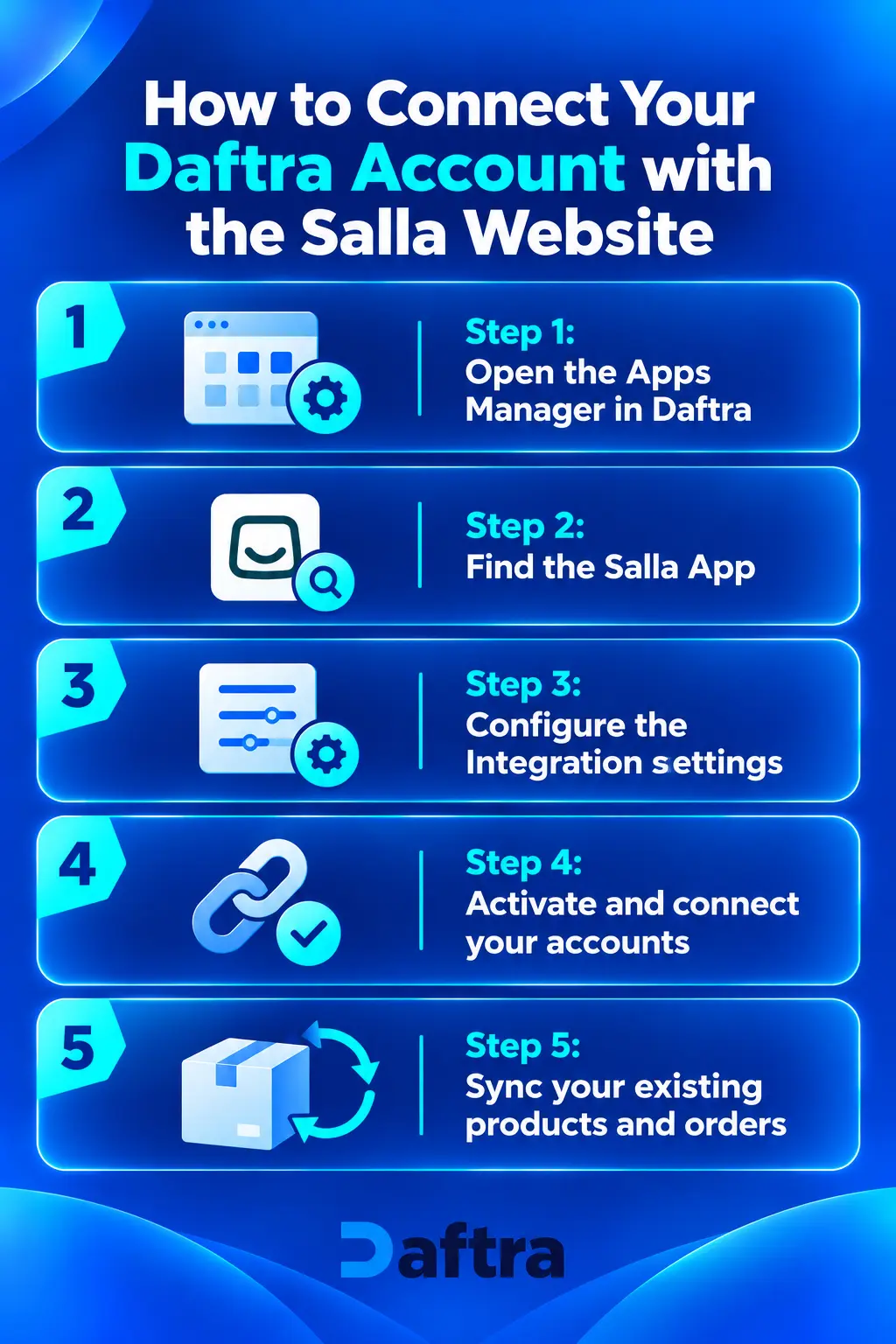
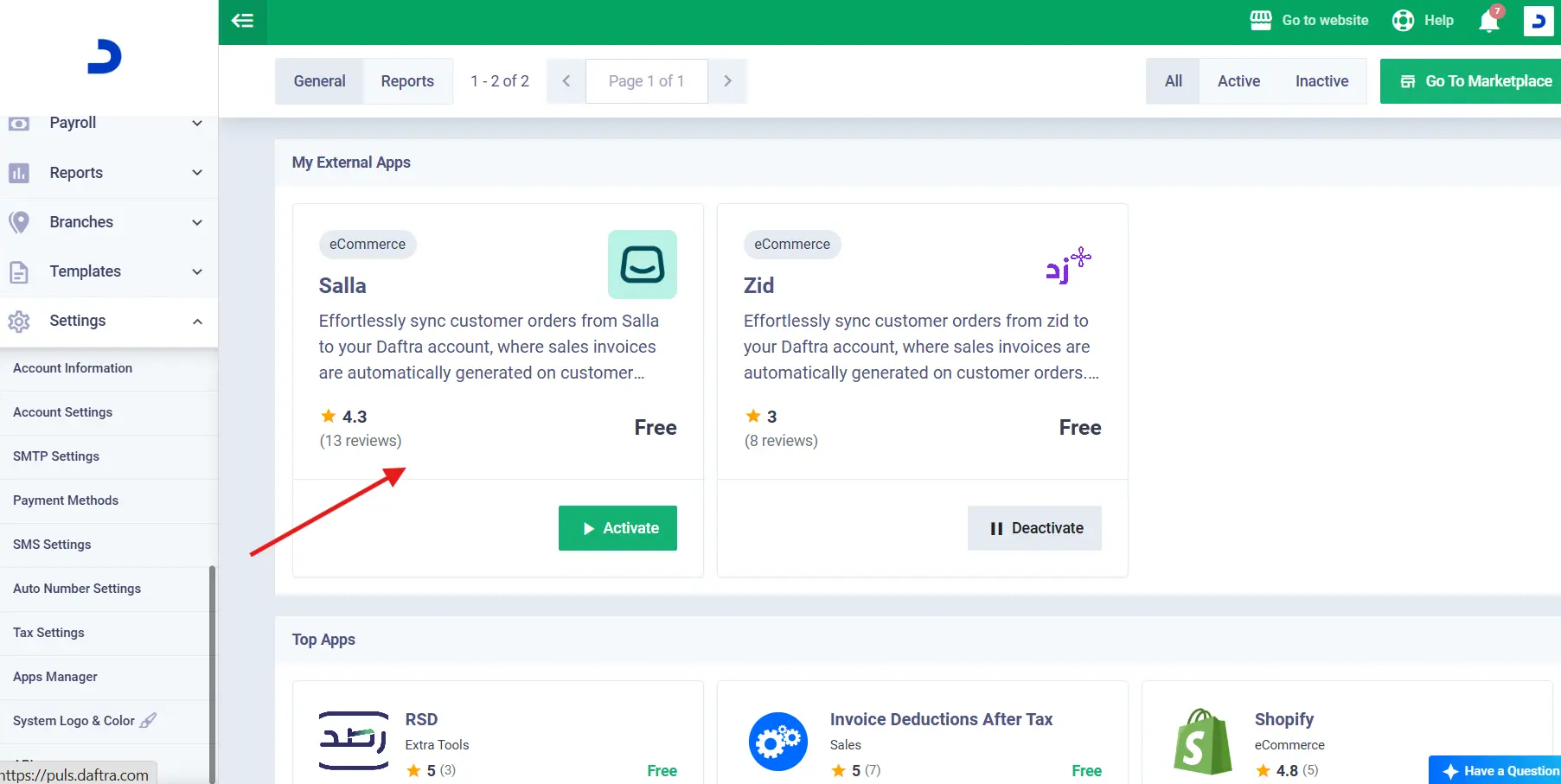
Step 1: Open the Apps Manager in Daftra
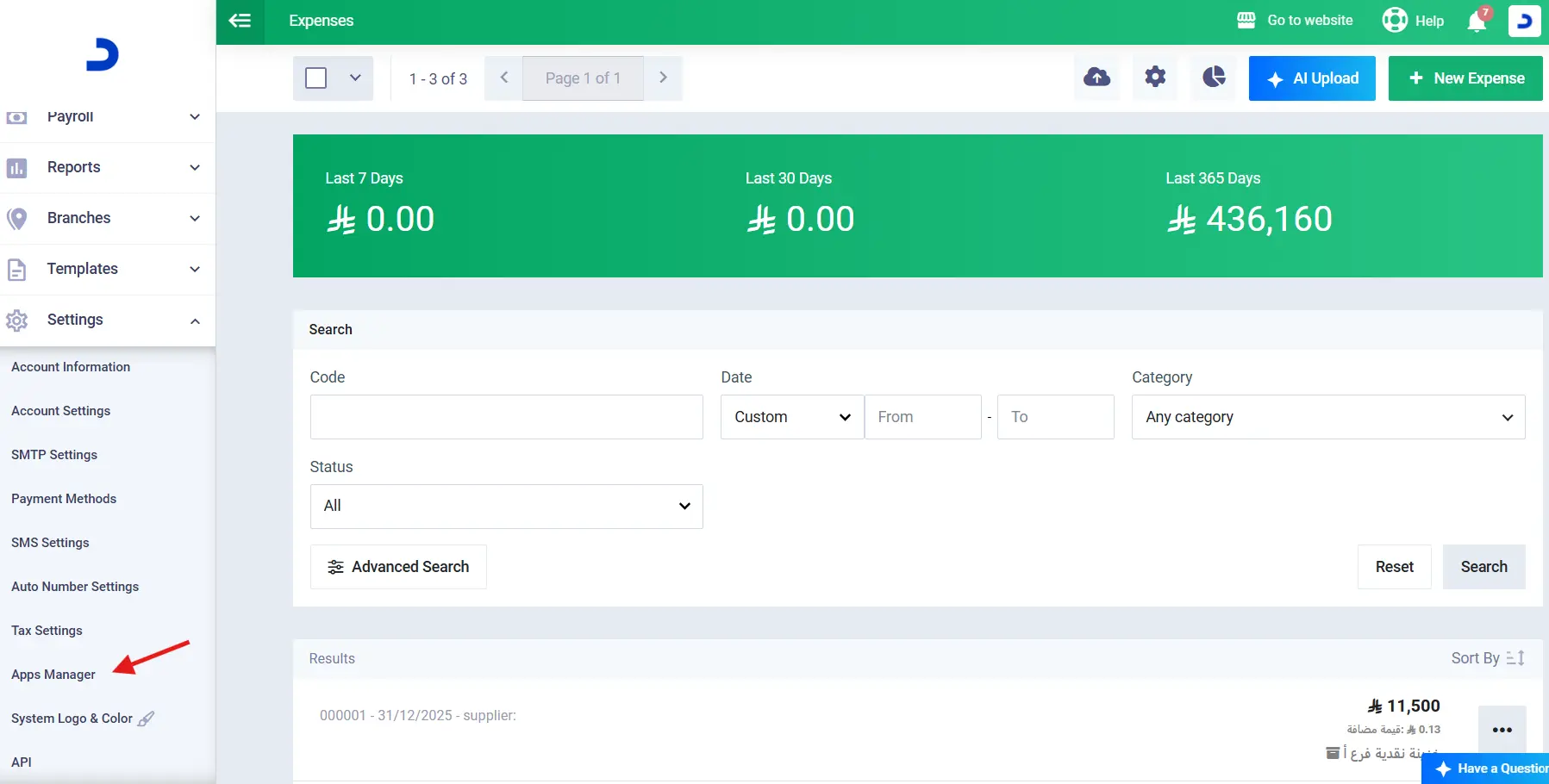
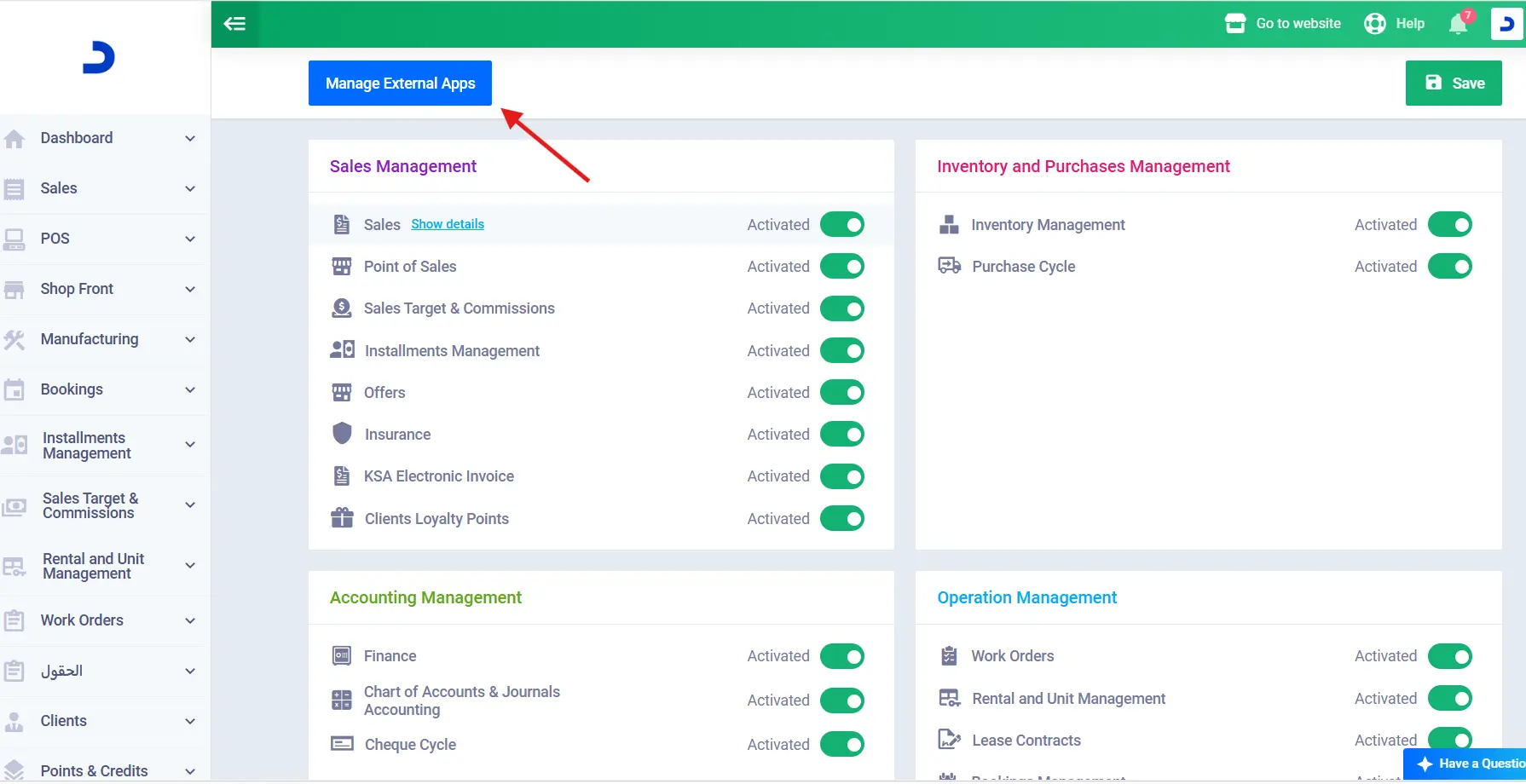
Log in to your Daftra account and open Apps Manager from the main menu, then select Manage External Apps to access the available integrations.
Step 2: Find the Salla App
Search for the Salla app in the Apps Manager, find it under Most Installed Apps, or go to the Apps Marketplace and search for Salla. Click Install to add it to your Daftra account.
Step 3: Configure the Integration settings
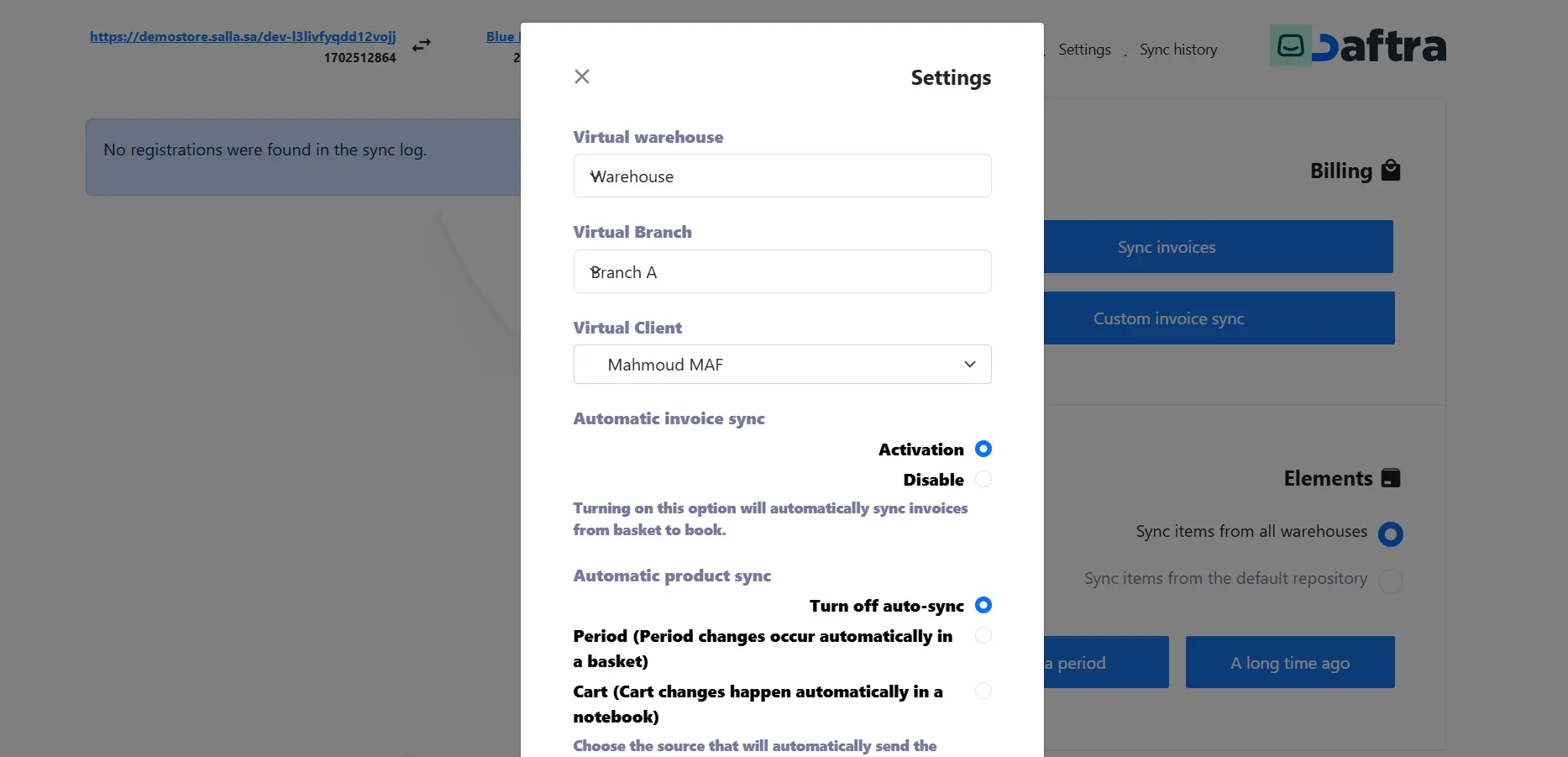
If the Salla settings page appears, complete the required information before activating the integration.
This can include — depending on your setup — the following:
- Default Client: the customer account used for orders placed by unregistered visitors.
- Default Warehouse: the warehouse used for quantities associated with Salla orders, new products, and returns.
- Default Branch: the branch used for transactions coming from Salla (if your business operates more than one branch).
- Cash on Delivery Fee: the service used to record cash-on-delivery fees included with Salla orders.
Important: You should also ensure the VAT name and rate are correctly configured in your Salla store before connecting the accounts (the tax information on the invoices is based on the tax defined in Salla).
Step 4: Activate and connect your accounts
After completing all settings, click Activate. Daftra will take you to the connection confirmation page.
Confirm your connection and complete the required steps to log in to your Salla store and approve the integration when prompted. Once the process is completed, you will be redirected to Daftra, where the Salla app will appear under My External Apps with an active status.
Step 5: Sync your existing products and orders
After connecting the accounts for the first time, we recommend a manual sync to transfer existing products and orders between Salla and Daftra.
Once the integration is active, Daftra can create sales invoices from completed Salla orders, and returned orders can generate refund invoices.
For further information, check our KB for Salla integration.
Read also: Best Accounting and POS Software for Shopify
Benefits of Connecting Daftra Account with Salla Website
Connecting Daftra with Salla helps sellers simplify accounting and maintain better control over their online store's financial data. Instead of managing sales and accounting records separately, this integration creates a more connected workflow between the store and the accounting system. Some of the benefits include:
- Less manual data entry: reducing the need to repeatedly transfer order information between Salla and the accounting system.
- More organized sales records: keep Salla sales and related transactions organized in Daftra.
- Better visibility into business performance: access accounting data and reports to monitor revenue, expenses, and profitability.
- Easier management of invoices and returns: keep sales invoices and return transactions connected to the accounting workflow.
- More efficient daily operations: spend less time on repetitive administrative tasks and more time managing the store.
- A scalable accounting workflow: keeps the process organized as orders and transactions increase.
Read also: Best Accounting Software in Saudi Arabia
Conclusion
Managing your growing Salla store takes more than tracking orders. Sellers also need an organized way to manage sales, invoices, payments, returns, inventory, and financial records.
Connecting Salla with Daftra streamlines these processes, reduces repetitive manual work, and makes it easier to track the financial side of the business. By integrating Daftra and Salla, sellers can spend less time moving data between systems and have more organized information to support their day-to-day operations and business decisions.










 Invoicing
 POS
 Offers
 Installments
 Sales Commission
 KSA E-Invoice Software
 EGY E-Invoice Software
 JO E-Invoice Software
 E-Invoice Software
 Chart of Accounts
 Asset Management
 Cost Centers
 Expenses
 Cheque Cycle
 UAE VAT-Tax
 Product Management
 Purchases
 Purchase Cycle
 Suppliers
 Requisitions
 Stocktaking
 Organizational Structure
 Personnel Management
 Attendance and Leave
 Contracts
 Payroll
 Requests
 Work Orders
 Booking Management
 Rental and Unit Management
 Time Tracking
 Work Flow
 Lease Contracts
 Manufacturing Management
 Client Follow-Up
 Loyalty Points
 Points and Credits
 Memberships
 Insurance Management
 Daftra ERP Full App
 Point of Sales App
 Point of Sales for Desktop – Support Offline Mode
 AI Expenses Scanner App
 Employee Attendance, Sign & ESS App
 E-invoice Reader App
 Inventory Stocktaking App