


Posted on 14 April 2026
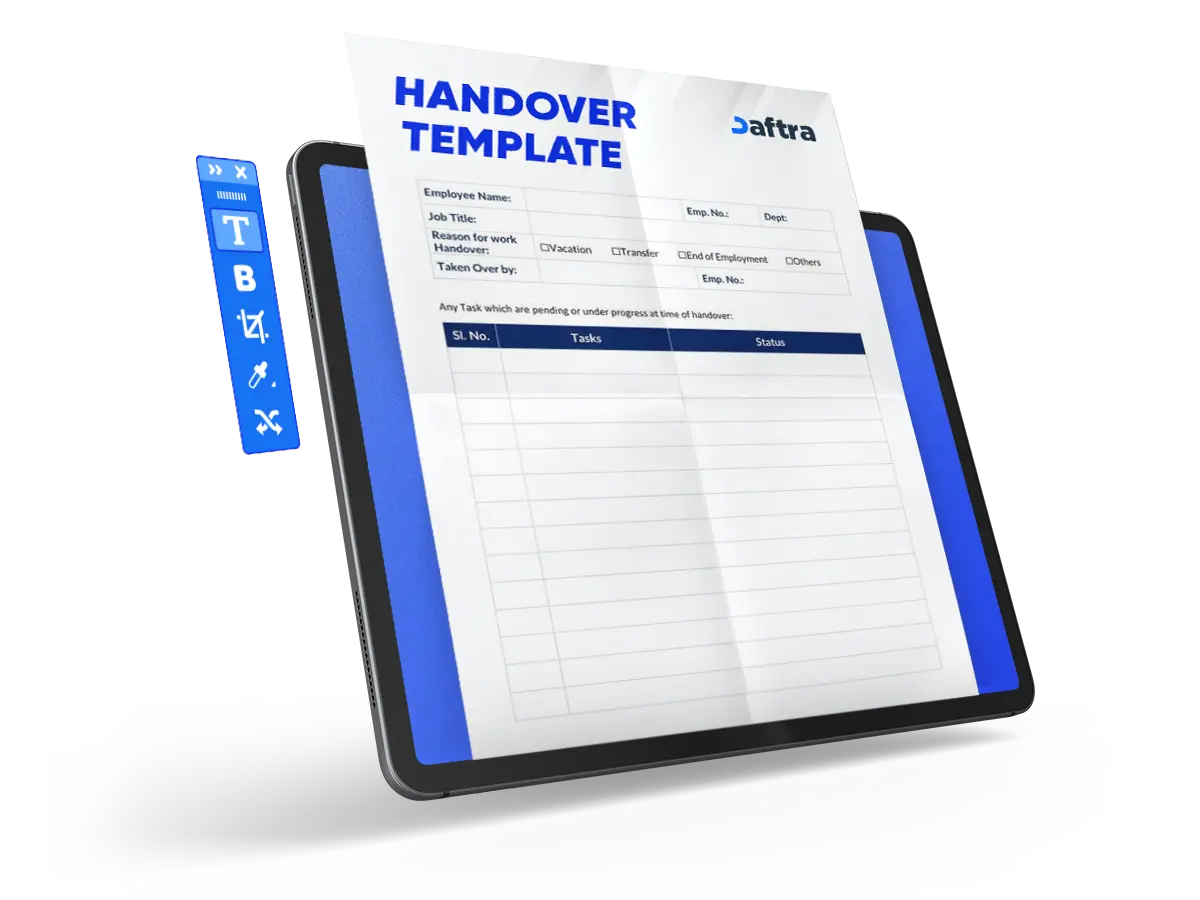
Handover Template
- Handover Template is easy to edit and fully customizable.
- It is available in Google Docs and Sheets.
- This template is useful to ensure a smooth transition between employment.


 Organize and Manage Your Team Workflow with Daftara
What is the Handover Template?
The handover template is a document that is used to transfer the employment responsibilities role to another person in charge, or it can be a project. This template is used to ensure a smooth transition during the role or project changes by documenting all the important information related to the role.
This way will help to prevent loss of info and improve the communication between outgoing and incoming employees. Including the task details, deadlines, responsibilities, and other factors.
What Are the Elements of a Handover Template?
The handover template is used to ensure continuity in business operations, and it is available in Google Docs or Sheets for easy editing and sharing. Let's discover the elements of the handover template:
- Employee information such as the Name, Position, Last Working Day, Expected Completion Date, and Successor's name.
- Key responsibilities
- Important deadlines
- Critical documents and files
- Key contacts
- Access information
- Ongoing projects
- Additional notes
- Signature: Outgoing and incoming employee signatures.
- Date:
Why is the UAE Handover Template Important?
The UAE handover template is important due to its clarity in all job role information, so the next employee follows the exact responsibilities, deadlines, and key contacts smoothly. This template helps with maintaining the continuity of the company operations as well as reducing the risk of losing important information.
Here's why the UAE Handover Template is important.
- Helps the new employee to adapt easily and quickly to the job role.
- Maintain the job's continuous operation, tasks, and deadlines smoothly.
- Minimize errors and avoid losing important information.
- A proper handling of client and project data.
- Enhances the productivity of the team and workflow.
- Improves professionalism in different company operation sections.
How To Fill Out Your handover template?
- Fill out the Employee Details:
- Employee Name: [Employee’s Full Name]
- Position: [Employee’s Job Title]
- Last Working Day: [Date]
- Expected Completion Date: [Date]
- Successor: [Successor’s Name, if applicable]
Then enter the following:
1. Key responsibilities
- List major responsibilities, providing a brief description of each.
- Indicate any ongoing tasks with current status and next steps.
2. Important deadlines
- Detail upcoming deadlines within the next [timeframe].
- Include any relevant project milestones.
3. Critical documents and files
- Specify locations of critical documents and files (e.g., shared drives, specific folders).
- Highlight any confidential or sensitive information, adhering to data protection guidelines.
4. Key contacts
- List internal and external contacts relevant to the role, including stakeholders and clients.
- Provide contact details and a brief note on the nature of each relationship.
5. Access information
- Note any necessary login information for work-related accounts or platforms, ensuring this is done securely and in line with company policy on information security.
- Include instructions for transferring access rights where applicable.
6. Ongoing projects
- Summarize the status of ongoing projects, identifying any immediate actions required.
- Detail any handover meetings or briefings arranged.
7. Additional notes
Include any other relevant information or personal insights that could assist the successor.
- Signature: Outgoing and incoming employee signatures.
- Write down the handover date
Who uses the Handover Template in Google Docs and Sheets?
The handover template in Google Docs and Sheets is used mainly by HR managers, as well as business owners and department managers, who can use it to assign responsibilities and manage operations.
Why use Daftra to generate a Handover Template?
Using Daftra simplifies the process of generating handover templates; it offers a friendly interface, ready-made templates that are editable and fully customizable, and auto-calculated sections to reduce errors and mistakes.
These templates by Daftra save time compared to using the manual document creation, as they improve workflow efficiency in HR operations and clarify role responsibilities for the new employer.








 Invoicing
 POS
POS Offers
 Installments
 Sales Commission
 KSA E-Invoice Software
 EGY E-Invoice Software
 JO E-Invoice Software
 E-Invoice Software
 Chart of Accounts
 Asset Management
 Cost Centers
 Expenses
 Cheque Cycle
 UAE VAT-Tax
 Product Management
 Purchases
 Purchase Cycle
 Suppliers
 Requisitions
 Stocktaking
 Organizational Structure
 Personnel Management
 Attendance and Leave
 Contracts
 Payroll
 Requests
 Work Orders
 Booking Management
 Rental and Unit Management
 Time Tracking
 Work Flow
 Lease Contracts
 Manufacturing Management
  Client Follow-Up
 Loyalty Points
 Points and Credits
 Memberships
 Insurance Management
 Daftra Bussiness App
 POS App
 POS desktop application
 Expense Scanner App
 ESS Application
 E-invoice Reader App
 Stocktaking App