


Posted on 12 October 2026
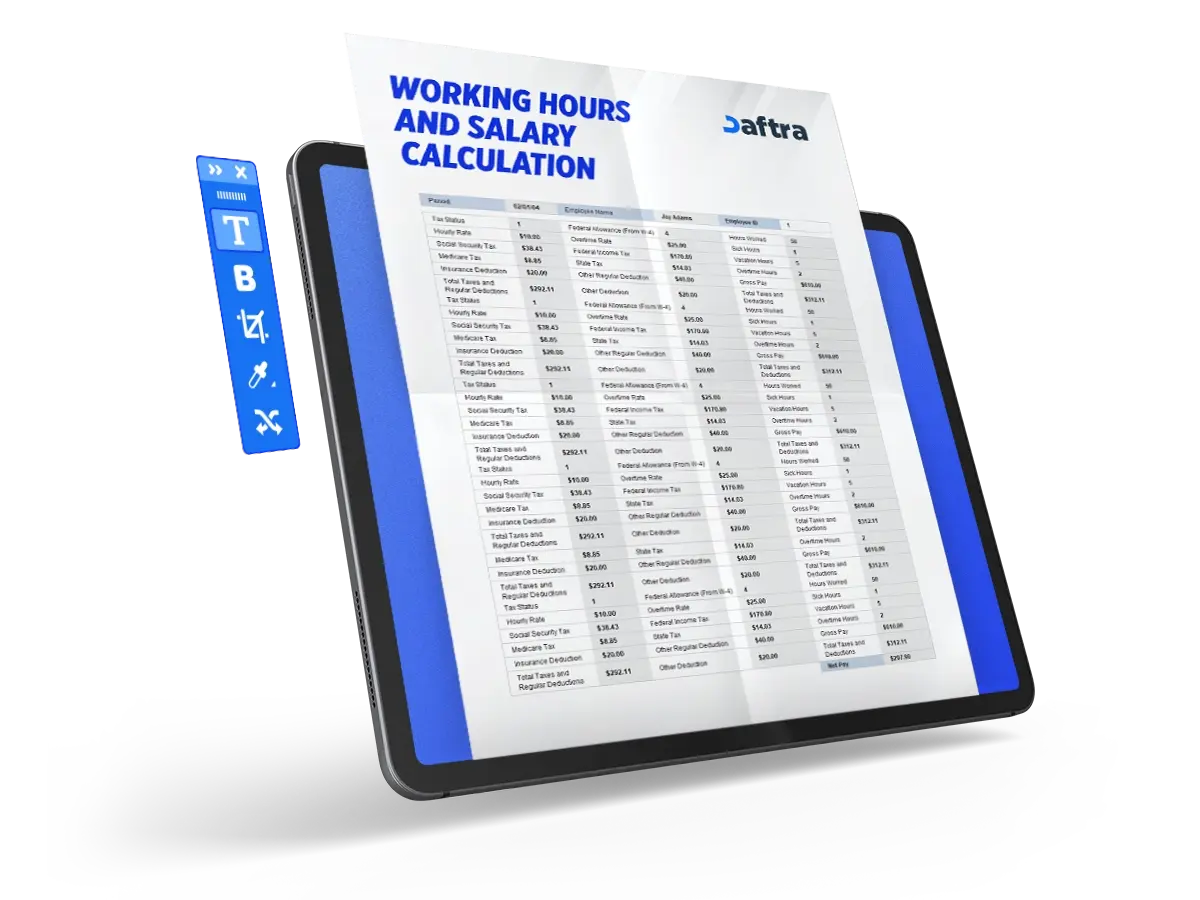
Working Hours and Salary Calculation Template
- The Working Hours and Salary Calculation Template helps build trust between the company and its employees by documenting all work-related employee data.
- It supports business continuity by preventing employee shortages on specific days.
- It is used to evaluate employee performance and productivity by providing an accurate database for each employee.


 Register with Daftra and calculate your employees' salaries automatically
What Is a Working Hours and Salary Calculation Template?
A Working Hours and Salary Calculation Template is an essential tool for companies to monitor employee performance by recording daily working hours, along with leave, deductions, and overtime. This makes the template similar to a comprehensive monthly employee performance report and also helps calculate an employee's gross salary.
Use our free salary calculator to calculate your salary with or without allowances and social security contributions automatically.
What Are the Elements of a Working Hours and Salary Calculation Template?
The template consists of several essential elements that cannot be overlooked:
1- Employee Name and First Week Start Date
The employee name is recorded, along with the date on which the employee started working at the company if the employee is new. If the employee is not new, the first day of the month is recorded as the first working day for that month.
2- Date Field
This field records all dates and days of the month to track daily working hours.
3- Start Time and End Time
The time when the employee starts work and the time when the employee finishes each day are documented to ensure that working hours are calculated accurately and transparently.
4- Working Hours
After documenting the employee's start and end times, the total number of hours spent at work during the day is calculated and recorded in this field.
5- Overtime Hours
This field documents overtime hours worked by the employee outside official working hours, which may require an additional calculation.
6- Leave Fields: Sick Leave, Annual Leave, and Public Holiday
The template includes fields dedicated to all types of paid leave, such as sick leave, annual leave, and public holidays.
7- Other
This field is used to record any additional hours that were not mentioned in the previous sections, such as training hours, deductions, or absences.
8- Total Hours
This calculates the total working hours spent by the employee during the specified period in the template, which is usually one month.
9- Hourly Wage Rate
The wage rate for each working hour is entered in this field, including both regular and overtime rates.
10- Gross Salary
Finally, the employee's monthly salary is calculated based on the total working hours, while taking the details of the other sections into account, such as overtime hours, deductions, and leave.
Use our overtime calculator to automatically calculate the value of overtime hours for employees in Saudi Arabia, for free.
How to Use a Working Hours and Salary Calculation Template
The template is used by recording all data in accurate detail through the following steps:
1- Enter the Data
Enter employee data in the monthly template, including the employee's name and the first working day of the month. If the template is digital, the remaining dates of the month will be filled automatically in the date field. If not, you will need to enter the dates manually.
2- Daily Follow-Up and Hour Recording
Then, follow up with the employee daily to confirm the start and departure times, and record them in the template. Based on this, calculate the employee's daily working hours. Throughout the month, record daily working hours, overtime hours, leave, and any deductions, if applicable.
3- Calculate Total Hours
At the end of the month, add the daily hours in each field to get the monthly totals, such as total official working hours and total overtime hours. Then enter the wage rate for each hour in the appropriate fields, noting that the regular hourly rate differs from the overtime hourly rate.
4- Calculate Gross Salary
After entering the hourly wage rate, calculate the gross salary by multiplying total hours by the hourly wage rate for each type of hour. Then add the figures together to get the employee's final gross salary.
5- Review the Data
Finally, review all figures and calculations to ensure the accuracy of the information and the correctness of the final results. After confirming everything is correct, submit the template to the accounting department so they can pay the employee's salary.
You Can Also Download
Why Is a Working Hours and Salary Calculation Template Important?
The Working Hours and Salary Calculation Template is an essential tool for companies to manage work and strengthen their relationship with employees. It contributes to several important areas, including:
1- Evaluating Employee Performance
The template provides accurate information and data about the employee's job performance, including their commitment to official working hours and an analysis of their productivity during those hours. This helps monitor and analyze employee performance accurately.
2- Maintaining Business Continuity
The template helps maintain business continuity by tracking all types of leave. This supports the organization and management of work schedules and prevents gaps or shortages in employees on specific days, helping ensure uninterrupted operations.
3- Improving Business Management
The template is used to analyze workflow and employee productivity. For example, it may show that the company needs to increase or reduce staffing, replace certain employees due to low productivity, or take other actions. This helps improve business management and supports better decisions regarding hiring and work organization.
4- Avoiding Financial Problems
The template helps avoid financial problems by ensuring the accurate calculation of total employee working hours. Based on this, total salaries are calculated accurately and transparently, which supports better budget planning and prevents financial disputes with employees.
5- Achieving Transparency
The template helps create trust between companies and their employees by documenting all work-related employee data. This promotes transparency and prevents problems or misunderstandings between the company and its employees.
Who Benefits from a Working Hours and Salary Calculation Template?
The template serves several important parties, including:
- Business Owners: Business owners use the template to improve management by analyzing workflow and employee productivity, helping them make better decisions about hiring and organizing work.
- Company Managers: Company managers use the template to track employee working hours and leave, support performance evaluations, and manage time effectively to keep work running smoothly and consistently.
- Human Resources Employees: HR employees use the template to regularly update salary and leave information and make decisions based on accurate data, such as determining salary increases, managing leave requests, or taking disciplinary action. This helps improve human resources management.
- Accountants: Accountants rely on the template to ensure accurate salary calculations and avoid financial problems. They also use it to compile salary data and record it as part of the company's financial transactions.
- Employees: The template protects employees' rights by ensuring that their salaries are calculated correctly and that their working hours and leave are properly documented.







 Invoicing
 POS
POS Offers
 Installments
 Sales Commission
 KSA E-Invoice Software
 EGY E-Invoice Software
 JO E-Invoice Software
 E-Invoice Software
 Chart of Accounts
 Asset Management
 Cost Centers
 Expenses
 Cheque Cycle
 UAE VAT-Tax
 Product Management
 Purchases
 Purchase Cycle
 Suppliers
 Requisitions
 Stocktaking
 Organizational Structure
 Personnel Management
 Attendance and Leave
 Contracts
 Payroll
 Requests
 Work Orders
 Booking Management
 Rental and Unit Management
 Time Tracking
 Work Flow
 Lease Contracts
 Manufacturing Management
  Client Follow-Up
 Loyalty Points
 Points and Credits
 Memberships
 Insurance Management
 Daftra ERP Full App
 Point of Sales App
 Point of Sales for Desktop – Support Offline Mode
 AI Expenses Scanner App
 Employee Attendance, Sign & ESS App
 E-invoice Reader App
 Inventory Stocktaking App