


Posted on 6 April 2026
Quotation Template
- This template is fully customizable, including colors, logos, and designs.
- Improves communication between client and business by clearly outlining pricing, services, and expectations.
- A quotation template helps your business track potential sales opportunities.


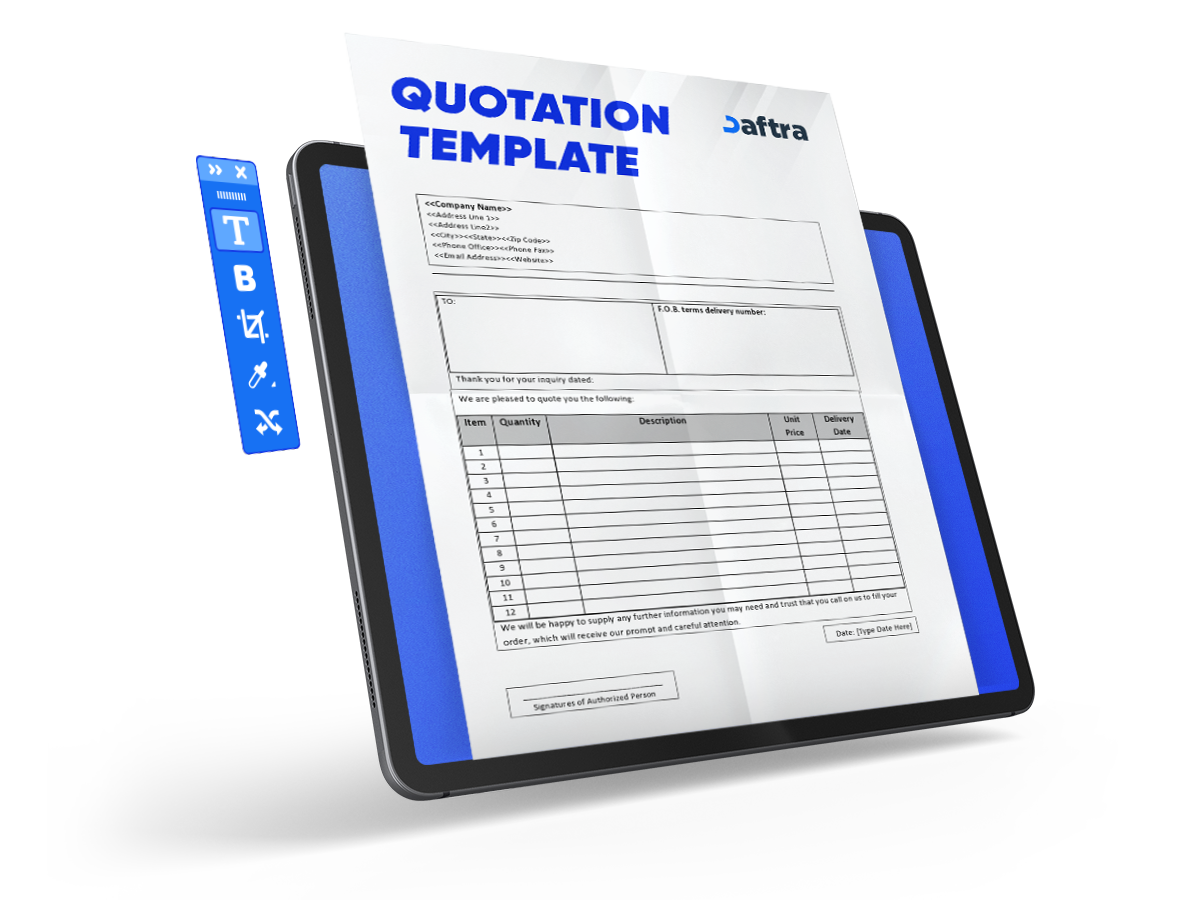
 Create, Send, and Track Quotations with Daftara
What is the Quotation Template?
A Quotation Template serves as a formal proposal and reusable document, offering clients prices for goods and services before finalizing a deal. This template helps businesses to have professional pricing, which offers and ensures clarity between the seller and the customer.
The quotation template can be customized for different industries and business needs, including sections, logos, colors, designs, columns, and more. Using a ready template for your business reduces errors in pricing and calculations, which improves tracking of potential sales opportunities.
What Are the Elements of the Quotation Template?
The main elements of the quotation template are description, quantity, and prices, including VAT, to clarify the number of goods and services and their prices for the customer, ensuring a smooth purchasing offer. Let’s discover other elements of the Quotation Template:
- Company name, logo, and contact details
- Customer name and contact information
- Unique quotation number for tracking, for example: Price Quote #1026
- Issue date and validity period of the quote
- Description of products or services offered
- Quantity and unit price for each item
- Subtotal, taxes (like VAT), and total amount
- Payment terms and conditions
- Branding elements like colors and layout
Why is the UAE Quotation Template Important?
The quotation template is important because it clarifies the cost of goods or services before making an agreement with the client, which helps build trust with customers by reducing disputes and tracking potential sales deals.
- Provides pricing and terms for a customer order
- Enhances brand credibility in competitive markets
- Reduces manual errors in calculations
- Helps track potential deals
- Quotation template saves time and effort
- It is editable and can be customized.
- Protects the seller's interests while ensuring transparency and compliance with the UAE
- Helps to maintain a meaningful connection with prospective buyers
How to Fill Out Your UAE Quotation Template?
1. Fill out the Company details:
[Your Company Name]
[Your Company Address Line 1]
[Your Company Address Line 2]
[Your Company Address Line 3]
Phone: [Your Phone]
2. Fill out the Customer information
[Client's Company Name]
[Client's Company Address Line 1]
[Client's Company Address Line 2]
[Client's Company Address Line 3]
3. Add a unique quotation number for easy tracking
For example [Price Quote #1026]
4. Fill out the Issue date and validity period of the quote
[Issue Date: 01/23/2021]
[Valid Through: 02/07/2021]
5. Fill out the Description of products or services offered
6. Add the quantity and unit price for each item and the tax.
7. Subtotal, taxes, and total amount will be calculated automatically.
8. Fill out the payment details:
Bank account number: [Your Payment Details]
Write down the terms and conditions.
Who uses the Quotation Template in Google Docs and Sheets?
Freelancers and small to medium businesses use the Quotation Template in Google Docs and Sheets because it helps them comply with UAE pricing and VAT requirements, ensures clear communication of costs with clients before agreements, and reduces misunderstandings and disputes.
Why use Daftra to generate a Quotation Template?
Using daftra to generate the quotation template is an excellent choice due to its auto-template creation, easy customization and branding, and reduced human errors, as well as storing all your client data and quotations in one easy system.
Daftra enhances professionalism and client experience by making it accessible from anywhere; moreover, it supports multiple currencies and languages.







 Invoicing
 POS
POS Offers
 Installments
 Sales Commission
 KSA E-Invoice Software
 EGY E-Invoice Software
 JO E-Invoice Software
 E-Invoice Software
 Chart of Accounts
 Asset Management
 Cost Centers
 Expenses
 Cheque Cycle
 UAE VAT-Tax
 Product Management
 Purchases
 Purchase Cycle
 Suppliers
 Requisitions
 Stocktaking
 Organizational Structure
 Personnel Management
 Attendance and Leave
 Contracts
 Payroll
 Requests
 Work Orders
 Booking Management
 Rental and Unit Management
 Time Tracking
 Work Flow
 Lease Contracts
 Manufacturing Management
  Client Follow-Up
 Loyalty Points
 Points and Credits
 Memberships
 Insurance Management
 Daftra Bussiness App
 POS App
 POS desktop application
 Expense Scanner App
 ESS Application
 E-invoice Reader App
 Stocktaking App