


Posted on 2 August 2026
Weekly Work Report Template
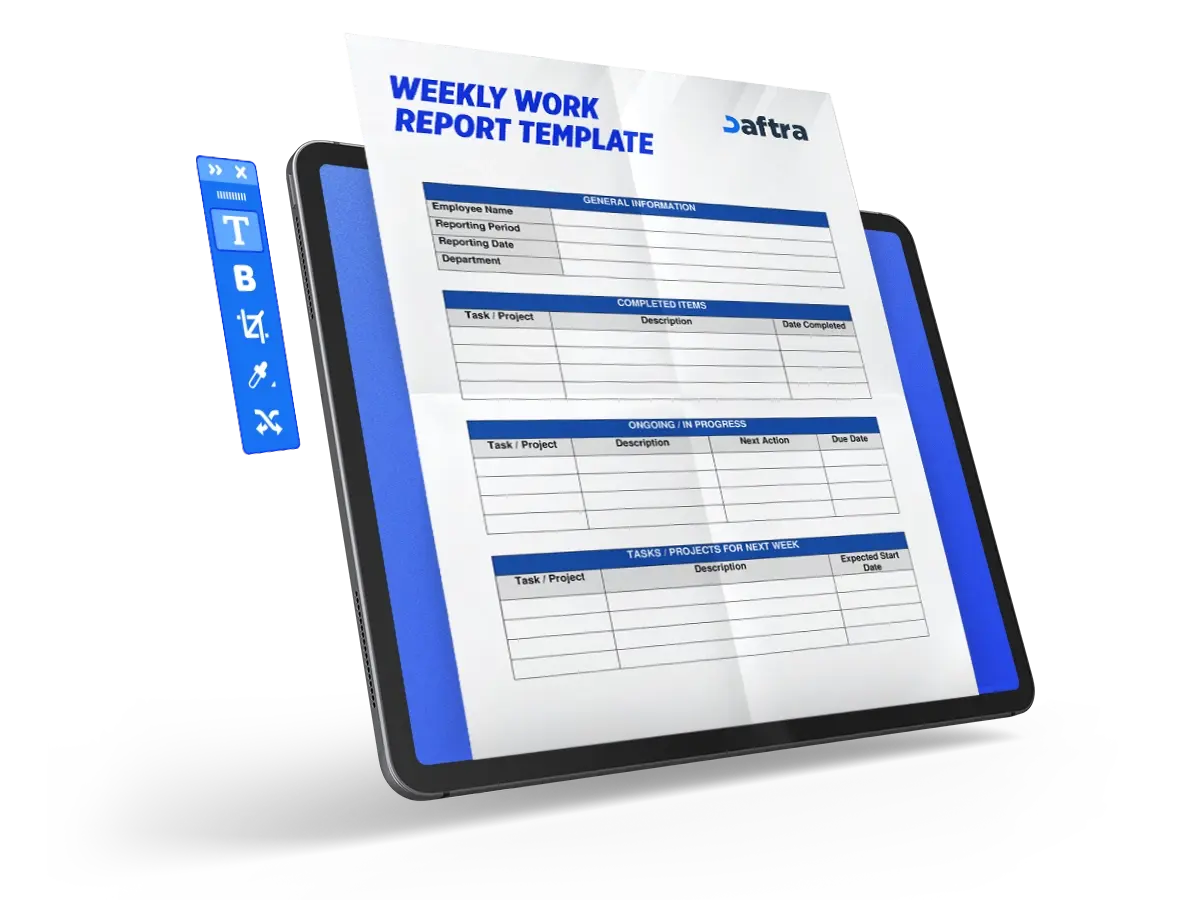
- A Weekly Work Report Template is a tool used to summarize the week’s achievements, track ongoing tasks, and organize upcoming work plans in a structured manner.
- This template helps improve performance tracking and supports decision-making by providing a clear view of progress and challenges.
- Project managers are among the main beneficiaries of this template, as it enables them to monitor workflow and ensure that tasks are carried out according to plan.


 Automate Weekly Reports with Daftra
What Is a Weekly Work Report Template?
A Weekly Work Report Template is an organizational tool used to summarize what has been accomplished during the work week, while outlining completed tasks, ongoing projects, and the plans and priorities for the following week. This type of report is characterized by clarity and conciseness, as it is intended to provide a quick yet comprehensive overview of workflow. It is often prepared on a regular basis to support continuous communication between employees and management.
Why Is a Weekly Work Report Template Important?
A Weekly Work Report Template helps track the performance of different teams in an organized manner by monitoring task progress and identifying challenges that may affect workflow, which makes it easier to make appropriate decisions and set future plans. This template can also be customized to suit the needs of different departments, such as marketing, sales, human resources, information technology, and others, making it an effective tool for improving productivity and organizing work processes.
What Are the Elements of a Weekly Work Report Template?
Although weekly reports may vary in design, layout, and color scheme, there are essential elements that should be included to ensure the report is clear and professional. The most important of these are:
- Report title: This is written at the top of the page and should directly reflect the content of the report. It is preferable for it to be brief and clear, such as “Weekly Performance Report” or “Project Progress Report.”
- Report date: Adding the date is important for organizing reports and making them easier to refer back to later. It also helps track performance development over time.
- Employee and team information: This includes your name, job title, as well as the names of team members and their roles, which helps clarify responsibilities and identify each person’s contribution.
- General summary: A quick overview of the most important achievements during the week, with reference to ongoing projects and major updates that the manager should be aware of.
- Task details: A clear presentation of the tasks that have been completed and those still in progress, with an indication of the level of progress in each one.
- Results and achievements: Highlighting what has actually been achieved during the week, with the option to use performance indicators to measure results accurately.
- Challenges and solutions: Mentioning the main difficulties faced during the work, together with how they were handled or the proposed solutions to overcome them.
- Next week’s plan: A brief outline of upcoming tasks and new priorities, which helps organize work and set direction for the coming period.
How to Prepare a Weekly Work Report Template?
To create an effective weekly report template that helps organize work, improve communication, and support decision-making, you can follow these steps in sequence:
- Define the purpose of the report: Start by clarifying the main purpose of the report, whether it is to track the progress of a specific project or present the team’s overall performance, as this will determine the type of information to be included.
- Determine the key performance indicators: Choose the metrics that will be used to evaluate progress, such as the volume of work completed or the percentage of task completion, while making sure they are clear and measurable.
- Create the template structure: Begin designing the template by adding a clear report title at the top, including the report date, and then entering your details and the team’s details, including names and roles.
- Collect the data and information: Gather all required data from team members or different systems to ensure that the report is accurate and comprehensive.
- Prepare the report content: Start filling in the template with the main information, including:
- A general summary of the most important work completed during the week
- Task details, including what has been completed and what is still in progress
- Results and achievements based on the selected performance indicators
- Challenges and solutions encountered during the work and how they were addressed
- Analyze the results: Review the data to identify strengths and detect any issues or opportunities for improvement.
- Add the plan for the coming week: Define the upcoming tasks and priorities to ensure continuity of work and achievement of objectives.
- Share and discuss the report: Finally, share the report with the team or management and discuss the results in order to define the next steps and strengthen coordination among team members.
Daftra’s Employee Time Tracking feature provides ready-made reports to monitor daily progress and employees’ task completion through the Time Tracking Reports view. Follow these steps:
- From the main menu, select Operations, then choose Time Tracking.
- After that, click Time Tracking once again.
- Click the “◷” icon next to the Import button.
- The system will display the reports categorized either by Employee, Project, or Status, or by time period (Daily, Weekly, Monthly, or Yearly).
How Is a Weekly Work Report Template Used?
A Weekly Work Report Template is used to track work progress in an organized manner by documenting completed and ongoing tasks, and presenting results and challenges. It also helps improve communication among team members, supports decision-making, and enables efficient planning for the tasks of the coming week.
Who Benefits from a Weekly Work Report Template?
This template is designed to serve a wide range of users within organizations, especially those who need continuous and organized weekly tracking of work performance. It is an ideal tool for:
- Team leaders: To monitor team tasks on an ongoing basis, assess the level of progress, and identify challenges at an early stage.
- Project managers: To oversee task progress, ensure alignment with the plan, and effectively prepare for the next steps.
- Department heads: To gain a comprehensive view of the department’s performance, identify weak points or delays, and make decisions based on clear data.
- Startups and small businesses: To support internal organization, strengthen coordination among team members, and ensure unified efforts toward achieving goals.
- Large companies: To facilitate report preparation, improve communication across different departments, and enhance overall performance efficiency.









 Invoicing
 POS
POS Offers
 Installments
 Sales Commission
 KSA E-Invoice Software
 EGY E-Invoice Software
 JO E-Invoice Software
 E-Invoice Software
 Chart of Accounts
 Asset Management
 Cost Centers
 Expenses
 Cheque Cycle
 UAE VAT-Tax
 Product Management
 Purchases
 Purchase Cycle
 Suppliers
 Requisitions
 Stocktaking
 Organizational Structure
 Personnel Management
 Attendance and Leave
 Contracts
 Payroll
 Requests
 Work Orders
 Booking Management
 Rental and Unit Management
 Time Tracking
 Work Flow
 Lease Contracts
 Manufacturing Management
  Client Follow-Up
 Loyalty Points
 Points and Credits
 Memberships
 Insurance Management
 Daftra ERP Full App
 Point of Sales App
 Point of Sales for Desktop – Support Offline Mode
 AI Expenses Scanner App
 Employee Attendance, Sign & ESS App
 E-invoice Reader App
 Inventory Stocktaking App