


Posted on 15 November 2026
Employee Attendance and Departure Template
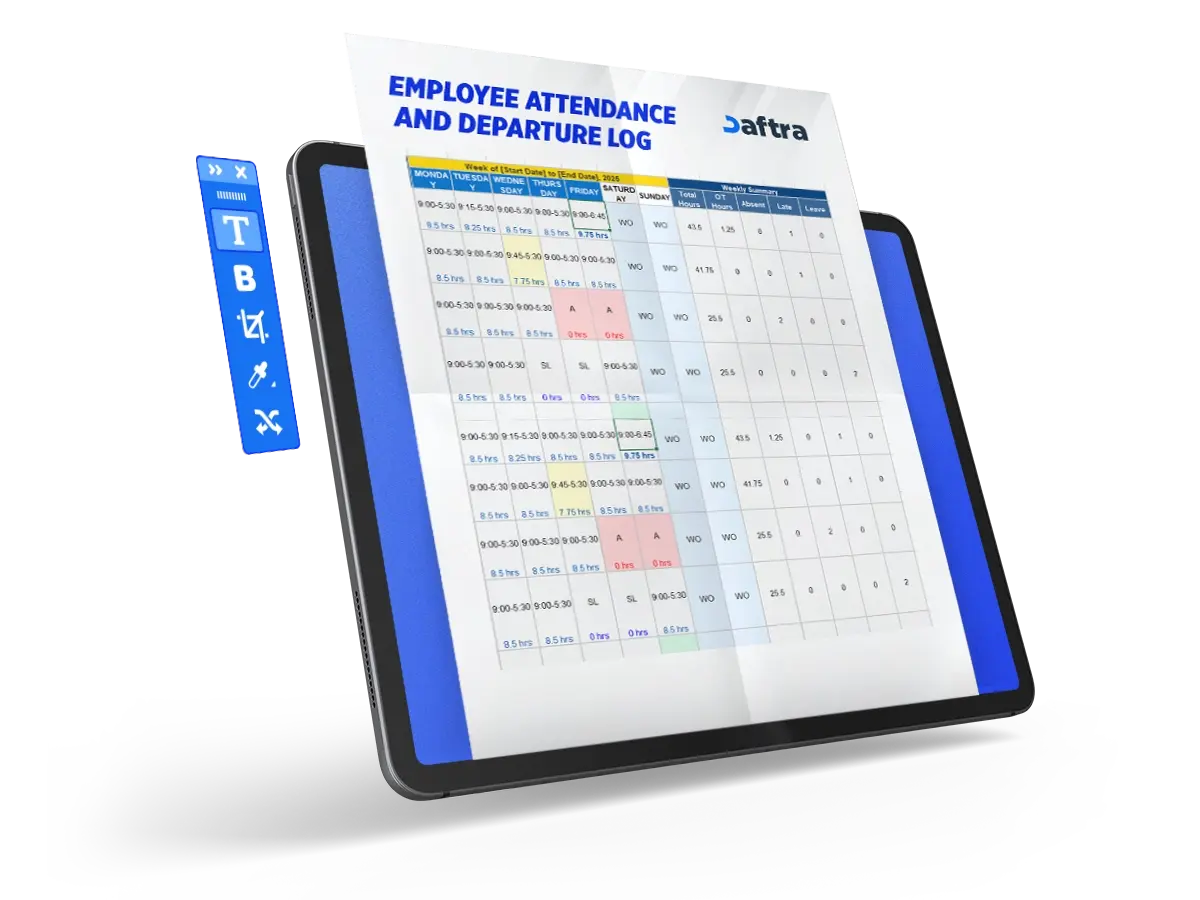
- The monthly employee attendance and departure template includes all data related to an employee’s workday, from the start of the shift to the end.
- The template records actual arrival and departure times, calculates the number of hours worked, and compares them with the expected working hours.
- The template helps protect employees’ financial rights by showing the days they attended and the days they were absent without authorization or prior notice.


 Automate Employee Attendance Tracking with Daftra
What Is a Monthly Employee Attendance and Departure Template?
A monthly employee attendance and departure record tracks employees’ attendance patterns and the extent to which they comply with official working hours. The template makes it easier to determine the total number of days each employee attended and helps the human resources team calculate the number of working hours each employee completed during the month.
Why Is a Monthly Employee Attendance and Departure Sheet Important?
The employee attendance and departure template is one of the most important forms used by human resources teams for the following reasons:
1- An Indicator of Employee Productivity
Failure to comply with official arrival and departure times may indicate lower employee productivity because attendance and productivity are closely connected. An employee who does not attend consistently may struggle to perform their duties efficiently.
2- Ensuring Payroll Accuracy
The monthly attendance and departure template is typically linked to the payroll sheet. A portion of the attendance data is converted into financial entitlements payable to the employee.
3- Evidence of Compliance with Local Labor Regulations
Is the employee entitled to leave, or has their leave balance been exhausted? What about sick leave and authorized permissions? The attendance and departure template records leave, approved permissions, and other factors that reduce attendance while ensuring compliance with the applicable labor regulations.
What Are the Components of a Monthly Employee Attendance and Departure Template?
The monthly employee attendance and departure template consists of two main pages: one for daily arrival and departure times and another for the value assigned to each working day during the month. The template includes the following elements:
- Employee details: Full name, employee number or code, department or division, and job title.
- Date and day: Each day of the month is listed with the corresponding weekday to record daily attendance and departure.
- Arrival time: The time the employee enters the workplace or starts the official shift.
- Departure time: The time the employee leaves the workplace or ends the official shift.
- Actual working hours: The difference between arrival and departure times, less any late-arrival time or leave hours, where applicable.
- Attendance status: Such as “Present,” “Late,” “Absent,” “On Leave,” or “Left Early.”
- Notes: Used to record reasons for lateness or absence, or any additional comments from the supervisor or employee.
- Employee or supervisor signature: Required for documentation and verification in paper forms, or replaced by electronic approval in digital systems.
- Monthly summary or totals: Includes the number of attendance days, absence days, late arrivals, actual working hours, and possibly the attendance compliance rate.
With these elements, the template becomes a powerful management and monitoring tool that helps control attendance performance and payroll calculations accurately.
How to Use the Monthly Employee Attendance and Departure Template
To use the monthly employee attendance and departure record effectively, follow these steps:
1- Export Attendance Data from the Biometric System
Extract the data recorded by the biometric device during the month. This allows you to identify each employee’s arrival and departure times using the reference number registered for them in the system.
2- Compare Actual and Expected Working Hours
After you enter the attendance and departure times, the total number of hours worked by the employee is calculated automatically. You can then compare actual attendance hours with the expected hours for the month.
3- Determine the Value of Each Working Day
If an employee completes the full working day as scheduled, the day is assigned a value of “1.” If the employee works less than the required amount without an approved reason, the day is assigned a value below 1.
4- Calculate Total Attendance and Absence Days
By reviewing the attendance and absence data, you can easily determine the total number of days the employee attended and the days they were absent, enabling accurate payroll processing.
Best Practices for Creating a Professional Monthly Attendance and Departure Template
When preparing a monthly template in Excel or Google Sheets, the following practices can make it more professional and easier to use:
- Start with a clear structure: Use the first row as a header that includes the company name, month, year, and department or division when needed. Use the first column for employee names and dedicate the following rows to individual employees. Create a column for each date of the month and list employee names in the first column.
- Use smart columns and formatting: For example, use columns B onward to represent the days of the month (1, 2, 3 … 31), and enter symbols or times for each day. Highlight weekends and public holidays to improve readability.
- Use formulas and automatic calculations: In Excel or Google Sheets, use formulas to calculate actual working hours, monthly totals, attendance days, late arrivals, and absence days. This reduces errors and improves accuracy.
- Use data validation and conditional formatting: Highlight cells for late arrivals, absences, or missing arrival and departure times so management can quickly identify issues.
- Make the template easy to share and review: In Google Sheets, share the template with the department manager or supervisor and define viewing or editing permissions to support real-time updates and review.
- Add a visual summary where possible: Use charts or summary cells to show metrics such as the number of attendance days per employee or the monthly compliance rate, making the report easier to present to senior management.
- Archive a copy every month: Save each month’s record as a PDF or store it in an archive folder for future audits and performance reviews.
- Keep the template flexible: You may need to calculate overtime, record remote work, or track break times in some months, so leave suitable fields available for these situations.
By applying these practices, the attendance and departure template becomes more than a simple spreadsheet; it becomes a flexible and professional administrative tool.
You May Also Download
Benefits of Using an Attendance and Departure Template
The following are the main benefits of adopting an employee attendance and departure template within an organization:
- Accurate payroll and employee entitlement calculations: The template records actual working hours for every employee, reducing errors related to attendance, absence, and overtime.
- Improved discipline and productivity: Regular attendance monitoring helps management understand employee patterns and address repeated late arrivals or absences, improving overall performance.
- Legal and administrative documentation: An organized attendance and departure record supports compliance with labor regulations and serves as a reference in disputes or external audits.
- Greater transparency and fairness: A clear and standardized record for all employees reduces perceptions of discrimination or unequal treatment and promotes fairness.
- Better workforce planning: Attendance patterns help management identify periods of high demand or staff shortages, allowing tasks and schedules to be adjusted more effectively.
- Performance analysis and trend detection: Over time, attendance data can reveal recurring late arrivals and absences, enabling corrective action, training, or schedule adjustments.
- Support for remote work and flexible schedules: Even in modern workplaces with remote or flexible arrangements, the template provides a reliable way to document attendance and absence regardless of the working model.
In summary, an employee attendance and departure template is not merely a simple administrative tool. It is a core organizational resource that promotes order, supports performance management, and reinforces fairness in the workplace.
Who Benefits from the Monthly Employee Attendance and Departure Template?
Several parties benefit from the monthly employee attendance and departure template. Management uses it to assess employees’ compliance with official attendance and departure times. It is also one of the most important tools the human resources department uses to monitor employee performance and process payroll. In addition, the template protects employees’ financial rights by providing a documented record of their attendance and working hours.





 Invoicing
 POS
 Offers
 Installments
 Sales Commission
 KSA E-Invoice Software
 EGY E-Invoice Software
 JO E-Invoice Software
 E-Invoice Software
 Chart of Accounts
 Asset Management
 Cost Centers
 Expenses
 Cheque Cycle
 VAT & Tax Compliance
 Product Management
 Purchases
 Purchase Cycle
 Suppliers
 Requisitions
 Stocktaking
 Organizational Structure
 Personnel Management
 Attendance and Leave
 Contracts
 Payroll
 Requests
 Work Orders
 Booking Management
 Rental and Unit Management
 Time Tracking
 Work Flow
 Lease Contracts
 Manufacturing Management
 Client Follow-Up
 Loyalty Points
 Points and Credits
 Memberships
 Insurance Management
 Daftra ERP Full App
 Point of Sales App
 Point of Sales for Desktop – Support Offline Mode
 AI Expenses Scanner App
 Employee Attendance, Sign & ESS App
 E-invoice Reader App
 Inventory Stocktaking App